EasyManua.ls Logo

Philips VR 665 - Connecting to Your Television; Connecting to the Mains Power

Philips VR 665
34 pages
Print Icon
To Next Page IconTo Next Page
To Previous Page IconTo Previous Page
Loading...
Connecting
to
the
TV
set
We
recommend
the
use
of
a
scart
cable.
This
will
give
you
the
best
picture
quality.
If
your
television
does
not
have
a
scart
(AV-Euro)
socket
please
do
not
read
further
here,
but
turn
to
Chapter
7,
'Special
features'.
In
the
section
'Playback
via
the
aerial
cable'
you
will
find
further
information.
I
I
I
I
I
I
I
I
I
f
I
I
I
I
I
I
I
I
I
I
O
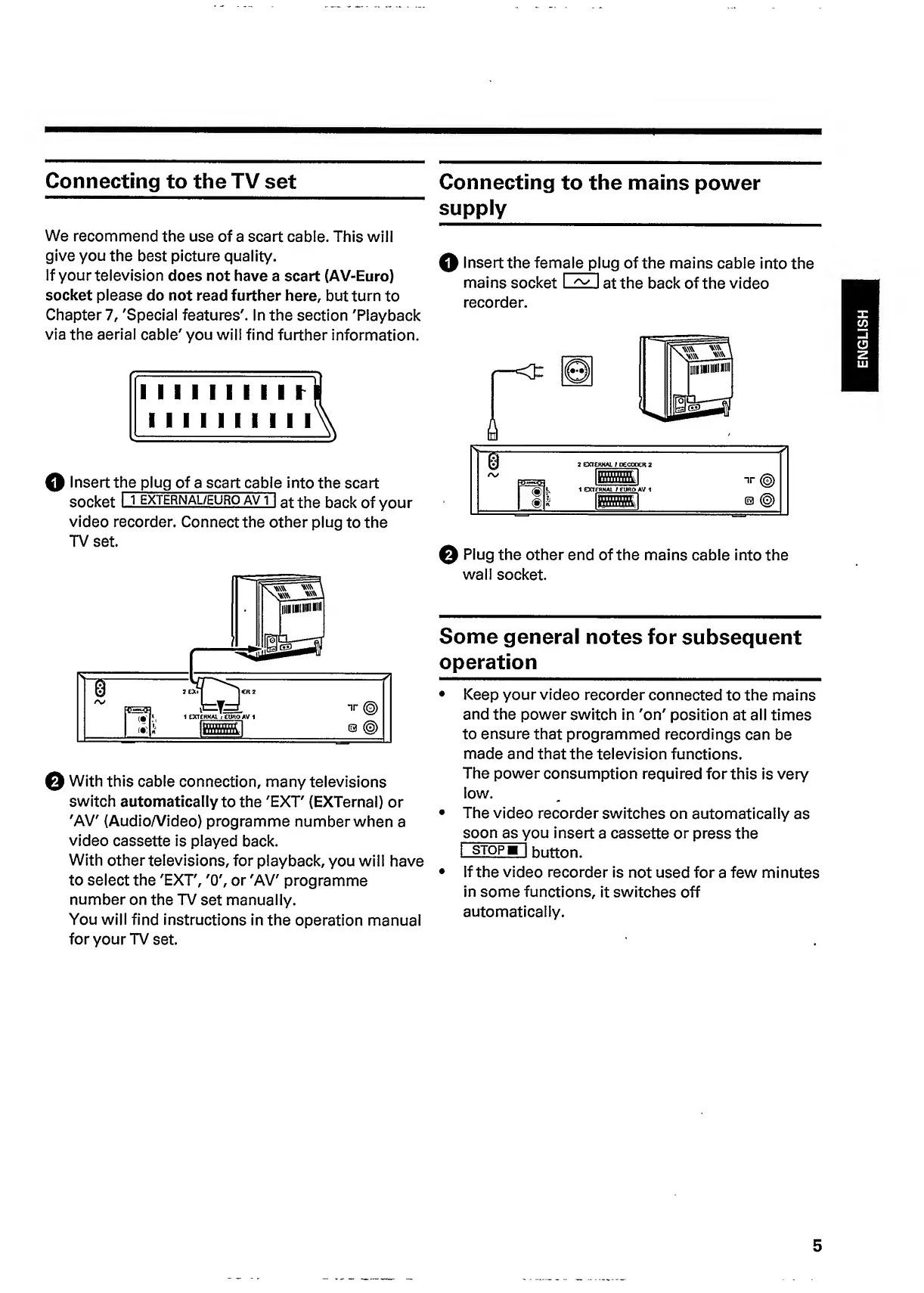
Insert
t
he
plug
of
a
scart
cable
into
the
scart
socket
I
i
external/euro
avT|
at
the
back
of
your
video
recorder.
Connect
the
other
plug
to
the
TV
set.
©
With
this
cable
connection,
many
televisions
switch
automatically
to
the
'EXT'
(EXTernal)
or
'AV'
(Audio/Video)
programme
number
when
a
video
cassette
is
played
back.
With
other
televisions,
for
playback,
you
will
have
to
select
the
'EXT',
'O',
or
'AV'
programme
number
on
the
TV
set
manually.
You
will
find
instructions
in
the
operation
manual
for
your
TV
set.
Connecting
to
the
mains
power
supply
0
Insert
the
fem
a
l
e
pl
u
g
of
the
mains
cable
into
the
mains
socket
I
EZ
I
at
the
back
of
the
video
recorder.
Q
Plug
the
other
end
of
the
mains
cable
into
the
wall
socket.
Some
general
notes
for
subsequent
operation
Keep
your
video
recorder
connected
to
the
mains
and
the
power
switch
in
'on'
position
at
all
times
to
ensure
that
programmed
recordings
can
be
made
and
that
the
television
functions.
The
power
consumption
required
for
this
is
very
low.
The
video
recorder
switches
on
automatically
as
soon
as
you
insert
a
cassette
or
press
the
I
stop
m
I
button.
If
the
video
recorder
is
not
used
for
a
few
minutes
in
some
functions,
it
switches
off
automatically.
5
ENGLISH

Related product manuals