EasyManua.ls Logo

Philips VR 665 - Playback via Aerial Cable Connection

Philips VR 665
34 pages
Print Icon
To Next Page IconTo Next Page
To Previous Page IconTo Previous Page
Loading...
Playback
via
the
aerial
cable
If
you
do
not
wish
to
use
a
scart
cable,
the
aerial
cable
which
is
already
connected
will
act
as
the
connection
between
your
TV
set
and
the
video
recorder.
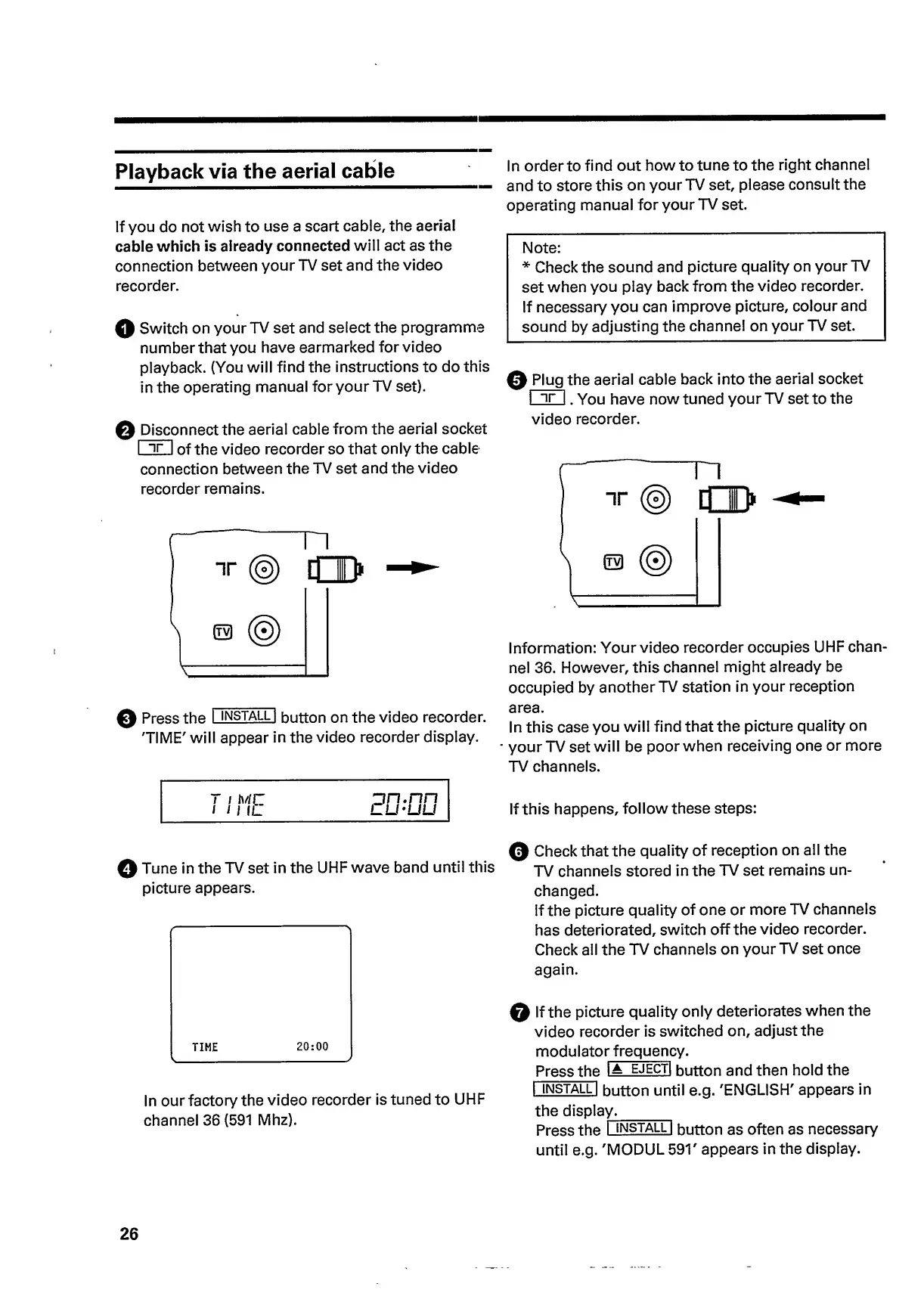
Q
Switch
on
your
TV
set
and
select
the
programme
number
that
you
have
earmarked
for
video
playback.
(You
will
find
the
instructions
to
do
this
in
the
operating
manual
for
your
TV
set).
Q
Disco
n
n
e
c
t
the
aerial
cable
from
the
aerial
socket
I
ir
|
of
the
video
recorder
so
that
only
the
cable
connection
between
the
TV
set
and
the
video
recorder
remains.
0
Press
the
I
INSTALL
|
button
on
the
video
recorder.
'TIME'
will
appear
in
the
video
recorder
display.
/
;
hC
ill
IL
In
order
to
find
out
howto
tune
to
the
right
channel
and
to
store
this
on
your
TV
set,
please
consult
the
operating
manual
for
your
TV
set.
Note:
*
Check
the
sound
and
picture
quality
on
your
TV
set
when
you
play
back
from
the
video
recorder.
If
necessary
you
can
improve
picture,
colour
and
sound
by
adjusting
the
channel
on
your
TV
set.
0
Plug
the
aerial
cable
back
into
the
aerial
socket
I
ir
|
.
You
have
now
tuned
your
TV
set
to
the
video
recorder.
Information:
Your
video
recorder
occupies
UHF
chan¬
nel
36.
However,
this
channel
might
already
be
occupied
by
another
TV
station
in
your
reception
area.
In
this
case
you
will
find
that
the
picture
quality
on
your
TV
set
will
be
poor
when
receiving
one
or
more
TV
channels.
If
this
happens,
follow
these
steps:
0
Tune
in
the
TV
set
in
the
UHF
wave
band
until
this
picture
appears.
In
our
factory
the
video
recorder
is
tuned
to
UHF
channel
36
(591
Mhz).
0
Check
that
the
quality
of
reception
on
all
the
TV
channels
stored
in
the
TV
set
remains
un¬
changed.
If
the
picture
quality
of
one
or
more
TV
channels
has
deteriorated,
switch
off
the
video
recorder.
Check
all
the
TV
channels
on
your
TV
set
once
again.
0
If
the
picture
quality
only
deteriorates
when
the
video
recorder
is
switched
on,
adjust
the
modulato
r
frequenc
y.
Press
the
IA
ejecti
button
and
then
hold
the
I
INSTALL
|
button
until
e.g.
'ENGLISH'
appears
in
the
display_
Press
the
I
install
|
button
as
often
as
necessary
until
e.g.
'MODUL
591'
appears
in
the
display.
26

Related product manuals