EasyManua.ls Logo

Philips VR 665 - External Source Recording and Timer Management

Philips VR 665
34 pages
Print Icon
To Next Page IconTo Next Page
To Previous Page IconTo Previous Page
Loading...
How
do
I
stop
a
TIMER
recording?
How
do
I
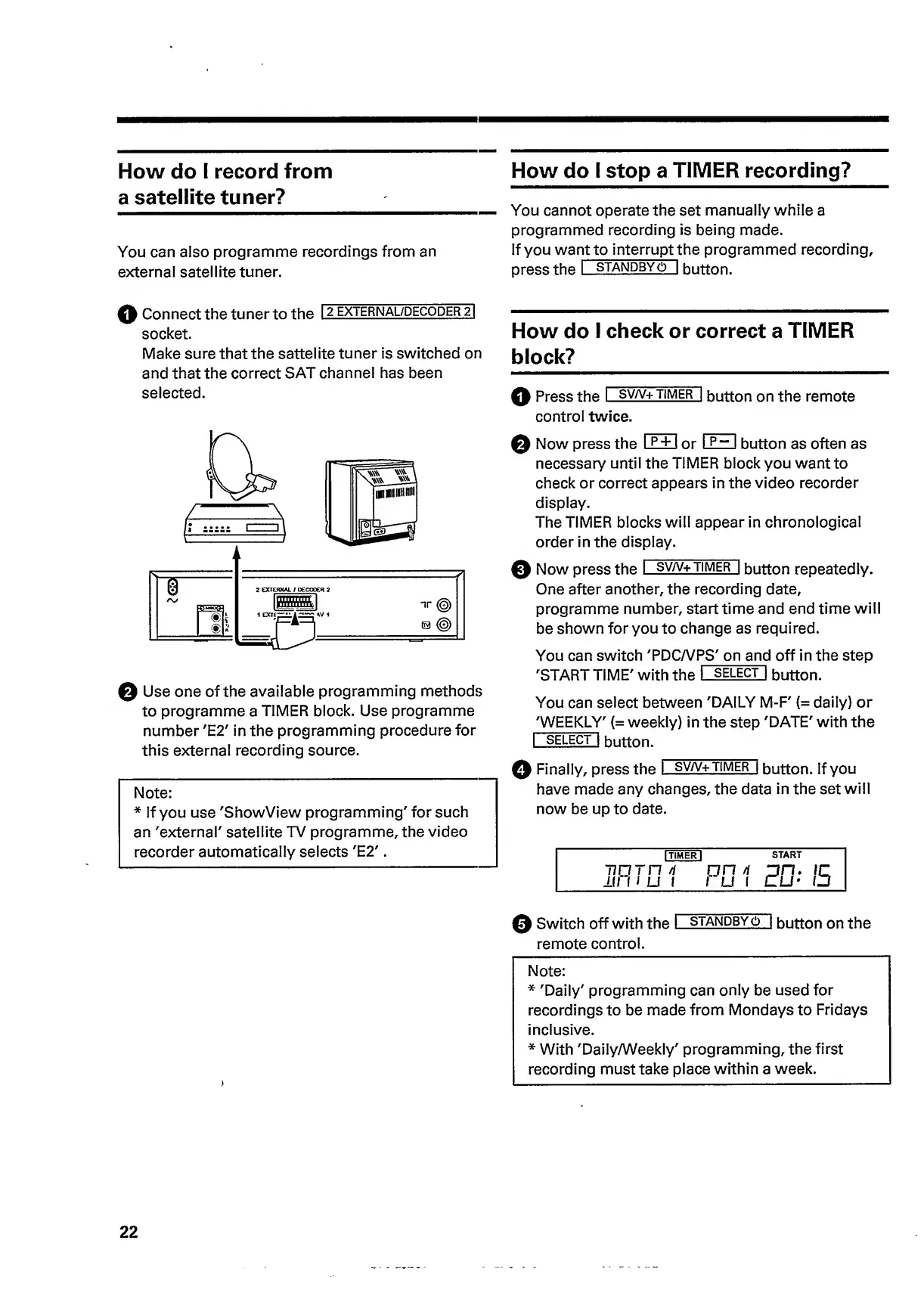
record
from
a
satellite
tuner?
w
,
,
_You
cannot
operate
the
set
manually
while
a
programmed
recording
is
being
made.
You
can
also
programme
recordings
from
an
if
you
wa
n
t
to
interrupt
t
h
e
programmed
recording,
external
satellite
tuner.
press
the
I
standby
o
j
button.
0
Connect
the
tuner
to
the
12
external/decoderT)
socket.
Make
sure
that
the
sattelite
tuner
is
switched
on
and
that
the
correct
SAT
channel
has
been
selected.
0
Use
one
of
the
available
programming
methods
to
programme
a
TIMER
block.
Use
programme
number
'E2'
in
the
programming
procedure
for
this
external
recording
source.
Note:
*
If
you
use
'ShowView
programming'
for
such
an
'external'
satellite
TV
programme,
the
video
recorder
automatically
selects
'E2'.
How
do
I
check
or
correct
a
TIMER
block?
_
0
Press
the
I
sv/v+
t
imer
|
button
on
the
remote
control
twice.
0
Now
press
the
I
p
+
1
or
I
P~
I
button
as
often
as
necessary
until
the
TIMER
block
you
want
to
check
or
correct
appears
in
the
video
recorder
display.
The
TIMER
blocks
will
appear
in
chronological
order
in
the
display.
0
Now
press
the
I
sv/v+
timer
|
button
repeatedly.
One
after
another,
the
recording
date,
programme
number,
start
time
and
end
time
will
be
shown
for
you
to
change
as
required.
You
can
switch
'PDC/VPS'
on
and
off
in
the
step
'START
TIME'
with
the
I
select
|
button.
You
can
select
between
'DAILY
M-F'
(=
daily)
or
'WEEKLY'
(=
weekly)
in
the
step
'DATE'
with
the
I
select
|
button.
0
Finally,
press
the
I
sv/v+
t
imer
|
button.
If
you
have
made
any
changes,
the
data
in
the
set
will
now
be
up
to
date.
I
TIMER
I
START
tioth
n
on
/t
on.
ir
11111
LI
1
1
u
1
cu-
o
0
Switch
off
with
the
I
standby
6
|
button
on
the
remote
control.
Note:
*
'Daily'
programming
can
only
be
used
for
recordings
to
be
made
from
Mondays
to
Fridays
inclusive.
*
With
'Daily/Weekly'
programming,
the
first
recording
must
take
place
within
a
week.
22

Related product manuals