English
EN
49
4.2 Network Conguration
The Smart Meeting Recorder device supports two network connection modes: wire-
less network (WLAN) or wired network.
4.2.1 WLAN Conguration
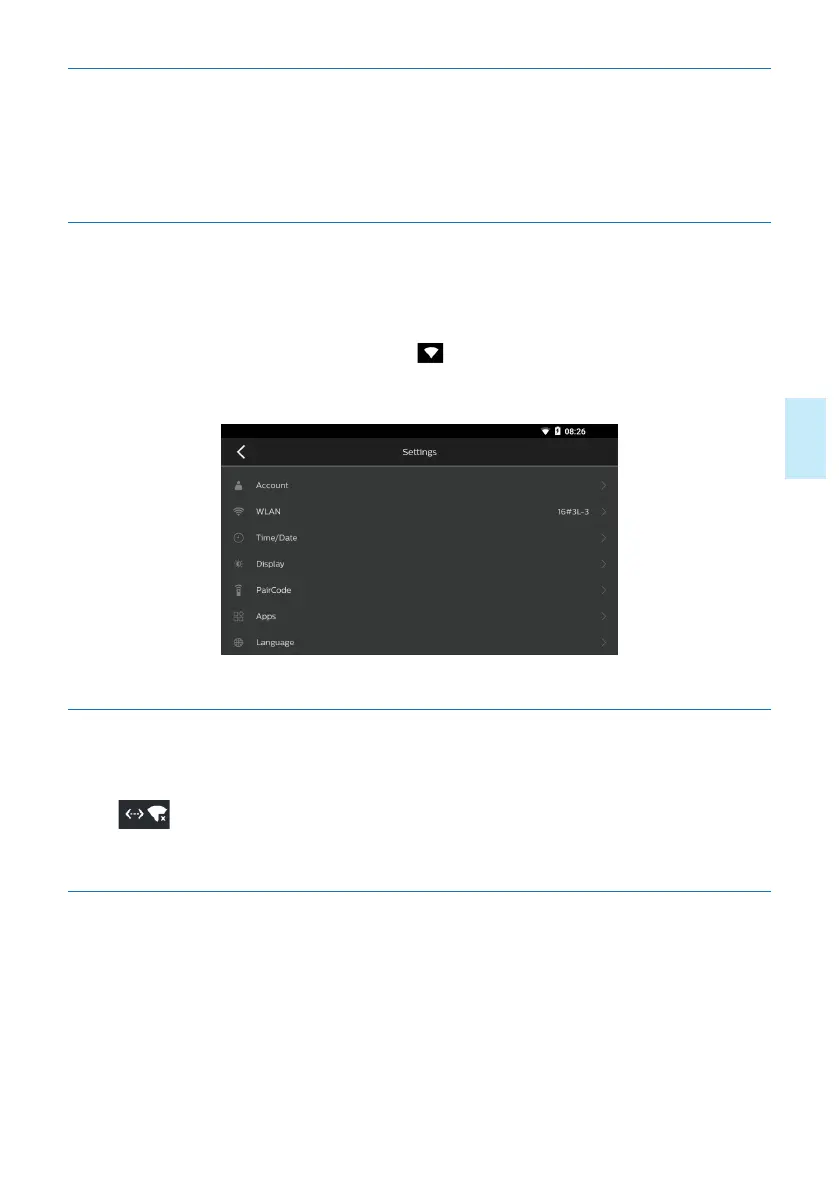
When using the Smart Meeting Recorder for the first time, please click the icon “My
Setting” on main menu to enter the next page, click “WLAN” to enter the network.
After the network is connected, the icon “ ” will be displayed in status bar on top.It
will connect automatically when you use the device next time under the same WLAN.
4.2.2 Connection with Wired Network
Insert the network line into the built-in wired network socket on device, and then the
icon “ ” will be displayed in status bar on top of screen of Smart Meeting Re-
corder , which means that the network is connected successfully.
4.3 Usage of Remote controller
4.3.1 Laser Pointer Button
When the laser pen button is pressed on any interface, fluorescence will be given out,
and the fluorescence will disappear when the key is released.










 To Next Page