68
EN
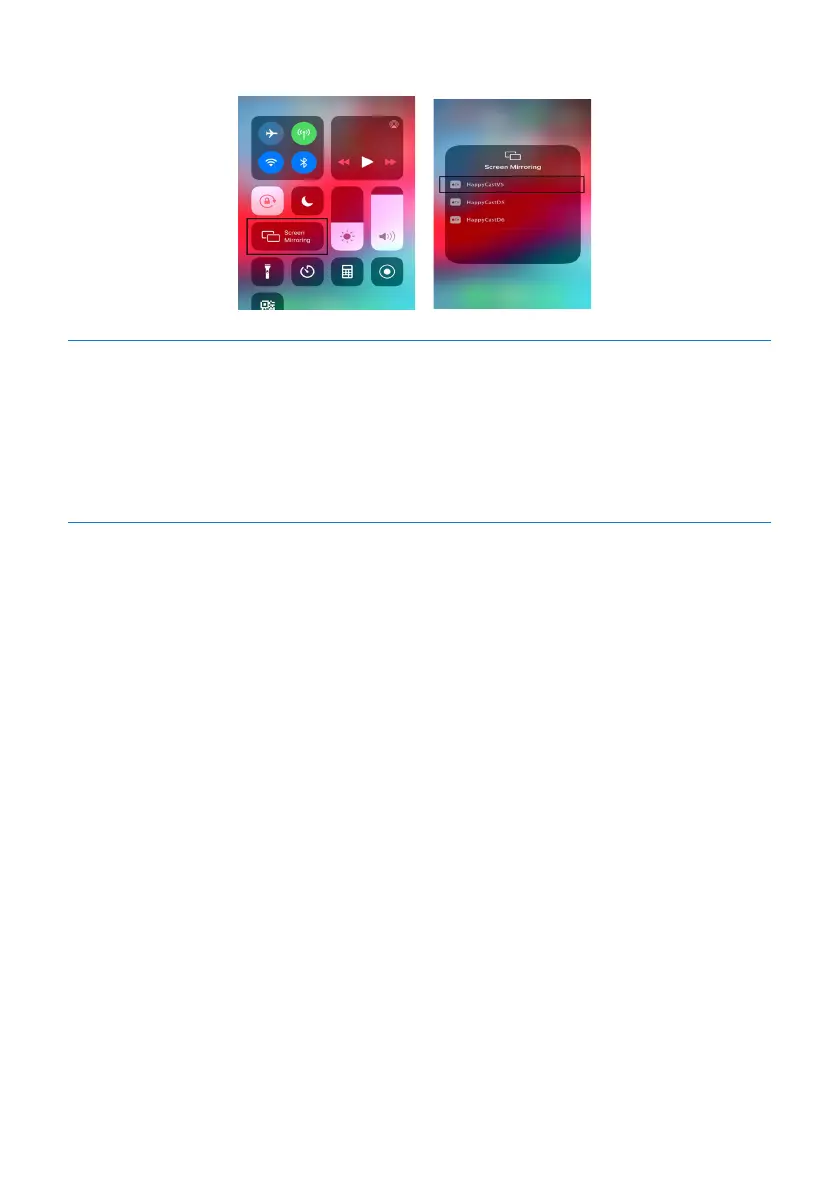
screen projection (as indicated by the mark in the right figure below).
5.8 Cloud File
Click the icon “Cloud File” on the page to activate the cloud file function. The cloud
file function is the function which can realize the transmission and view of files be-
tween Smart Meeting Recorder and mobile phone or computer.
5.8.1 File Sharing
Sharing a file on Smart Meeting Recorder is uploading a file on Smart Meeting Record-
er to the cloud drive. Any file uploaded to the cloud drive has a cloud drive link. The
user can view or download the file via the mobile phone by scanning the QR code of
the cloud file link on Smart Meeting Recorder or logging into its website. The steps
for uploading and checking a file are as follows:
1)Click the file sharing button, and wait until the file is successfully uploaded;
2) After the file successfully uploaded, the two-dimensional code page for file sharing
will be opened;
3) Use the mobile phone to scan the two-dimensional code, so as to view or down-
load the file (You can also type in the website and access code on computer browser
to view the file), as indicated in the figure below:










 To Next Page