English
EN
61
Note
The built-in microphone of this device will not support the loudspeaker
function! When using a loudspeaker, please use the wired microphone or
microphone on remote controller.
5.5 Start of Conference
5.5.1 Check-in for Conference
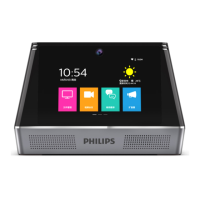
Click the icon “Start the conference”, and then the two-dimensional code icon will
appear on the page. You can carry out check-in by using the mobile phone to scan the
two-dimensional code in WeChat, or by clicking “Newly-added participant” and then
manually entering the name and e-mail address. As a result, the conference minutes
and recording file can be sent to e-mail address of every participant conveniently after
the conference is concluded.










 To Next Page