62
EN
5.5.2 During Conference
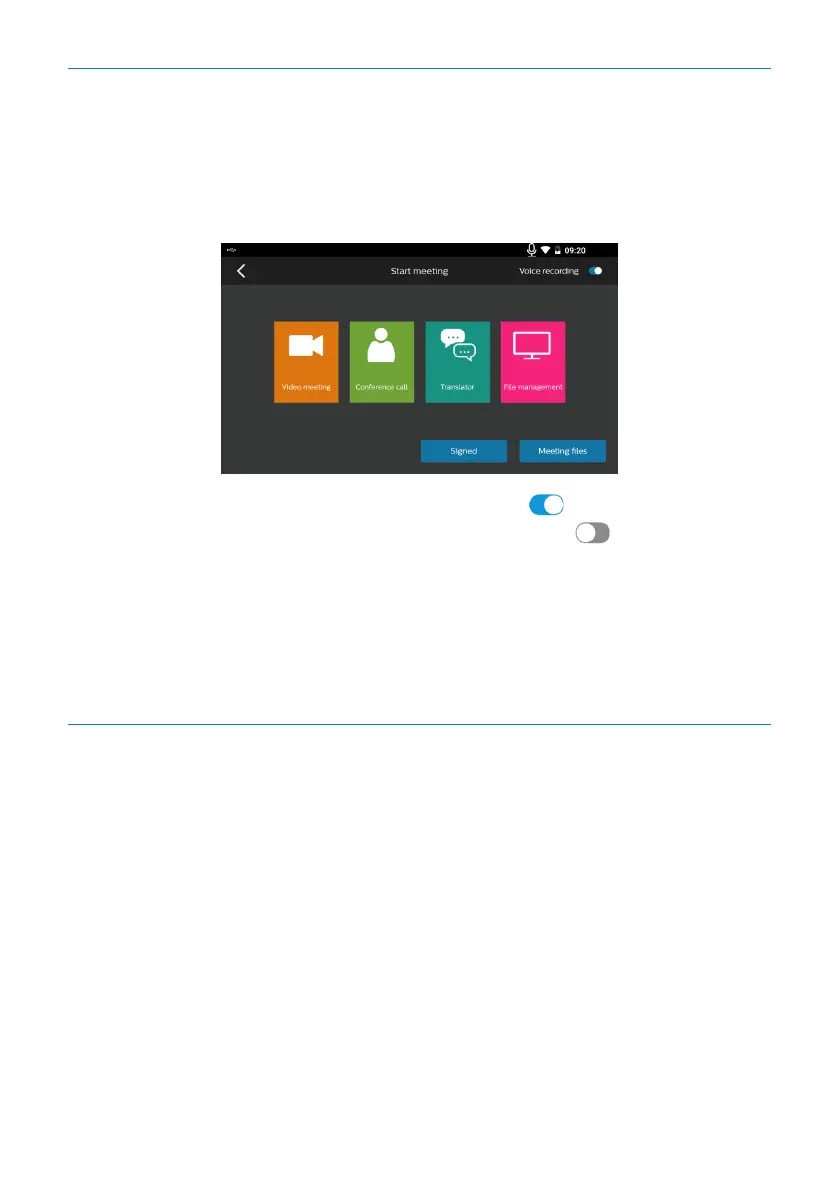
You can turn on the conference recording by clicking the icon “Next step for entering
the conference” and then clicking “Confirmation”. During the conference, you can ini-
tiate the video conference, telephone conference, real-time commercial interpretation
and file sorting.
After the recording is turned on successfully, the icon will be displayed on top
right corner; when the recording is not turned on, the icon will be displayed on
top right corner.
If you click the icon “Previous step for check-in”, the system will return to check-in
page.
If you click the icon “Next step for file sorting”, the current conference will be con-
cluded, the file will be sorted out, and the recording will be turned o.
5.5.3 Sorting-out of Conference File
1) Please carry out operation in accordance with the following steps:
1. Click the audio-to-text button;
2. Click the confirmation button;
3. Enter the audio-to-text page, and after the conversion is completed, click the saving
button.
4. The conference minutes file will be generated automatically after the system returns
to file sorting page. At that time, you can view or edit the contents of conference
minutes file by clicking the conference minutes. The steps are detailed as follows:










 To Next Page