52
EN
Note
1. The opening method of the USB flash device, click the “File management”
on the main menu first and the “All”, then click the icon “USB” to open
the USB memory device. Drop down from the top of the screen, and
click the icon “pop-up” to close the USB memory device.
2. When a USB disk is inserted
,
the icon" "is displayed on the top left
of the screen, the system will search all files of corresponding format in
USD disk. If no file is displayed, you can refresh the display or re-enter
the file list by clicking the screen.
3. As for audio, video or picture, when no USB disk is inserted, the system
will only search the files under local fixed storage directory (audio,
video or picture).
4. The system classifies all the files on the USB flash drive. To ensure that
the classification is finished quickly, you find the required files easily, and
you can enjoy the best experience, please store the files required only
for the meeting on the USB flash drive. Too many files on the USB flash
drive may cause the system to load files for a long time or even make an
error.
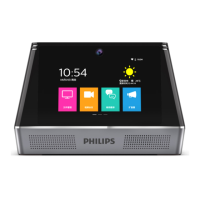
5. When you open a file in USB disk for the first time under the file
management function of Smart Meeting Recorder , the system will
display “Is this application permitted to edit the file on the SD card?”.
Pleaseselect “Permit” and then click “Select” rather than enter any
content, as indicated in the figure below:










 To Next Page