72
EN
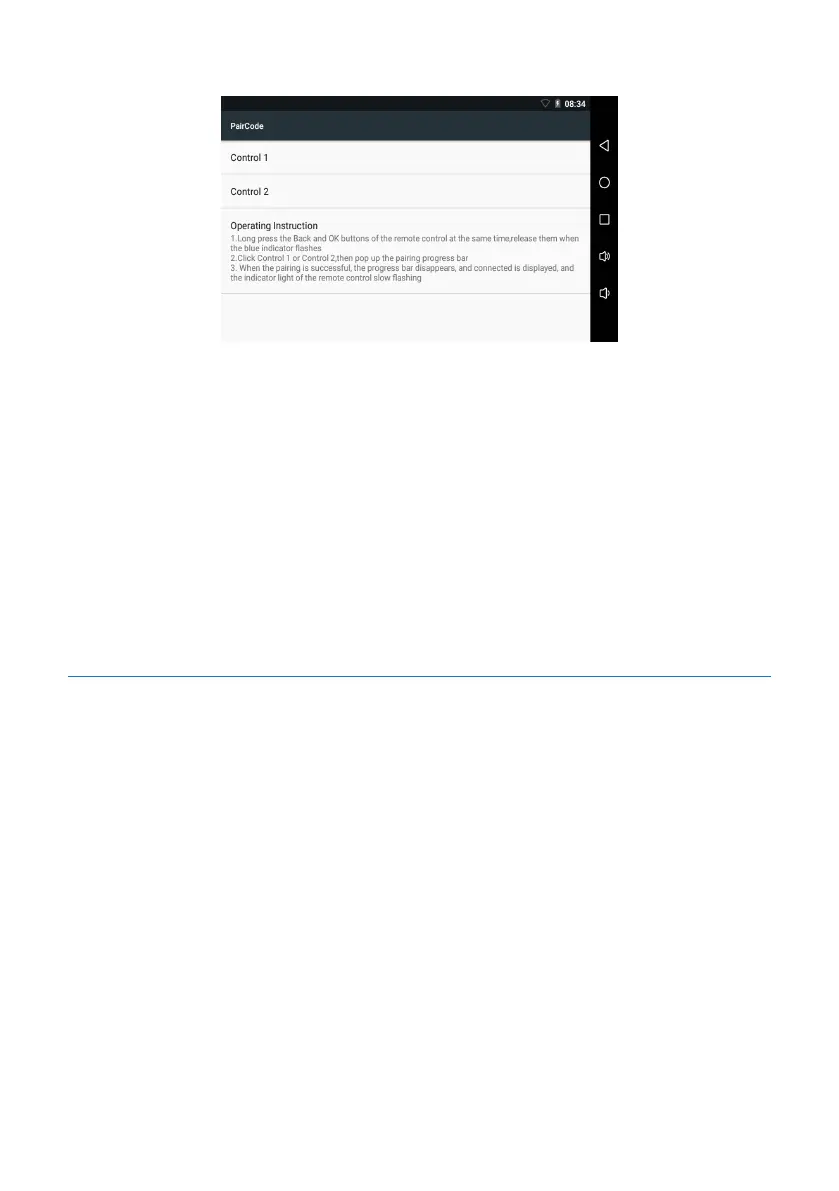
nected”, as indicated in the figure below:
Matching method for remote controller:
1.Remove the remote controller from the device, Long press both the buttons “Return”
and “OK” on remote controller, and release them when the indicator flashes quickly in
blue. This means that the remote controller enters the matching mode.
2.Click “remote controller 1” or “remote controller 2” on the page to carry out the
matching, and then the status box for matching will pop up.
3.After the matching is completed successfully, the status box will disappear automati-
cally, the status bar will display “Connected” under “remote controller 1” or “remote
controller 2”, and the indicating lamp on remote controller will change to slow flash-
ing.
5.12.3 Recording Black Box
The device supports the recording black box function: Insert the TF card (FAT32) into
TF card slot 2 on the recording black box. When Smart Meeting Recorder turns on
normally, the recording black box will perform cyclic recording, and save a file every 30
minutes automatically. When the memory of the TF card is fully used, the most previ-
ous file will be replaced.
Click the “My Settings” screen on the main menu, and then “Recording Black Box” to
enter the inquiry screen to view: 1. Whether the card is inserted; 2. Whether the re-
cording is being carried out; 3. Remaining memory. etc., as shown below:










 To Next Page