Basic Orientation
2-8 LIFEPAK 20 Defibrillator/Monitor Operating Instructions
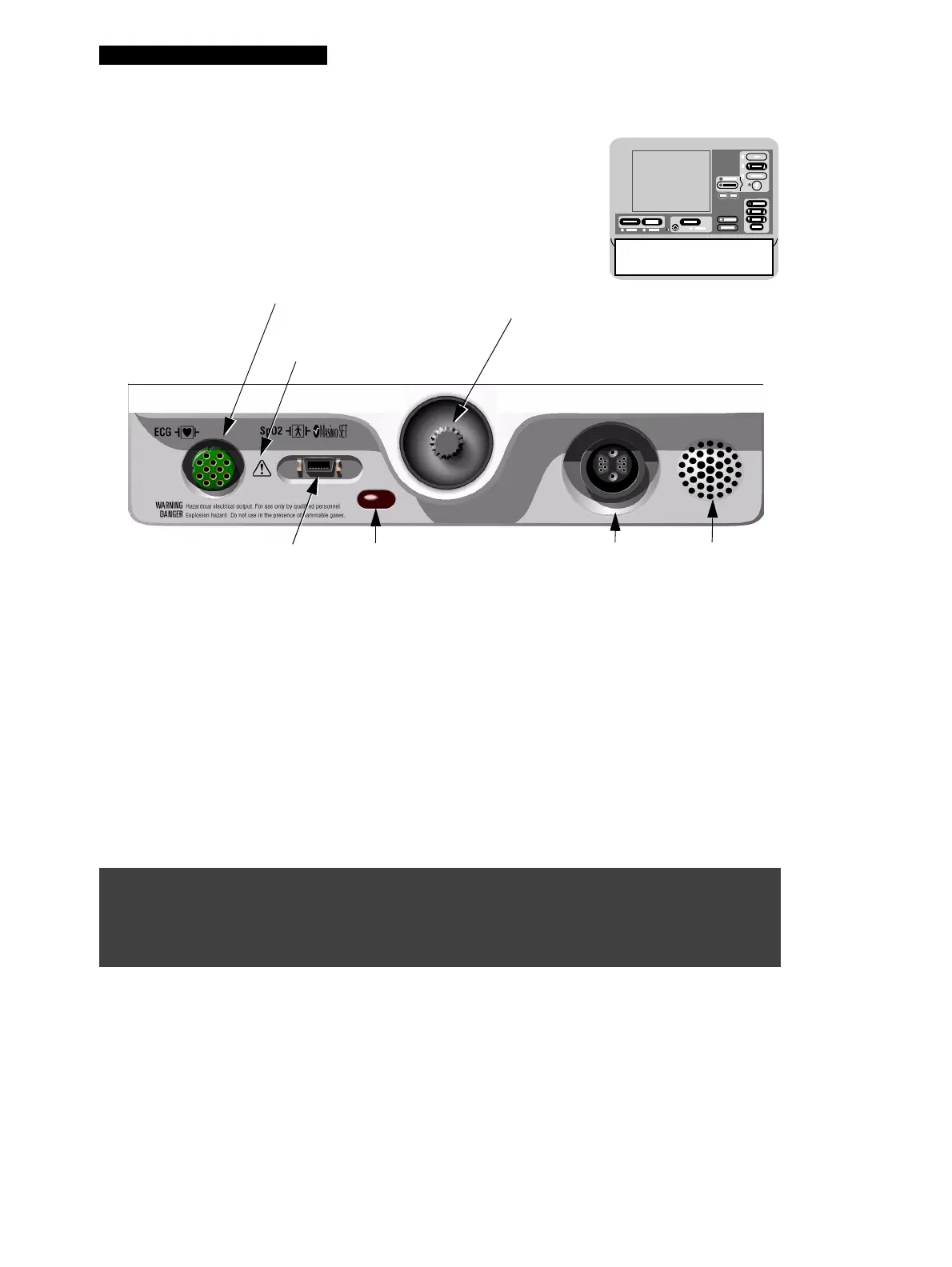
Figure 2-7 Area 4
Area 4
The following paragraphs provide additional information about the Speed Dial and the therapy cable
connector shown in Area 4.
Speed Dial
The Speed Dial is active when the indicator LED is illuminated. When active, you can rotate the Speed
Dial to highlight and select certain areas of the screen and displayed menu items. Pressing the Speed
Dial activates the highlighted menu item. Default menu items are highlighted with a gray background;
after a menu item is selected, the background is black.
Therapy Cable Connector
Connecting the Therapy Cable
To connect a therapy cable to the therapy cable connector:
1 Orient the therapy cable so that the arrow is on top with the cable angled to the right (refer to
Figure 2-8).
2 Insert the therapy cable into the therapy cable connector on the defibrillator.
3 Rotate the locking ring on the therapy cable clockwise until you feel the connector “click.” Pull
gently on the locking ring to check that the cable is locked in place.
WARNING!
Possible equipment damage and inability to deliver therapy.
To protect the therapy cable connector from damage or contamination, keep the therapy cable
connected to the defibrillator at all times.
SPEED DIAL
Scrolls through and selects menu items.
LED illuminates when Speed Dial is active.
Refer to this page.
ECG CABLE CONNECTOR
Refer to page 3-5.
THERAPY CABLE
CONNECTOR
Refer to page 2-8.
SpO2 CABLE CONNECTOR
Refer to page 3-10.
SPEAKER
Area 4
IrDA PORT
Refer to page 6-13
4
Refer to warning, page 2-15.



 To Next Page