phyFLEX
®
-i.MX 6
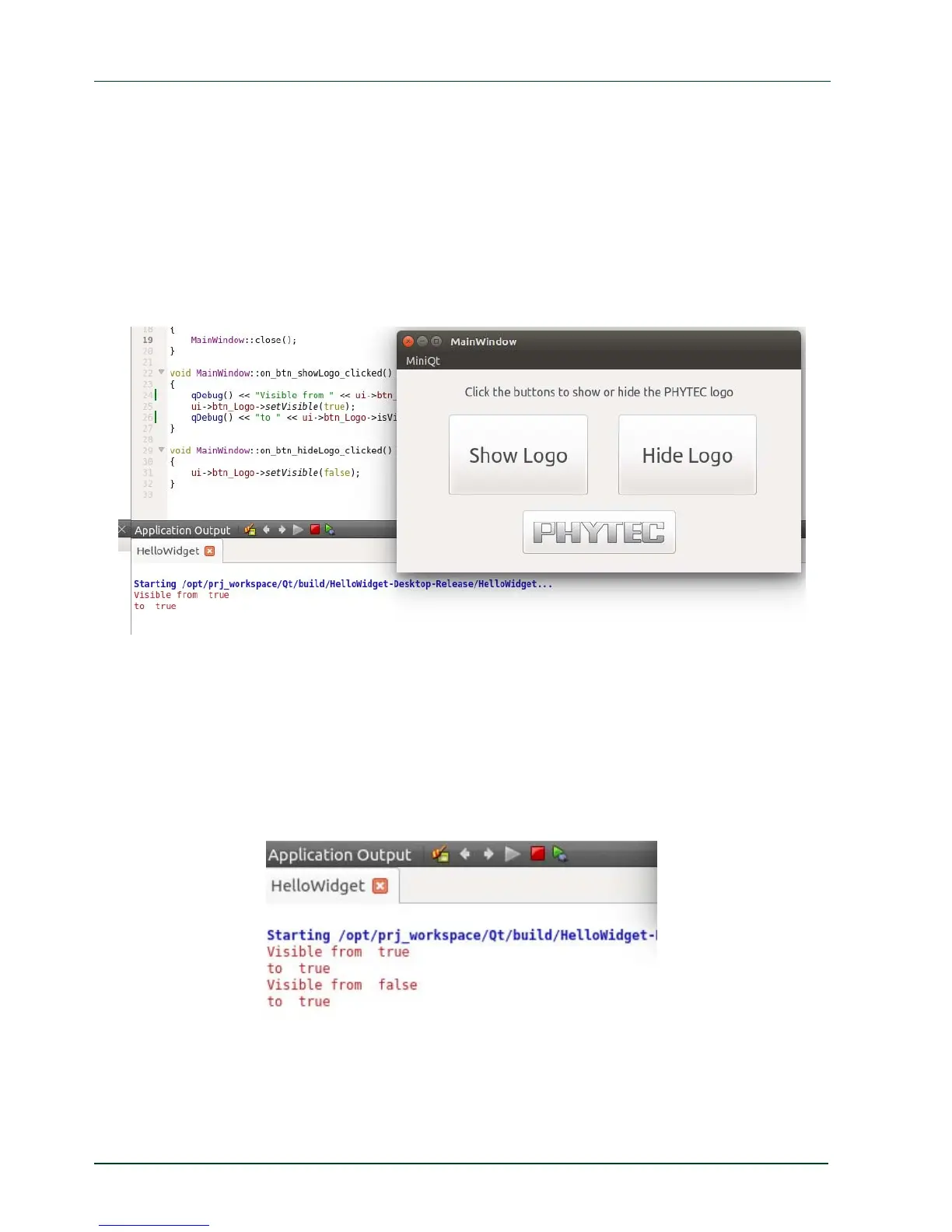
Remove the comment flags ( // ) from both "qDebug lines" to enable the two debug
messages.
Save the changes with Ctrl + S .
Open the Application Output if it is not already opened.
Build and run the application on the Desktop with the build configuration Release, as it
was shown in the chapter before.
A window with the running application opens.
Press the Show Log
o button.
The logo was visible before we pressed the button so we see the appropriate message from
qDebug() in the Application Output.
Press the Hide Logo button and then the Show Logo button.
Now the logo was hidden before we pressed the Show Logo button again and we see the
appropriate message from qDebug() in the Application Output.
QDebug is a simple way to generate debug information. In the next chapter we use the
debugger integrated i
n Qt Creator.
50
PHYTEC Messtechnik GmbH 2015 L-781e_7



 To Next Page