OPERATING MANUAL PSEN op4F/H-A series
• C
ode 1 or Code 2
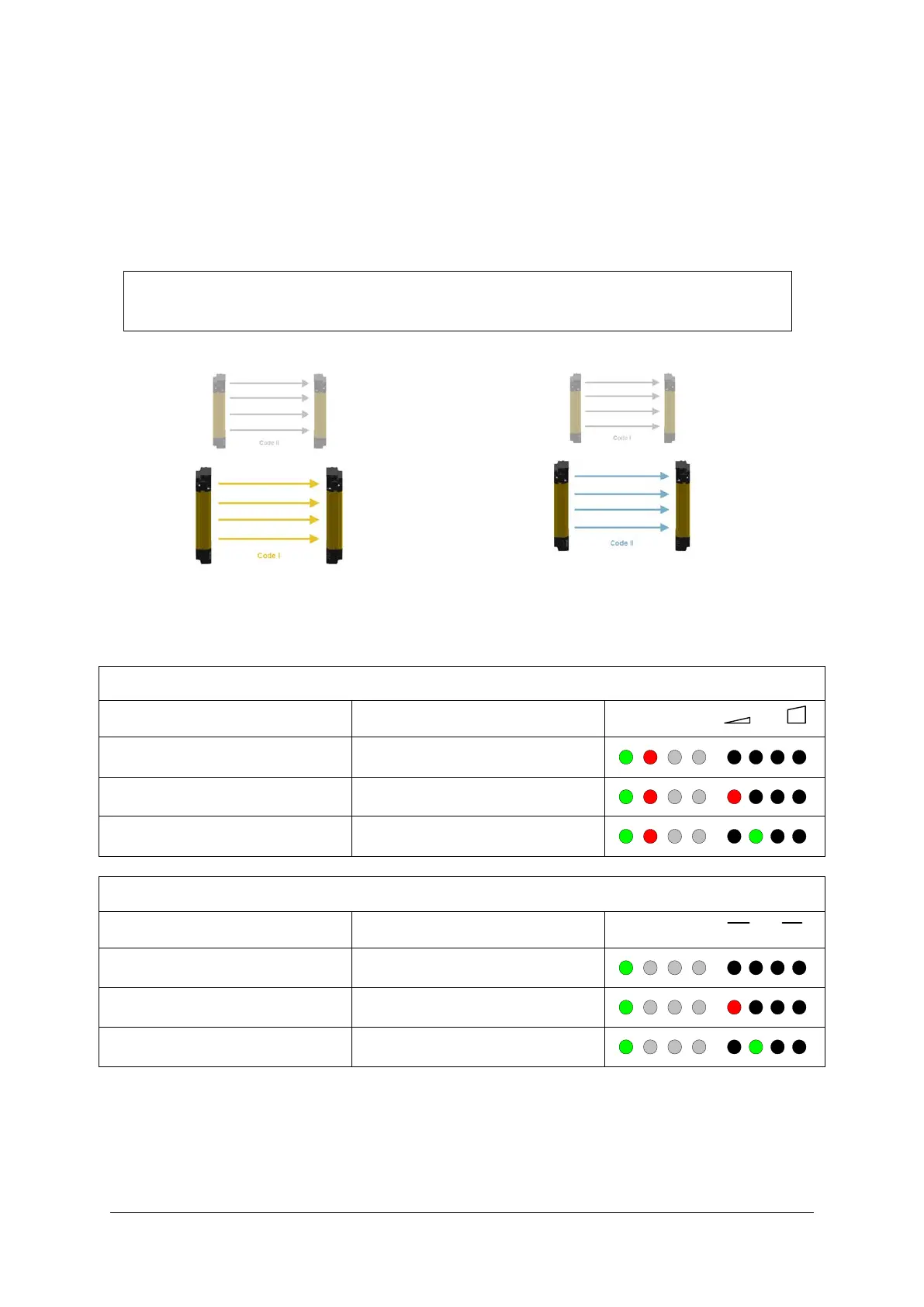
If the two light curtain
s
− ar
e installed at a distance that is lower than the minimum distance permitted for
identical devices
− and has RX on the same side,
the user must configure the light curtains with different codes.
NOTE: The configuration performed using the GUI only changes the code on
the RX side; for the light curtain to operate correctly, the user must configure
the TX side with the same code via BCM.
Fig. 61 – Code 1 and Code 2
If one of the three options (no code, code 1 and code 2) has been selected and beams have
been interrupted, the following display appears on the user interface.
Normal operating mode (RX side): beams interrupted
LED Level
No Code LED 5 and 6 OFF
Code 1 LED 5 ON Red, LED 6 OFF
Code 2 LED 5 OFF LED 6 ON Green
Normal operating mode (TX side)
No Code LED 5 and 6 OFF
Code 1 LED 5 ON Red, LED 6 OFF
Code 2 LED 5 OFF LED 6 ON Green


 To Next Page
 Loading...