HUNTER-PRO 32 Intruder Alarm System - Installation Manual
26
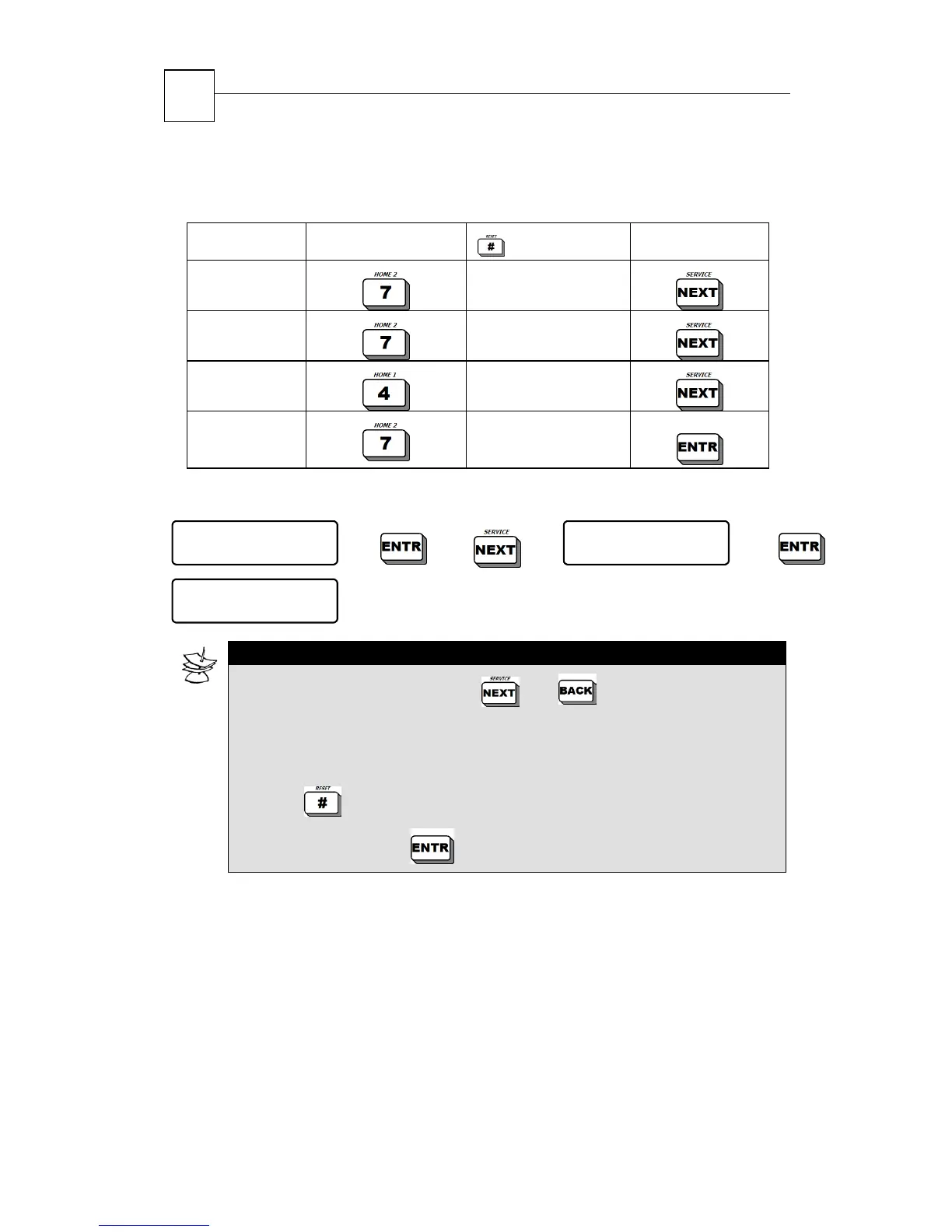
The following example illustrates key depressions for the word
‘7PIR’.
Character Key Pressed
Depressions
Follow Key
7
5
P
1
I
3
R
3
4.1.2.4 Modifying User Access
User 1
ENTER/NEXT/END
X3
User Access
ENTER/NEXT/END
UTCMBKA
+++-----
(code programming bar)
NOTE:
To scroll on Access Bar, use and keys.
Marking a “+” under a parameter’s letter authorizes the user to
program this parameter. Marking a “-“ denies this possibility.
In order to change the mark from “-“ to “+” (and vise versa)
press
To save data press
User Access Bar (parameter letters)
U + User can program User Codes; (default)
- User Code programming is disabled
T + User can program phone numbers; (default)
- Phone numbers programming is disabled
C + User can program time and date; (default)
- Time and date programming is disabled


 To Next Page