85
FX-MG8156ZT,MG8156ZT-91,MG8317ZT,MG8317ZT-91
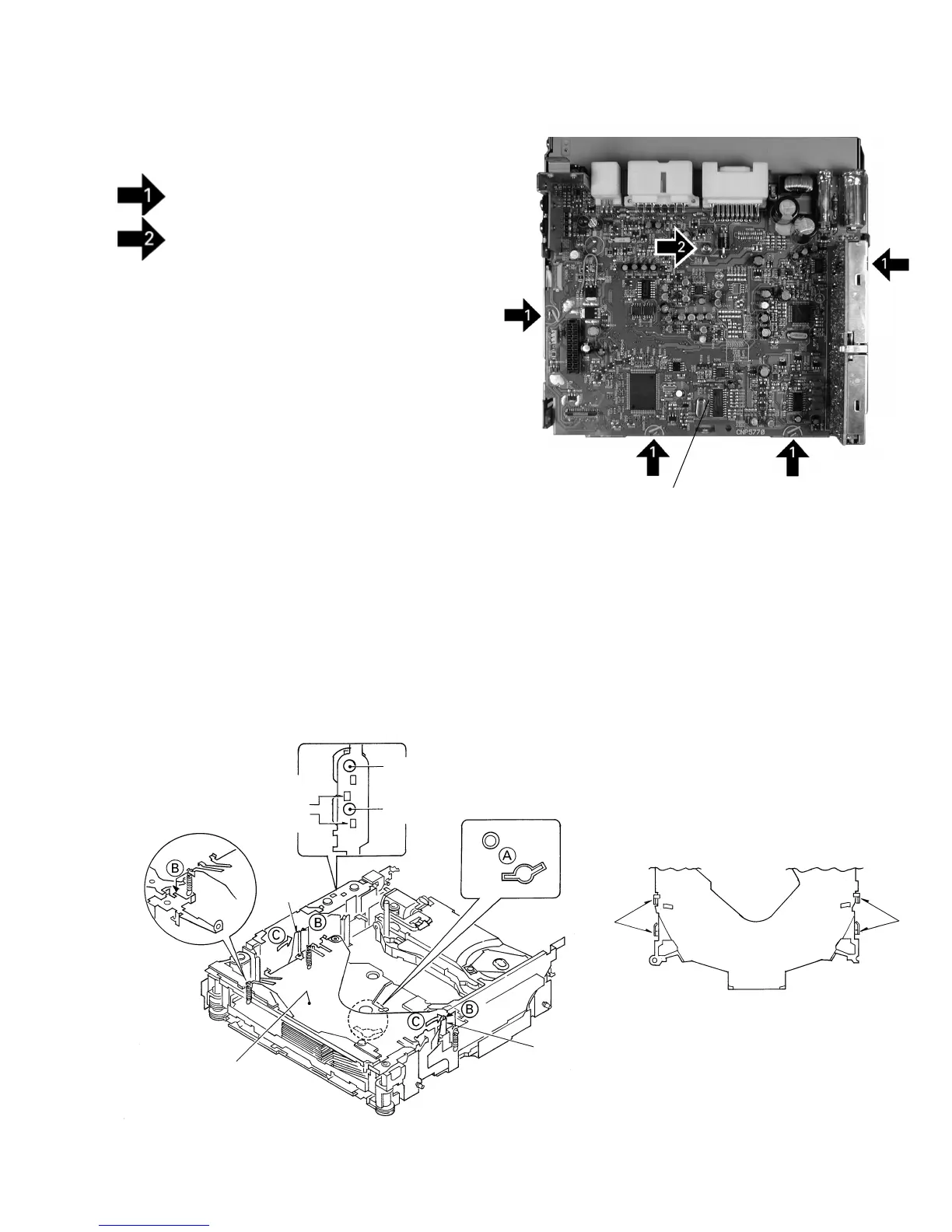
- Removing the Main Unit (Fig.5)
Straight the tabs at four locations indicated.
Remove the screw and then remove the Main
Unit.
Fig.5
Main Unit
- How to remove the Tray Assy
1. Apply about 6V current to the Cam gear motor until
all holes match at the position (A) (elevation OK
position).
2. Hook the three springs B temporarily as shown in Fig.
6. While pushing the Tray holder lock arms (right and
left) in the direction (C), remove the Tray holder.
3. Lift up the Tray assy to remove it.
* Be careful not to remove the Tray hooks from the Tray
assy.
ELV motor
Cam gear motor
Approximately DC 6V
Tray holder
Tray holder lock arm
Tray holder
lock arm
Tray
hooks
Tray Assy
Fig.6
Fig. 7
Tray
hooks



 To Next Page