A-20 SV61831 Rev. A DA50S/DA55S/DA70S/DA75S AddressRight™ Printers Service Manual
Appendix A • Printer Control Panel Menus and Utilities
A.5 LCD
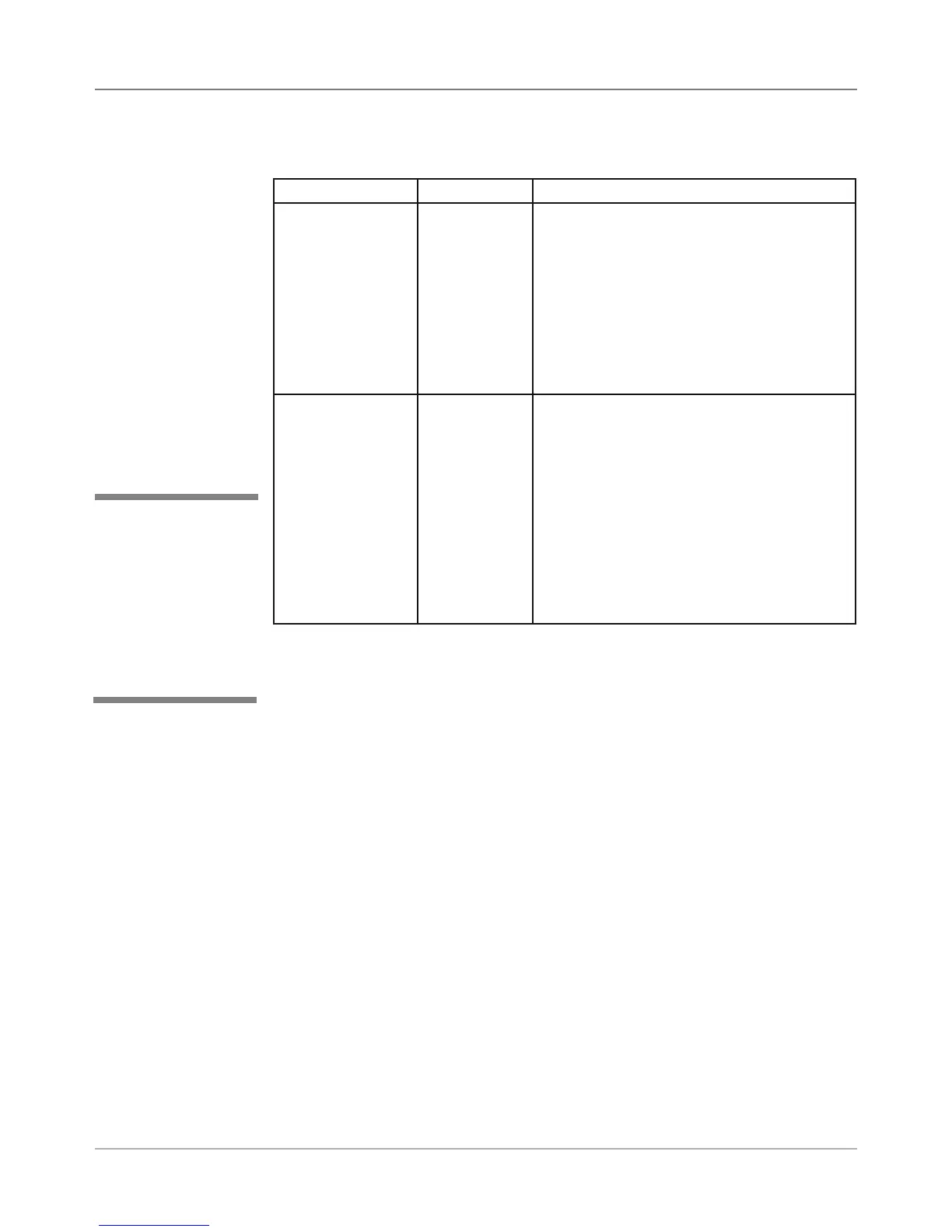
Service Menu
Submenu Option Settings What It Does
Paper Sensor Test Sensor
Blocked,
Sensor Un-
blocked
Allows you to slip paper under the pa-
per sensor to see if the sensor is working
properly. If the “Sensor Blocked” message
displays, the sensor is covered with paper,
paper dust or is defective. Correct the prob-
lem and retest. If the Sensor Blocked mes-
sage remains, shine a flash light into the hole
to the bottom sensor. A Sensor Unblocked
message indicates the upper sensor isn’t
operating.
Calibrate Sensor Allows you to calibrate the paper sensor.
1. The system displays “Clear Sensors”
when the Calibrate Sensor menu item is
selected. When displayed, press Enter.
2. At the “Raise paper guide” prompt,
press Enter. The system automatically
calibrates the paper sensor. During the
calibration, the “Please wait” screen is
displayed.
3. When complete, the confirmation screen
is shown until you press Enter to return to
the submenu.
2. Test Paper Sensor
✍
TIP: The paper sensor
must remain unblocked
and the paper guide
must be set at the maxi-
mum height (maximum
paper thickness) in or-
der for the calibration to
work properly.



 To Next Page