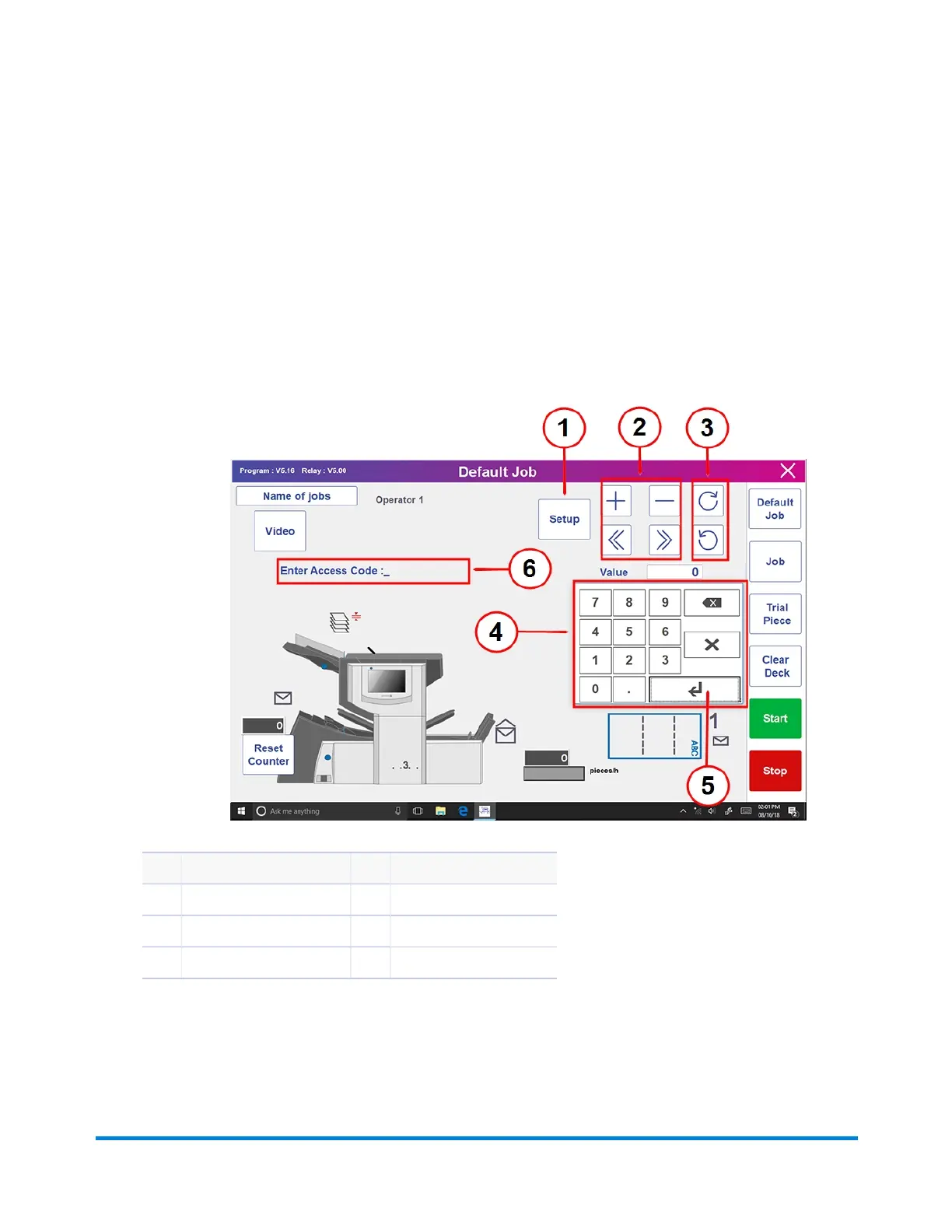
Initiating JobSetup
1. Log in.
2. From the main screen, tap the Setup button. The Enter Access Code: field displays over the
inserter model and the keypad appears on the touchscreen display.
3. Using the keypad, type the Supervisor code (71) and tap the Enter key. The Enter Access
Code: field counts up or down to display the password code entered.
Item Description Item Description
1 Setup Button 4 Keypad
2 Job Options and Settings 5 Enter Key
3 Fast Scroll Buttons* 6 Enter Access Code Field
* These keys are used as a fast forward to move through large changes in job setup settings
4. Tap >> to accept the access code and advance to the job settings.
Product Overview
Pitney Bowes Relay™ 2500, 3500, 4500 User Guide December, 2018 Page 26 of 174


 To Next Page