ATR401 - User manual 17
6 A2 On when alarm 2 is active.
7
A3 On when alarm 3 is active.
8
MAN On when “Manual” function is active.
9
TUN
On when controller is executing an
auto-tuning cycle.
10
REM
On when serial communication is in progress.
Flashing when Remote setpoint is enabled
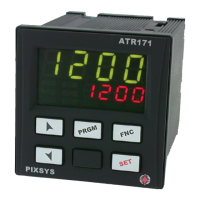
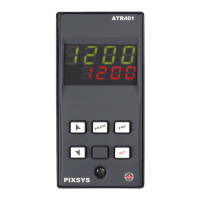
6.3 Keys
11
• Increases main setpoint.
• In con guration mode allows to scroll and modify parameters.
• Press after
SET
key increases alarm setpoint.
12
• Decreases main setpoint.
• In con guration mode allows to scroll and modify parameters.
• Press after
SET
key decreases alarm setpoints.
13
SET
• Allows to visualize command and alarm setpoints.
• In con guration mode allows to access the parameter to change
and con rm its modi cation.
14
FNC
• Allows to enter Tuning launch, selection automatic / manual.
• In con guration mode operates as exit key (ESCAPE).
15
PRGM
• If pressed allows to enter con guration password.
• In con guration mode assigns at selected parameter a
mnemonic code or a number.
• Allows to switch from local to remote setpoint (see par. 7.3).
16
• If pressed for 1 second, allows to switch from local to remote
setpoint (see par. 7.2).
7 Dual input mode
Each ATR401 model is provided with two analogue inputs:
it is possible to do mathematic operations between 2 measured process
values, correlating obtained result to the command or alarm outputs, or use
a process as remote setpoint. It is also possible to use the controller for 2
independent control loops: one loop ON/OFF only, one loop ON/OFF - PID.


 To Next Page