FIG-1
FIG-2
13
GEO:CS1
QUICK START
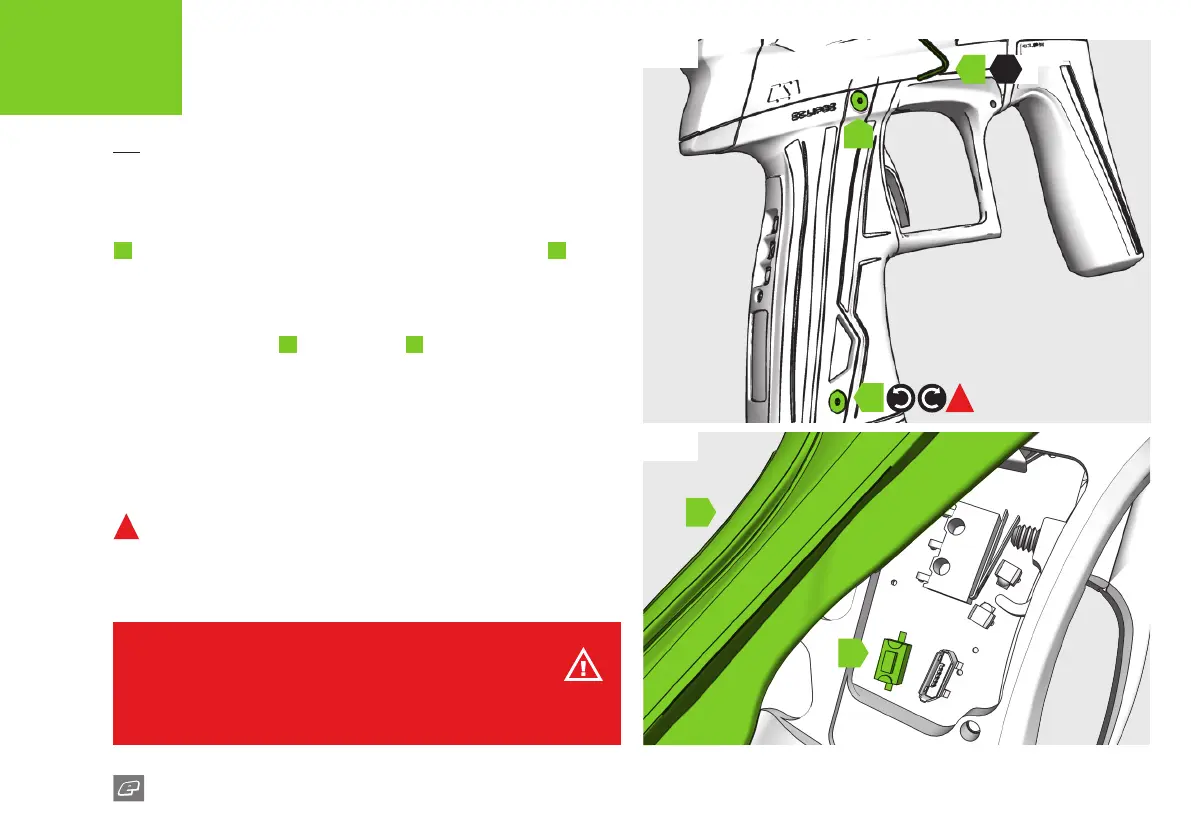
THE TOURNAMENT LOCK BUTTON
FIG-1
To access the tournament lock button use the 5/64” (2mm) hex key
A
to remove the grip screws on the right hand side of the grip
B
.
FIG-2
Lift the front part of the grips away from the frame to access the
tournament lock button
C
. The rear grips
D
do not need to be
removed for access.
To lock/unlock your marker push the button once.
The LCD will display the locked/unlocked mode status (see page 09).
Replace the rubber grips and screws as per Fig-1.
1
DO NOT over-tighten the screws.
1
C
D
B
A
B
WARNING!
Always ensure the marker is made safe before changing the tournament lock
state to avoid accidentally ring the marker.
HEX
5/64













 To Next Page