FIG-1
08
GEO:CS1
FIG-1
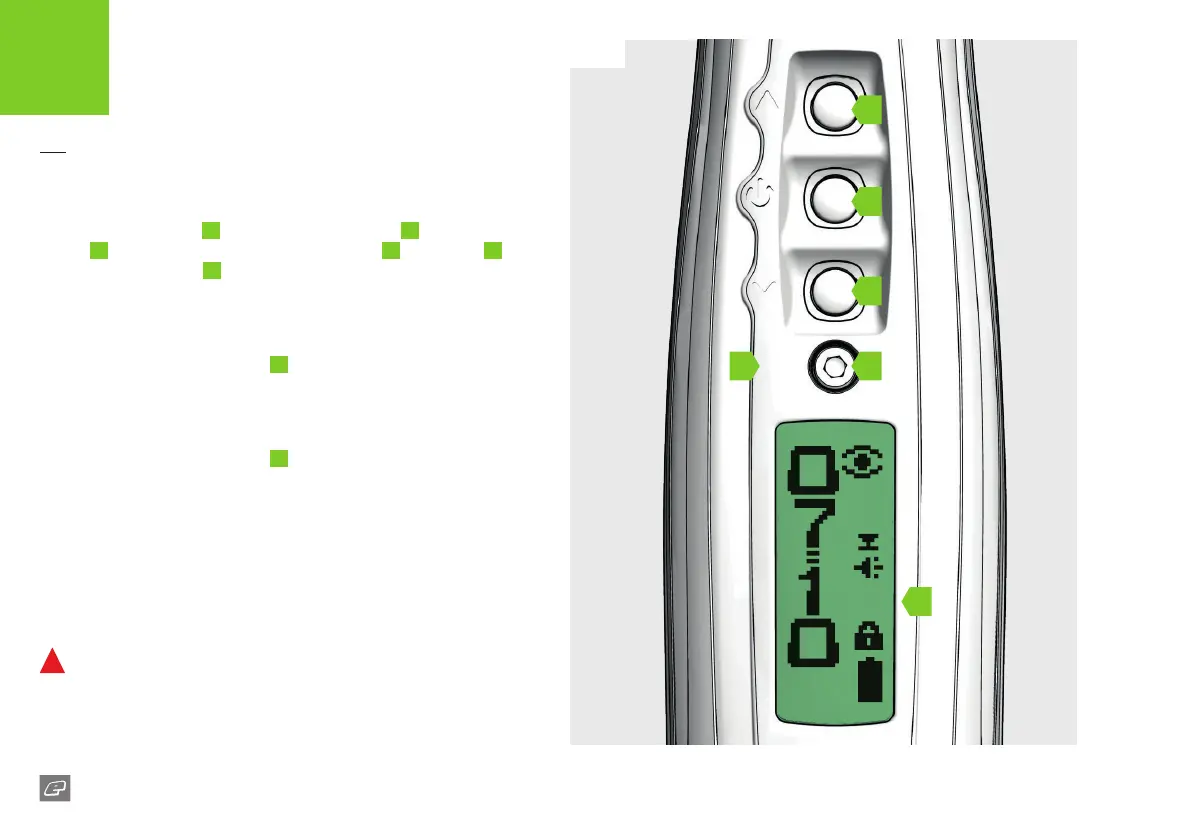
The navigation console
A
houses the Select button
B
the LCD
screen
C
the LCD display navigation buttons Up
D
and Down
E
and the rear grip screw
F
. Use the navigation console to switch the
CS1 On/O and change the marker settings.
Switching On the CS1
Press and hold the Select button
B
, or double-click it, until the Planet
Eclipse logo is displayed.
1
Switching O the CS1
Press and hold the Select button
B
, or double-click it, until the TURN
OFF option is displayed. Press the Select button again to switch o
the CS1.
1
Firing the CS1
Pull the trigger to re the CS1. The breech sensor (BS) will dictate how
the CS1 res. See page 18 for details.
1
DO NOT dry re your CS1 as this may lead to damage over a
continual period of dry ring.
1 The double-click feature can be disabled in the HARDWARE menu (see page 31).
QUICK START
SWITCHING THE CS1 ON/OFF
D
B
E
A
C
F














 To Next Page