4.2.4 WDS Link List
Click “Status
WDS Link List”
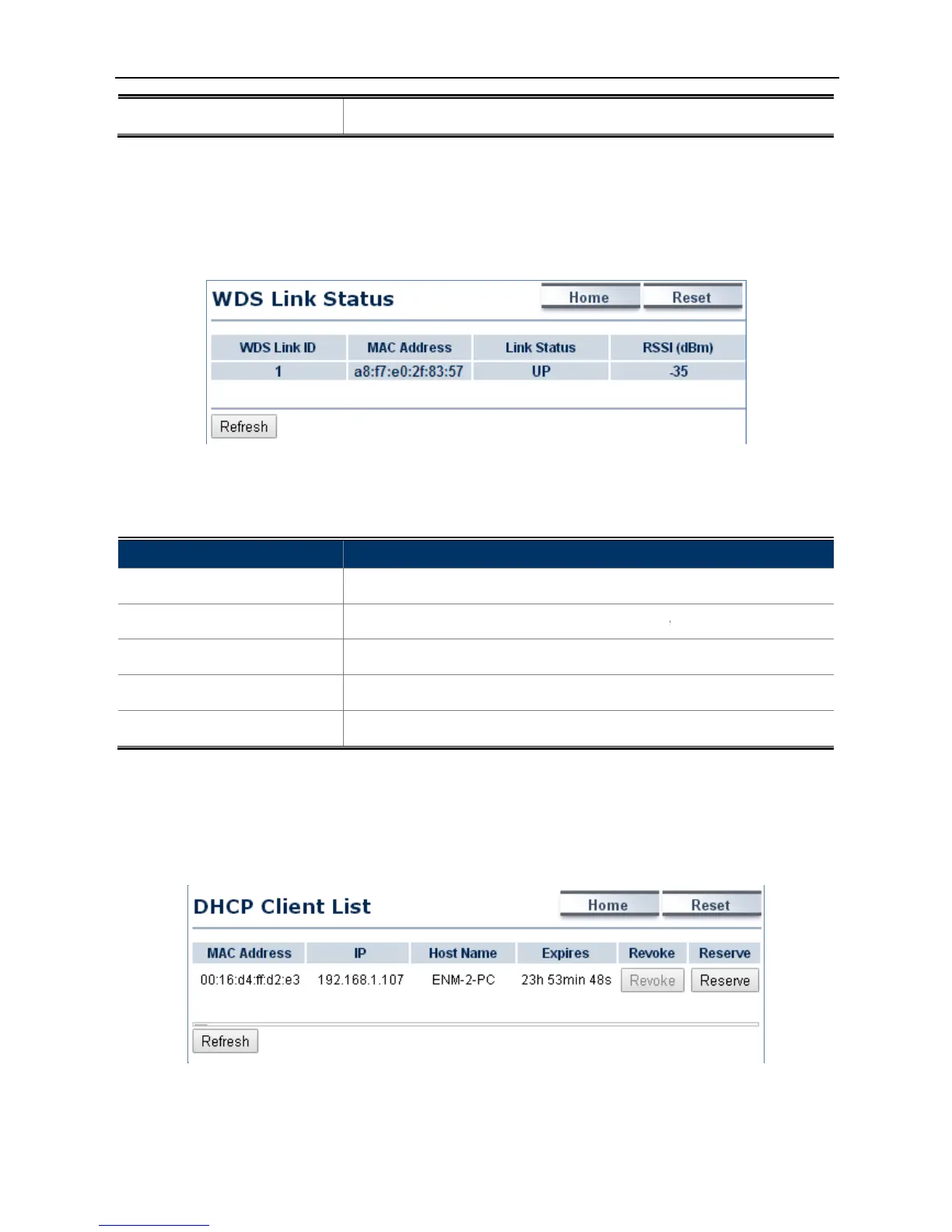
to view the current WDS link client.
The WDS Link List is only available
The page includes the following settings
The sequence number of the WDS link.
The current signal strength of the associated remote node.
4.2.5 DHCP Client Table
Click “Status
DHCP Client Table”
to add the client to the wireless mac filtering deny list.
to view the current WDS link client.
WDS Bridge mode.
Figure 4-8 WDS Link Status
The page includes the following settings
The sequence number of the WDS link.
Address of the associated remote node.
The current signal strength of the associated remote node.
Refresh to update the current list.
to view the current DHCP client.
in WISP mode.
Figure 4-9 DHCP Client List
to add the client to the wireless mac filtering deny list.
Address of the associated remote node.
The current signal strength of the associated remote node.



 To Next Page