User Manual of WAP-500N/WBS-500N
-44-
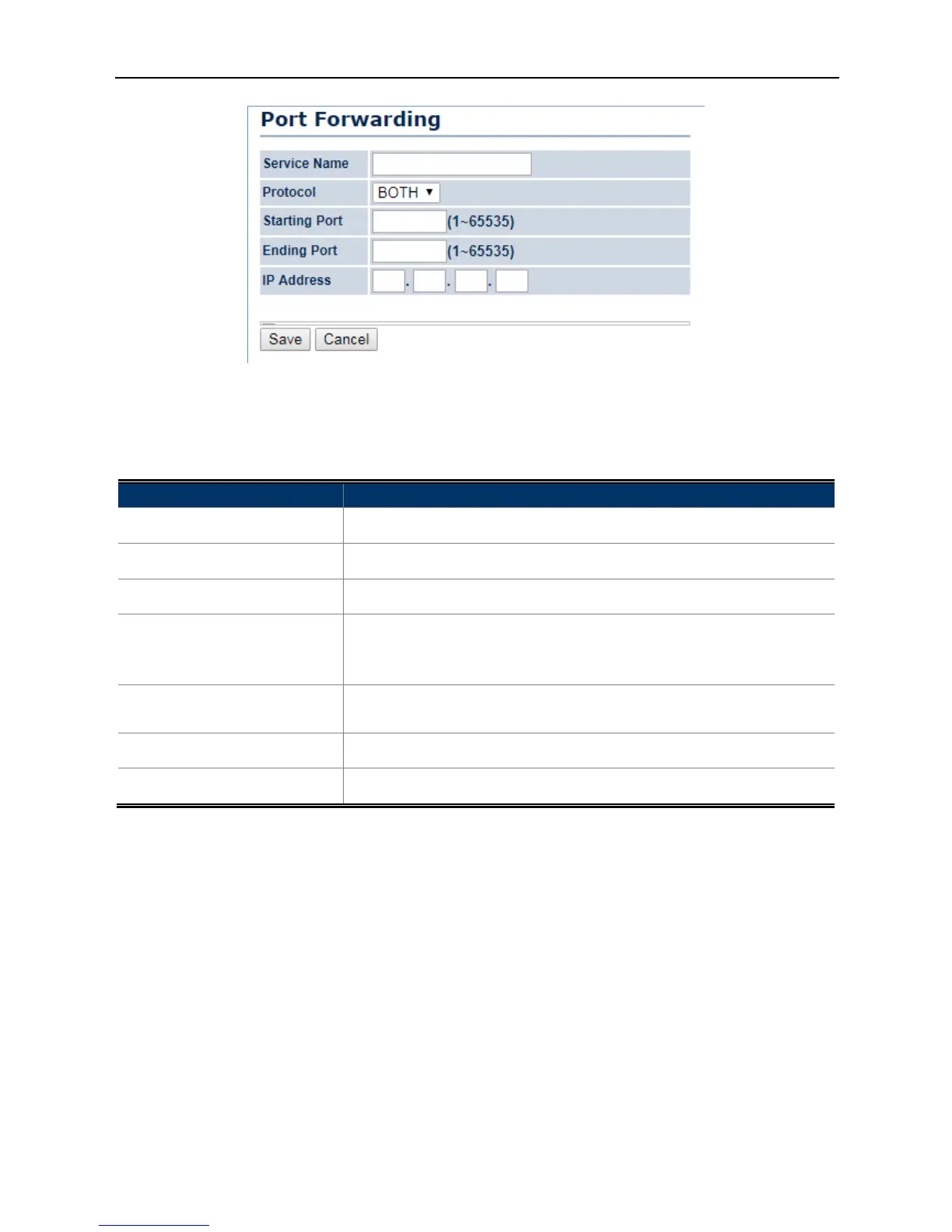
Figure 4-22 Port Forwarding
The page includes the following settings:
Object Description
• Service Name
Enter a name for the port forwarding rule.
• Protocol
Select a protocol for the application: Choices are TCP or UDP, or both.
• Starting Port (1~65535)
Enter a starting port number.
• Ending Port (1~65535)
Enter an ending port number.
All ports numbers between the starting and ending ports will forward
users to the IP address specified in the IP Address field.
• IP Address
Enter the IP address of the server computer on the LAN network where
users will be redirected.
• Save
Click Save to save the new forwarding rule.
• Cancel
Click Cancel to cancel the setting.
4.4.5 DMZ Settings
The DMZ function allows the device to redirect all packets going to the WAN port IP address to a particular IP
address on the LAN. The difference between the virtual server and the DMZ function is that a virtual server
redirects a particular service or Internet application, such as FTP, to a particular LAN client or server, whereas a
DMZ redirects all packets, regardless of the service, going to the WAN IP address to a particular LAN client or
server.
Go to the “Operation Mode” page to configure the device as “WISP” and then go to “Router
DMZ Settings”
to enable/configure DMZ.



 To Next Page