Authentication is disabled and no password/key is required to connect to the access point.
The security mode includes the following settings
using WEP encryption method.
Select Open System or Shared.
Select an input type of Hex or ASCII.
Authentication is disabled and no password/key is required to connect to the access point.
basic encryption. For a higher
level of security consider using
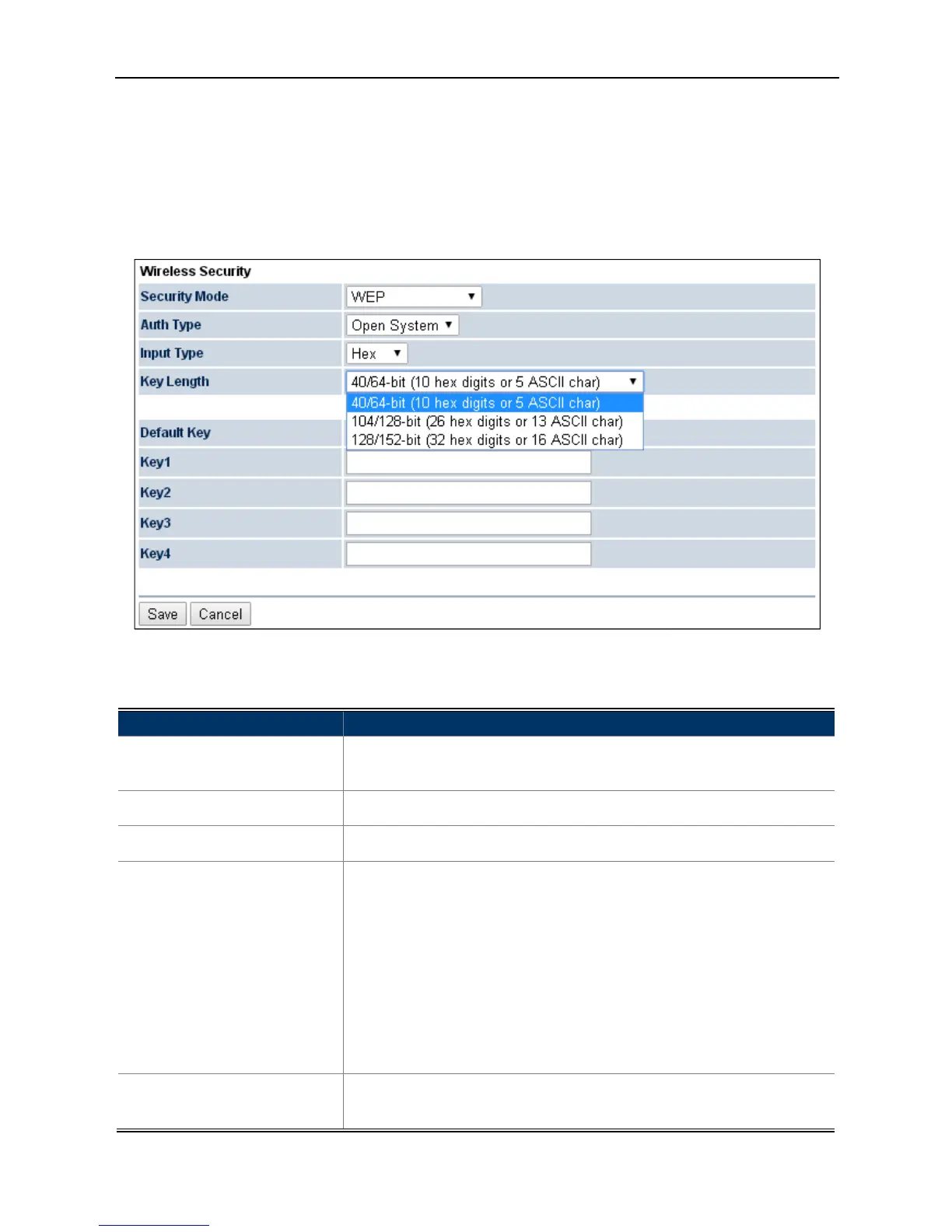
4-31 Security Settings – WEP
The security mode includes the following settings
WEP from the drop-down list to
configure the wireless network
using WEP encryption method.
Select Open System or Shared.
Select an input type of Hex or ASCII.
-/128-/152-bit password length.
enter 10 hexadecimal digits (any combination of 0
F and null key is not permitted) or 5 ASCII characters.
hexadecimal digits (any combination of
a-f, A-F and null key is not permitted) or 13
hexadecimal digits (any combination of 0
a-f, A-F and null key is not permitted) or 16
– 4 to specify which of the four
Authentication is disabled and no password/key is required to connect to the access point.
level of security consider using
configure the wireless network
enter 10 hexadecimal digits (any combination of 0
F and null key is not permitted) or 5 ASCII characters.
hexadecimal digits (any combination of
hexadecimal digits (any combination of 0



 To Next Page