Specify Bridge Hello Time in seconds. This
does not send a hello packet for a
Specify Bridge Forward Delay in
Specify the Priority number. Smaller
4.4.1 DHCP Server Settings
Go to the “Operation Mode”
page to configure the device as
to configure the device’s LAN IP settings.
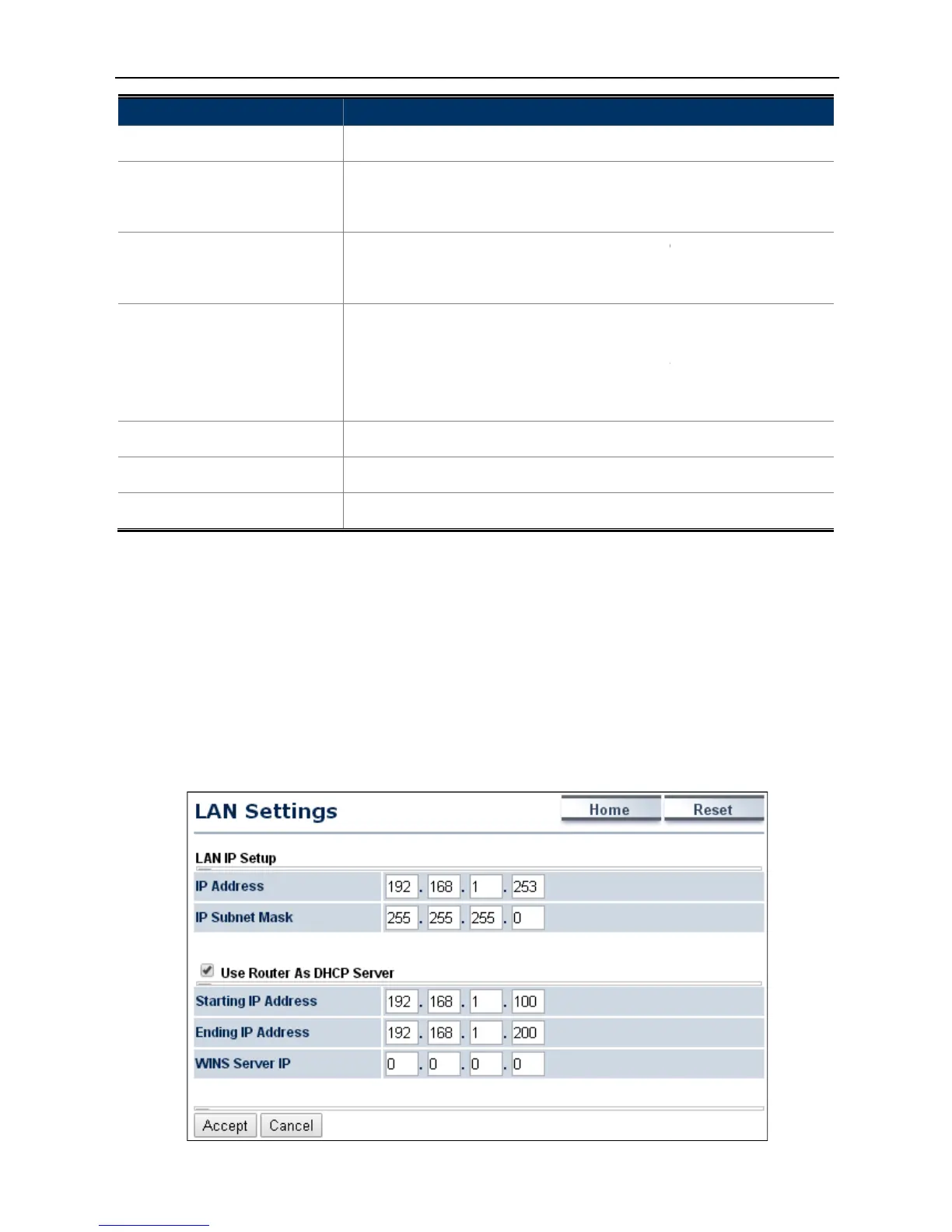
n this page, enable the DHCP server to assign IP address to local wired/wireless clients after the device
connected to the remote AP supplied by wireless ISP.
ON to enable or click OFF
Specify Bridge Hello Time in seconds. This
value determines how often
packets to communicate information about the
throughout the entire Bridged Local Area Network
ify Bridge Max Age in seconds. If another
bridge in the spanning tree
does not send a hello packet for a
long period of time, it is assumed to be
Specify Bridge Forward Delay in
seconds. Forwarding delay time is the
Listening and Learning states before the
entered. This delay is provided so that when a new
onto a busy network, it looks at some traffic before
Specify the Priority number. Smaller
numbers have greater priority.
Accept to apply the setting.
Cancel to cancel the setting.
page to configure the device as
to configure the device’s LAN IP settings.
n this page, enable the DHCP server to assign IP address to local wired/wireless clients after the device
connected to the remote AP supplied by wireless ISP.
Figure 4-14 DHCP Server Settings
value determines how often
packets to communicate information about the
throughout the entire Bridged Local Area Network
bridge in the spanning tree
long period of time, it is assumed to be
seconds. Forwarding delay time is the
Listening and Learning states before the
entered. This delay is provided so that when a new
onto a busy network, it looks at some traffic before
numbers have greater priority.
n this page, enable the DHCP server to assign IP address to local wired/wireless clients after the device



 To Next Page