User’s Manual of WNRT-300
-13-
3.3.2. Configure the IP address manually
If you are sure the DHCP server of WNRT-300 is disabled (the default setting of AP Mode and Client
Mode), you can configure the IP address manually. The IP address of your PC should be
192.168.1.xxx (the same subnet of the IP address of WNRT-300, and "xxx" is any number from 2 to
254), Subnet Mask is 255.255.255.0, and the Gateway is 192.168.1.1 (The default IP address of
WNRT-300)
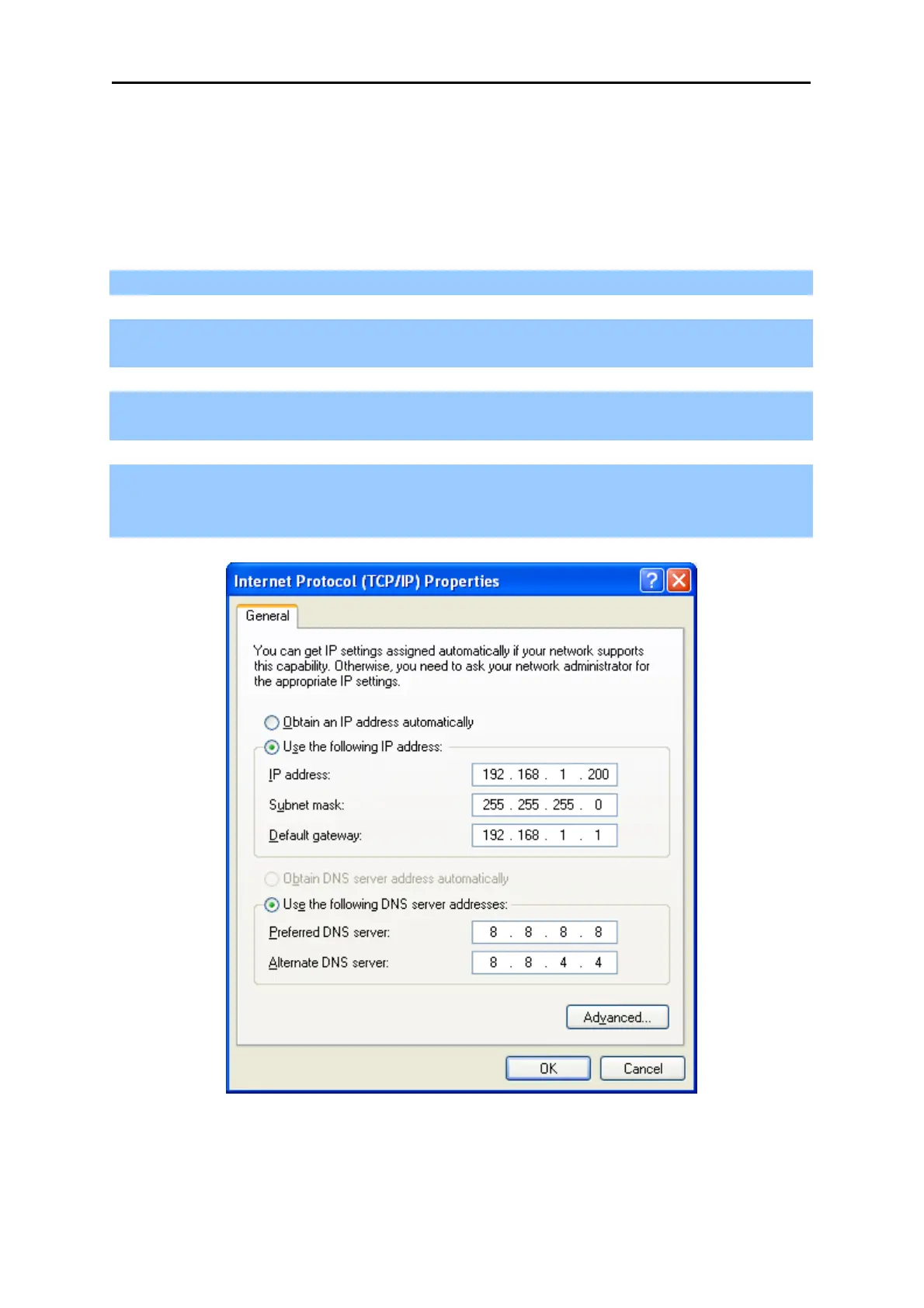
1) Continue the settings from the last figure, select Use the following IP address radio button.
2) If the LAN IP address of the WNRT-300 is 192.168.1.1, enter IP address 192.168.1.x (x is from 2
to 254), and Subnet mask 255.255.255.0.
3) Enter the LAN IP address of the WNRT-300 (the default IP is 192.168.1.1) into the Default
gateway field.
4) Select Use the following DNS server addresses radio button. In the Preferred DNS Server field,
you can enter the DNS server IP address provided by your local ISP. Then click OK to save your
settings.
Figure 4-2



 To Next Page