2
72
Mini-101U
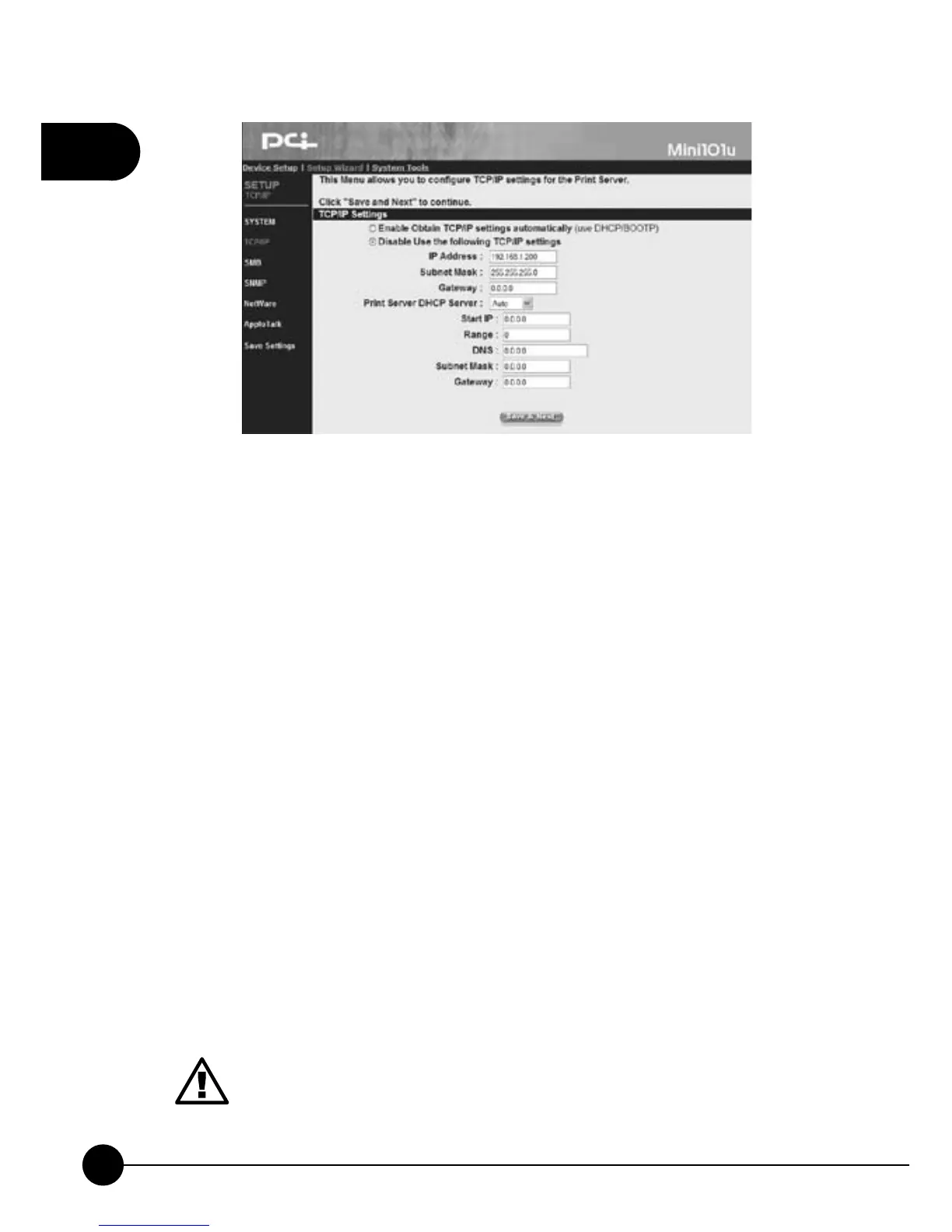
TCP/IP Settings
œEnable Obtain TCP/IP settings automatically (Use DHCP/
BOOTP)ĈIf your network has DHCP/BOOTP function, you can
enable this function and let related IP settings to have the IP addresses
automatically from the DHCP server.
œDisable Use the following TCP/IP settingsĈIf you do not use DHCP/
BOOTP, please select this entry and fill in the following information.
œIP Address, Subnet Mask, GatewayĈ If you choose to disable DHCP
server, you have to enter the IP Address, Subnet Mask,andGateway
Address which are at the same network with your computer. If you want
to let Mini-101U provide Internet printing function, you will have to
configure the Gateway Address; otherwise, you can leave it blank.
œPrint Server DHCP ServerĈ You can choose Enable, Disable,or
Auto status. The default status is Disable. If you want to choose Enable
or Auto, you have to assign a range for the IP addresses. Fill in Start IP,
Range, DNS, Subnet Mask, Gateway, and then the DHCP server will
distribute IP addresses to the LAN side users.
1.In order to build a connection successfully, we suggest that you
should give Mini-101U a static IP address.
2.If you choose Auto, DHCP server will only boot when there is
no other DHCP server on the LAN.



 To Next Page