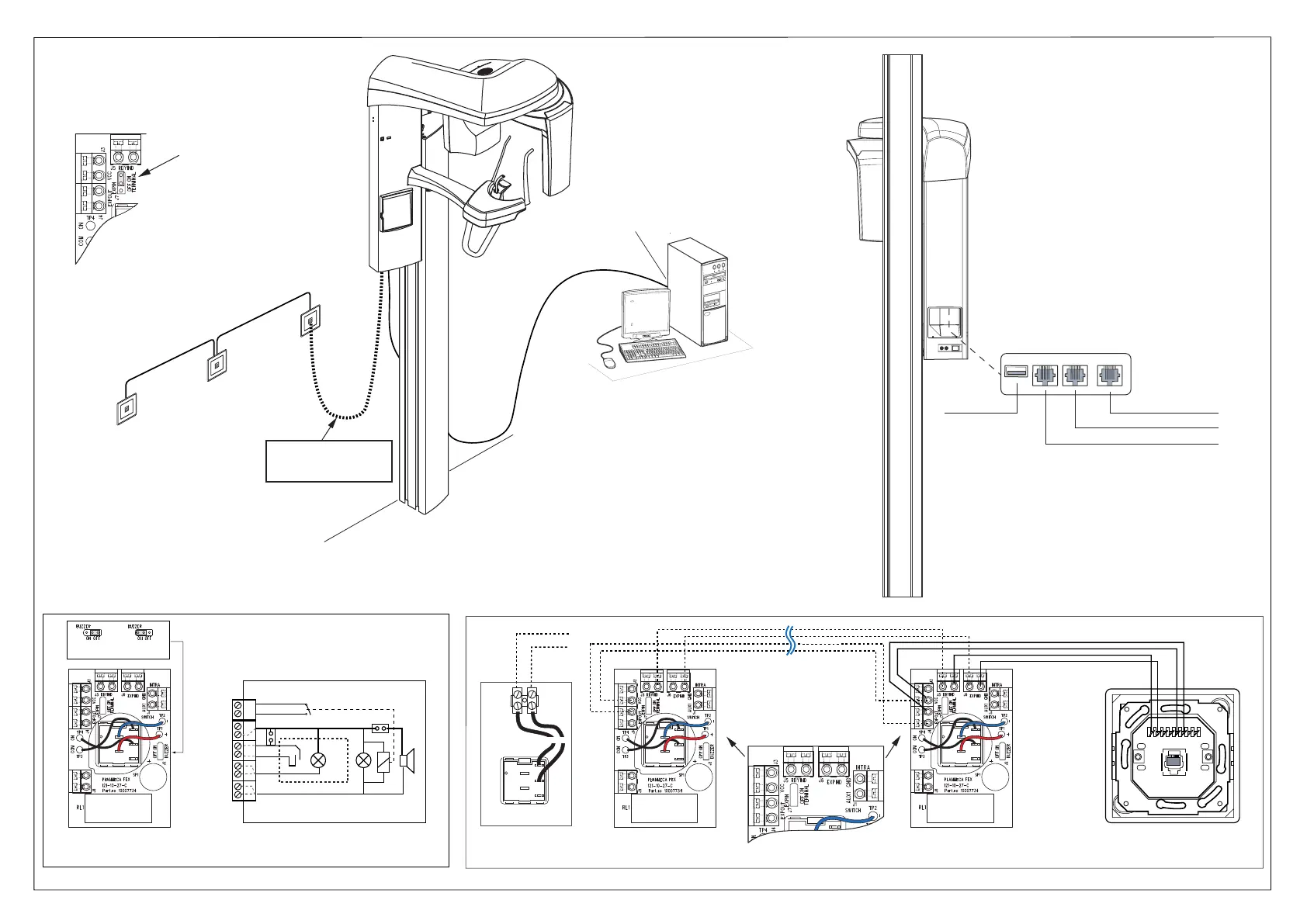
P lanmeca P roOne
Double E xposure S witch /
R emote connection E U
LY 05.06.2007
B uzz O ff B uzz O n
10008048
L
(+)
3
2
1
L
(-)
NC
NO
C OM
F ixed E xposure Ass embly
10016800
F ixed E xposure Ass embly
10016800
F ixed E xposure Ass embly
10008347
10008048
E XP IND - E XPIND
R DY IND - R DYIND
E XP IN - E XPOUT
VC C - VC C
+26V
E XPOUT
L
(+)
3
2
1
L
(-)
NC
NO
C OM
L
(+)
3
2
1
L
(-)
NC
NO
C OM
1
L
(-)
NOT E ! T he las t F E X
should be terminate by jumpper J 7
to "ON"-pos ition.
F ixed E xposure switch
E XP IN
E XP
S W.
E XP OUT
+26V
NC
E XTE R NAL
LAMP
J 3
J 8
J 4
J 5
R L1
J 6
R DY IND
E XP IND
E thernet cable UT P cat5e
06320060
E xpos ure C able
10001193
C able MHS 1x5x0.5 C ode 06320032
P C with grabber card
US B Memory E thernet
E xposure S witch
R emote E xposure O ption
L
(+)
3
2
1
L
(-)
NC
NO
COM
00001864
10008102
10008092
NOT E !
E L E C TR IC AL L Y
C R OS S -C O NNE C T E D
Data Wall S ocket Ass embly
06001019
R DY IND <--> 1
E XP IND <--> 2
VC C <--> 5
E XP IN <--> 6
1 456 78
2
3
Printed copies of this document are considered uncontrolled.
7535.13.Rev001 08.07.2018














 To Next Page