EasyManua.ls Logo

Platinum PT-DPF500C - Page 36

Platinum PT-DPF500C
52 pages
Print Icon
To Next Page IconTo Next Page
To Previous Page IconTo Previous Page
Loading...
36
2 On each slave flash,
press the FN 4 button
one or more times
until MENU 1 is
displayed on the LCD,
then press the FN 3
(Gr) button to select
A, B, C, D, or E.
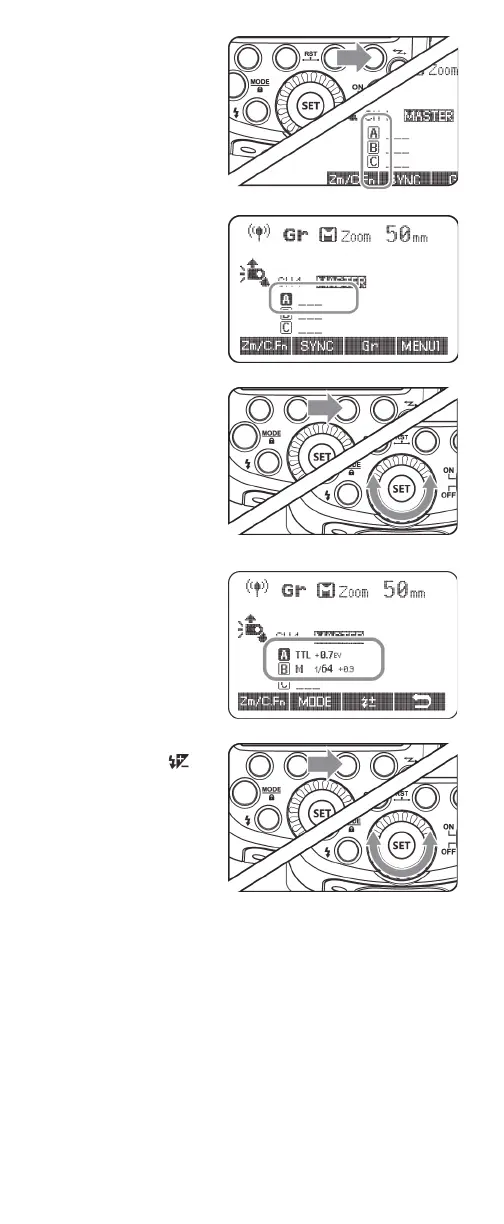
3 On the master flash,
press the FN 4 button
one or more times
until MENU 1 is
displayed on the LCD,
then press the FN 3
(Gr) button to select a
group (A, B, C, D, or E).
4 On the master flash
with a firing group
selected, press FN 2
(MODE) button, then
select the flash mode
of the group. You can
select ETTL, M, or –––
(off). Repeat this step
for each group.
5 On the master flash,
press the FN 3 ()
button, turn the select
dial to set the flash
function that
corresponds to flash
mode, then press the
SET button to
confirm. Repeat this
step for each group.

Table of Contents

Related product manuals