20 P/N 2018 - 10 B Rev A 6 – Release
Monocular Mode
It may be desirable or easier to measure one eye at a time. This can be done in mon-
ocular mode. To measure in monocular mode, proceed with the following steps:
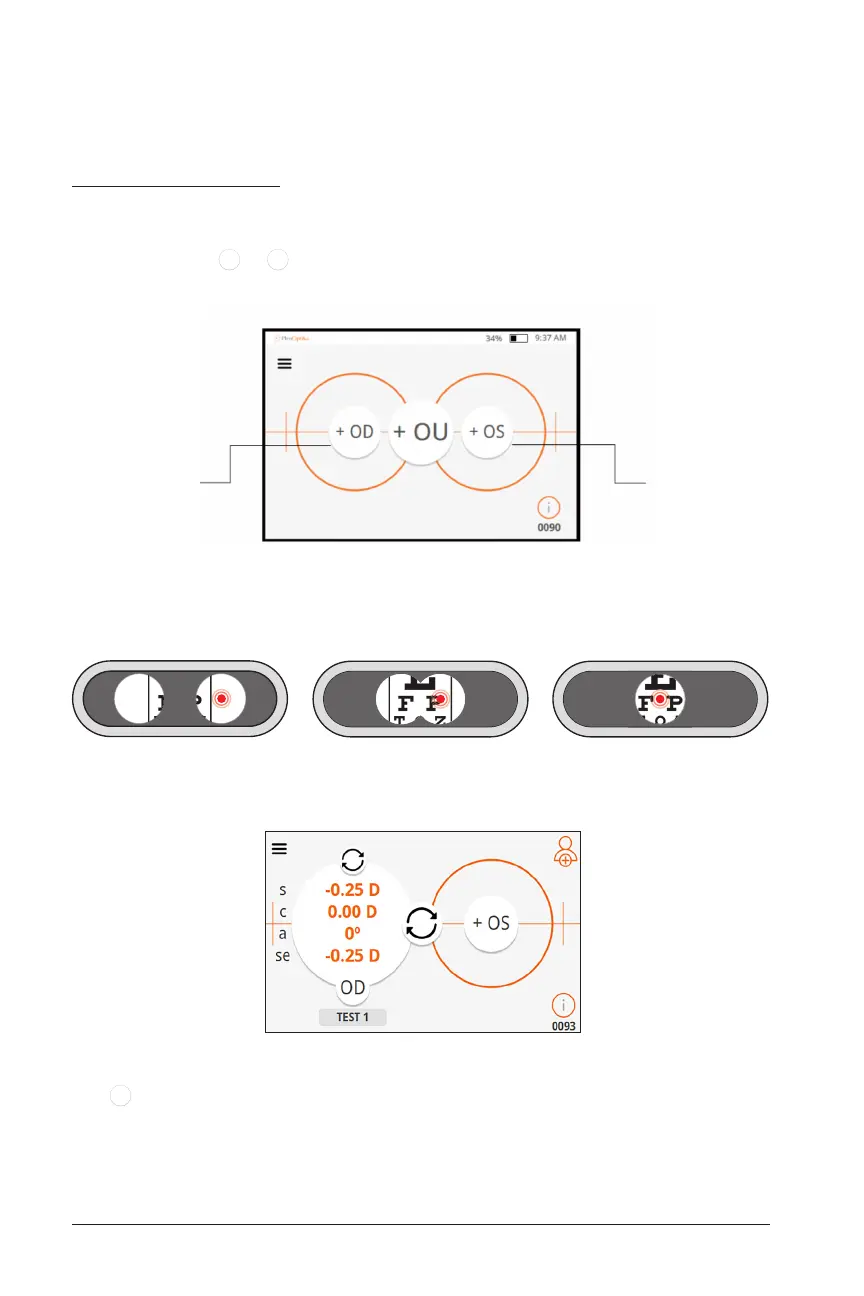
1. Select either
+ OD
or
+ OS
icon on the Home Screen to measure the right or left eye
respectively.
2. Repeat steps 2-7 of the binocular mode acquisition method.
NOTE: Patient will only see a red dot in the eye being measured
(right eye alignment process shown here):
3. When measurement is complete, the prescription will be displayed for that eye
(for example right eye measured in the below screen):
4. To measure the other eye, press the icon for the other eye (in the example above,
+ OS
for the left eye), and repeat step 2 of monocular mode as above. The red dot
will show up in only that eye.
NOTE: Spot diagram monocular mode is available in advanced settings and can
be used to troubleshoot alignment issues.
Measure
Left Eye
Measure
Right Eye


 To Next Page