27P/N 2018 - 10 B Rev A 6 – Release
User Operation
Advanced Settings
By selecting the
ADVANCED
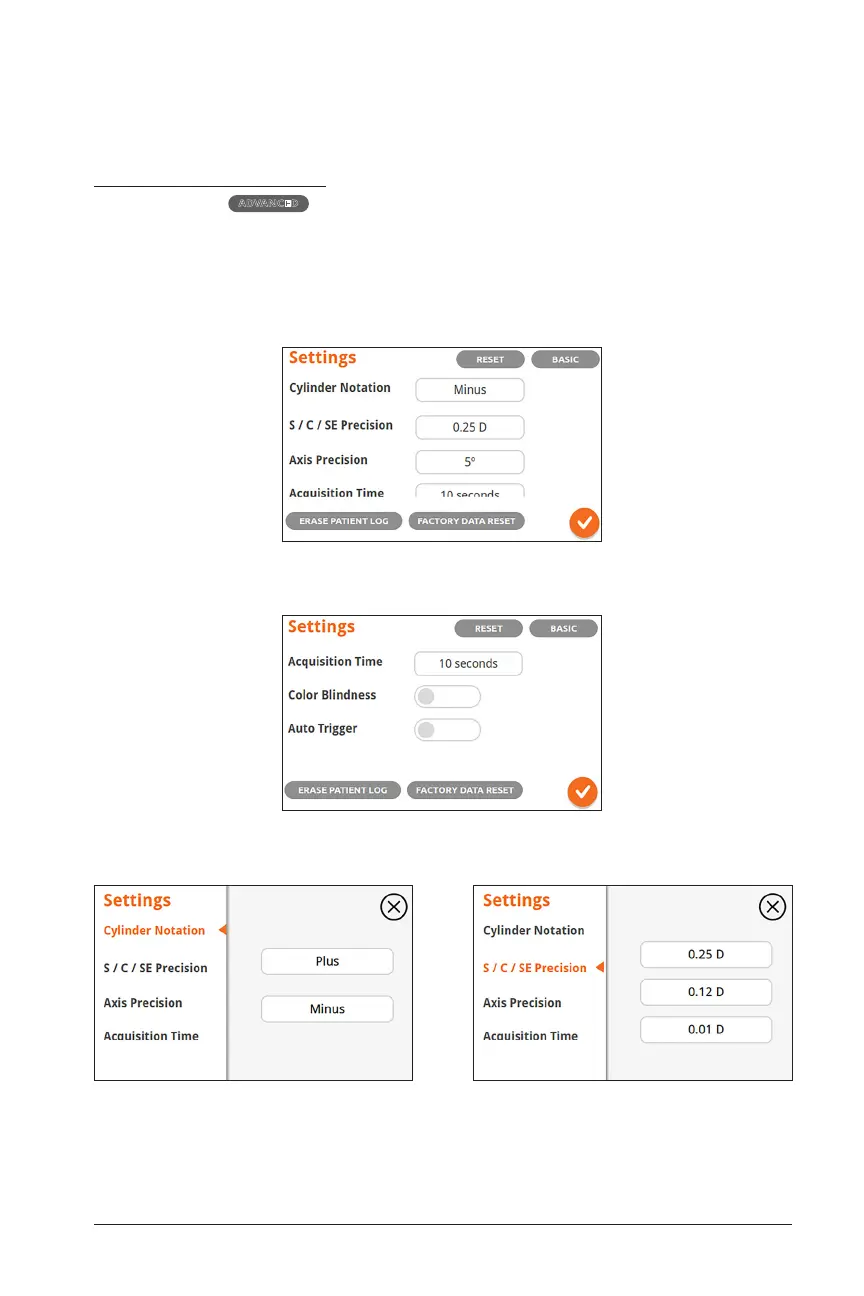
option, you will be presented with the advanced settings
menu where you can alter the cylinder notation, measurement precision, axis degree
precision, acquisition time, and also toggle on/off the color blindness display set-
ting as well as the automatic acquisition trigger. The eye layout, eye notation, and
shutdown time can be set there as well. Drag to scroll down on the advanced settings
menu:
Advanced Setting Screen
Advanced Setting Screen Continued (scroll down)
Change Cylinder Notation
Set display convention for Cylinder readings
Defaults to minus
Change Precision of Measurement Diopter
Set Diopter Precision. Defaults to 0.25 D
(recommended)


 To Next Page