28 P/N 2018 - 10 B Rev A 6 – Release
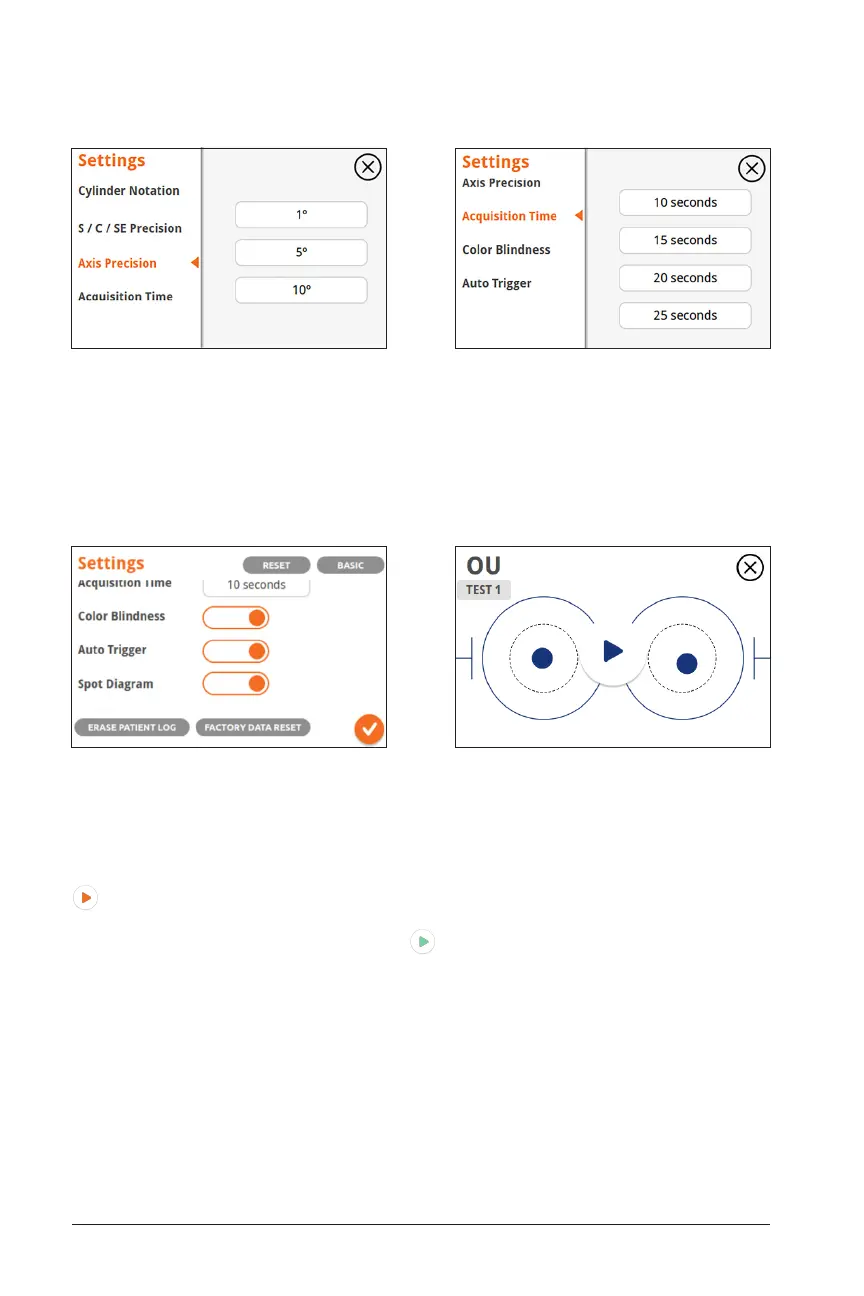
ChangePre Axis Measurement Degree Precision
Set Axis Precision. Defaults to 5 degrees (recommended).
Change Time to take Measurement
Set Acquisition Time. Defaults to 10 seconds (recommended).
The Color Blindness setting changes the color of the screen to help users with red-
green color blindness operate the menu, especially during acquisition mode. Green
colors are changed to dark blue while orange colors stay orange:
Auto-trigger enables the acquisition to start automatically when the eye is detected
to be aligned. When this setting is enabled, touch and hold anywhere on the screen
for at least 2 seconds to prompt the device to enter auto-trigger mode. The play icon
in acquisition mode will start to blink, and once the patient’s eyes are aligned, the
round circles will turn green and start the acquisition process without requiring the
user to press the green acquisition arrow to begin the measurement. To inacti-
vate auto-trigger, touch and hold anywhere on the screen for two seconds or cancel
acquisition. This functionality is also available in monocular mode.
Spot Diagram changes the visualization of the pupil from a dot to the raw wavefront
aberrometry image of each eye. This mode may be helpful if it is difficult to locate the
pupils during measurement.
Color Blindness, Auto-trigger, Spot Diagram Color Blindness Screen


 To Next Page