29P/N 2018 - 10 B Rev A 6 – Release
User Operation
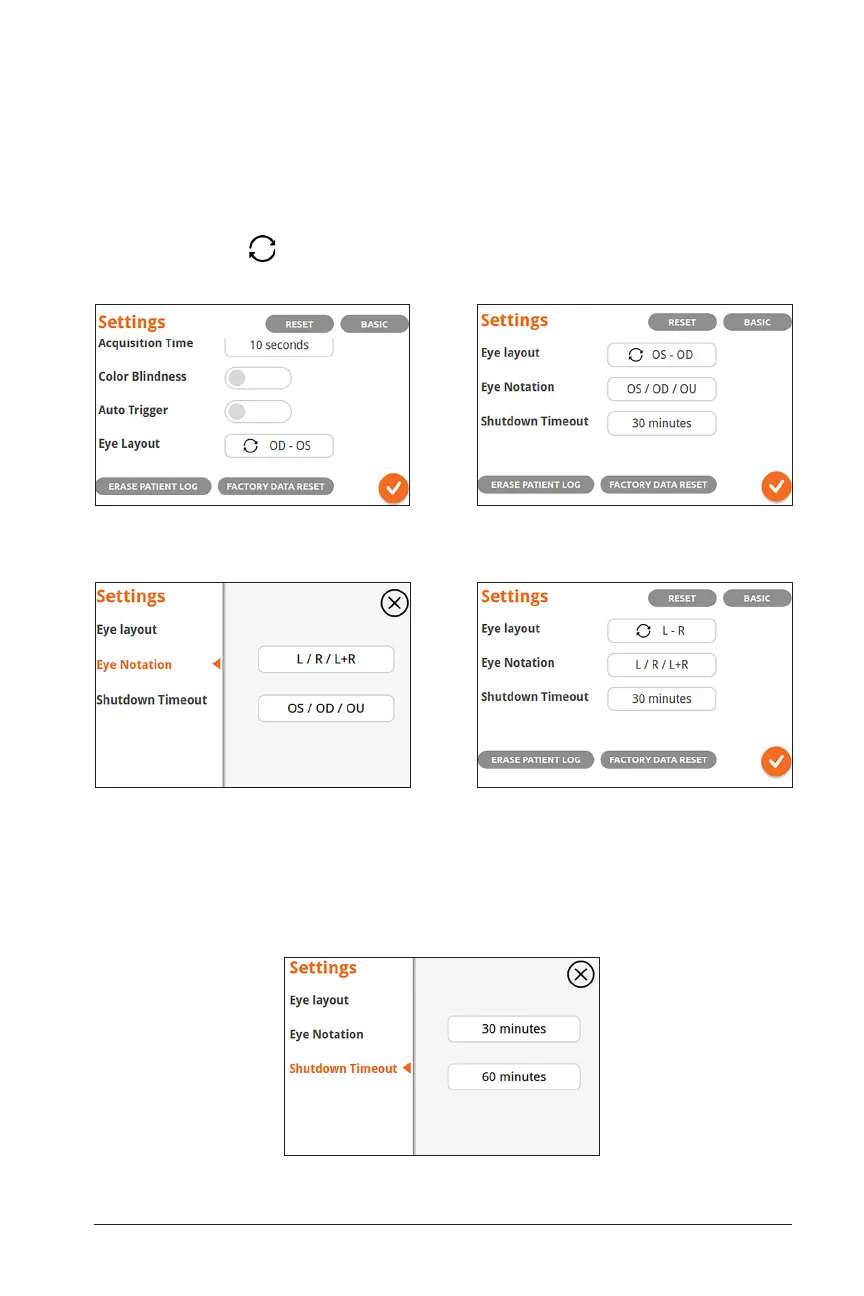
The Eye Layout and Eye Notation settings configure how the patient’s right (OD)
or left (OS) eye is displayed in acquisition and Patient Information screens. Several
options are available including those traditionally used by healthcare professionals
(OD – OS: OD on the screen left, OS on the screen right) or the reverse, by selecting
the reverse button on ‘eye layout.’ Eye notation can also be changed from “OS /
OD / OU” to “L / R / L+R” to indicate a patient’s “Left / Right / Both” eyes:
The Shutdown Timeout setting: if the UI is inactive for this period of time the device
will shut itself down to save battery and avoid overheating. There are two options: 30
minutes (default) and 60 minutes:
Traditional ‘OD-OS’ Layout ‘OS-OD’ Reverse Layout with Corresponding
Notation
Reverse Layout with “L” and “R” NotationSelect Eye Notation: ‘OD/OS’ or ‘R/L’


 To Next Page