! Plexxi Switch 3eq Installation Guide (Switch-Control 3.0.0-3.2.x)! 19!
PSI!Network!Example!
Using the PSI, you can create a network topology that includes Switch 3eq, Switch 2e, and a Switch 2p,
or Switch 2sp. The switch 3eq optics used in the QSFP28 LightRail ports use 10Gbit or 25Gbit parallel
optics, which makes Switch 3eq LightRail compatible with the pod versions of Plexxi Switches (Switch
2p, 2sp).
IMPORTANT: If any Switch 1 or 2 models (10Gb/s ports) are in the fabric, the Switch 3eq must use 10
Gb/s parallel optics.
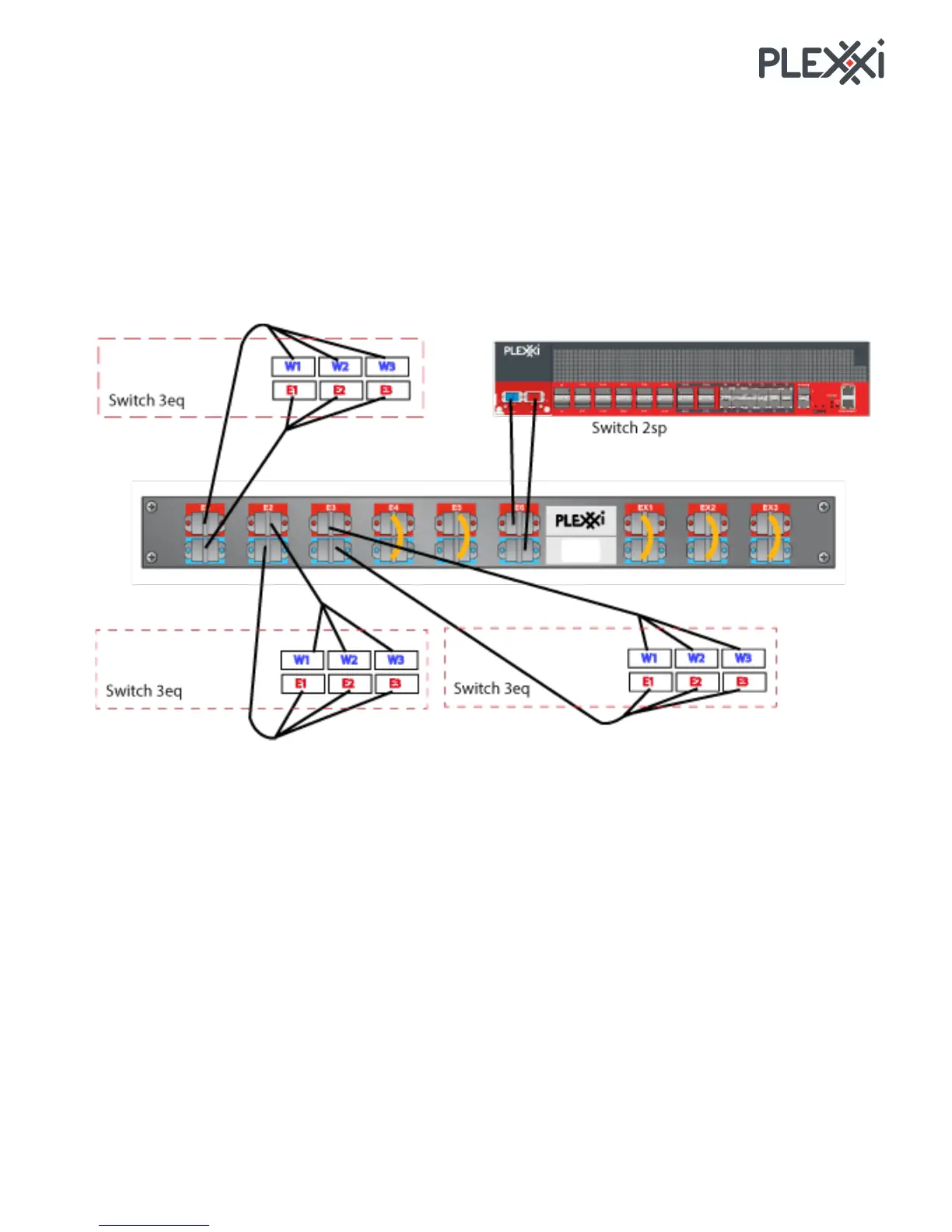
The following illustration shows a network topology that includes three Plexxi 3eq switches and a Plexxi
Switch 2sp connected to Plexxi PSI Interconnect device.
As shown, all unused PSI ports are looped back using loopback cables.
Note: The QSFP28 ports in the diagram include a label indicating direction: W1 through W3 and E1
through E3. These labels are informational and are not found on the Plexxi Switch chassis.
Connecting!Multiple!PSI!Devices!
PSI devices can be connected to scale out the Plexxi fabric. Three 24-fiber MTP cables are used to
connect to a PSI device to the next (East) PSI device, and an additional three cables are used to connect
to the previous (West) PSI device.
To connect PSI devices together, use 24 fiber MTP to MTP LightRail cables available in varying lengths
(1, 3, 5, 10, 20 and 100M). You need six cables to connect a PSI device East and West to other PSI
devices. For part numbers and descriptions of supported cables, refer to the document, Plexxi Support
Matrix.
!



 To Next Page