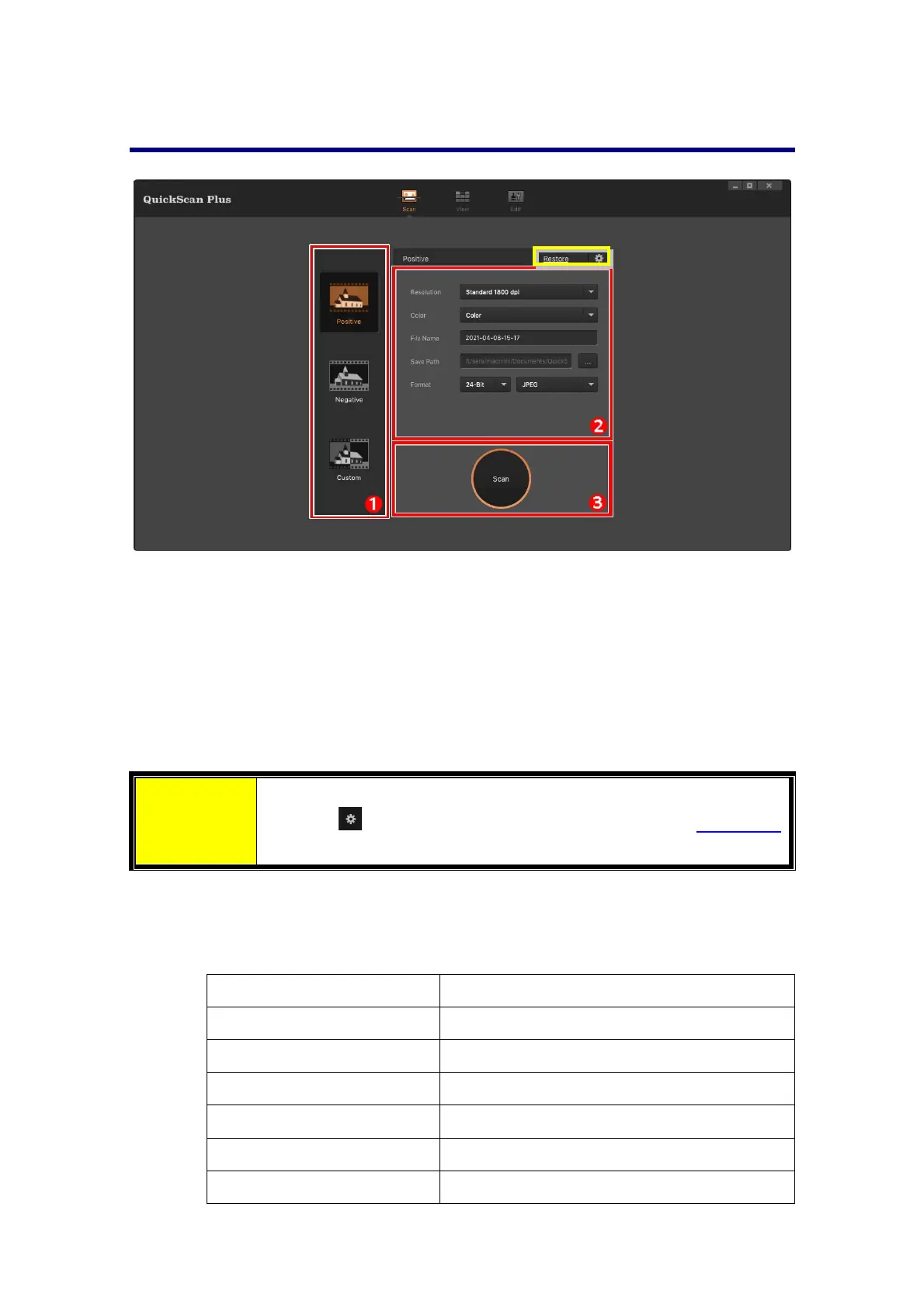
The[Scan]Screen
The [Scan] screen is where you set your scanning parameters. These scanning
parameters will also be used when you initiate a scan using the physical button on
yourscanner.
Scanmode
Selectedbyclickingontherespectivebuttonontheleftside,youcanchoosebetween
[Positive],[
Negative]and[Custom].Basicallythisallowsyoutocreate3scanprofiles;
oneforpositives,onefornegativesandoneforeitherpositivesornegatives.
Attention
Youmayclick[Restore]buttontoresetallsettingstodefault.
Click on
button to access online help and adjust Preference
settings.
Scansettings
[Resolution]:Selectadesiredresolutionfromthedrop‐downlist.Thehigher
theresolution,themoredetailedthescanandtheresultingfilewillbe.
Resolution Windows&Mac
7200dpi Approx.9000x6200dots
3600dpi Approx.4500x3100dots
2400dpi Approx.3000x2000dots
1800dpi Approx.2250x1500dots
1200dpi Approx.1500x1000dots
600dpi Approx.750x500dots
16














 To Next Page