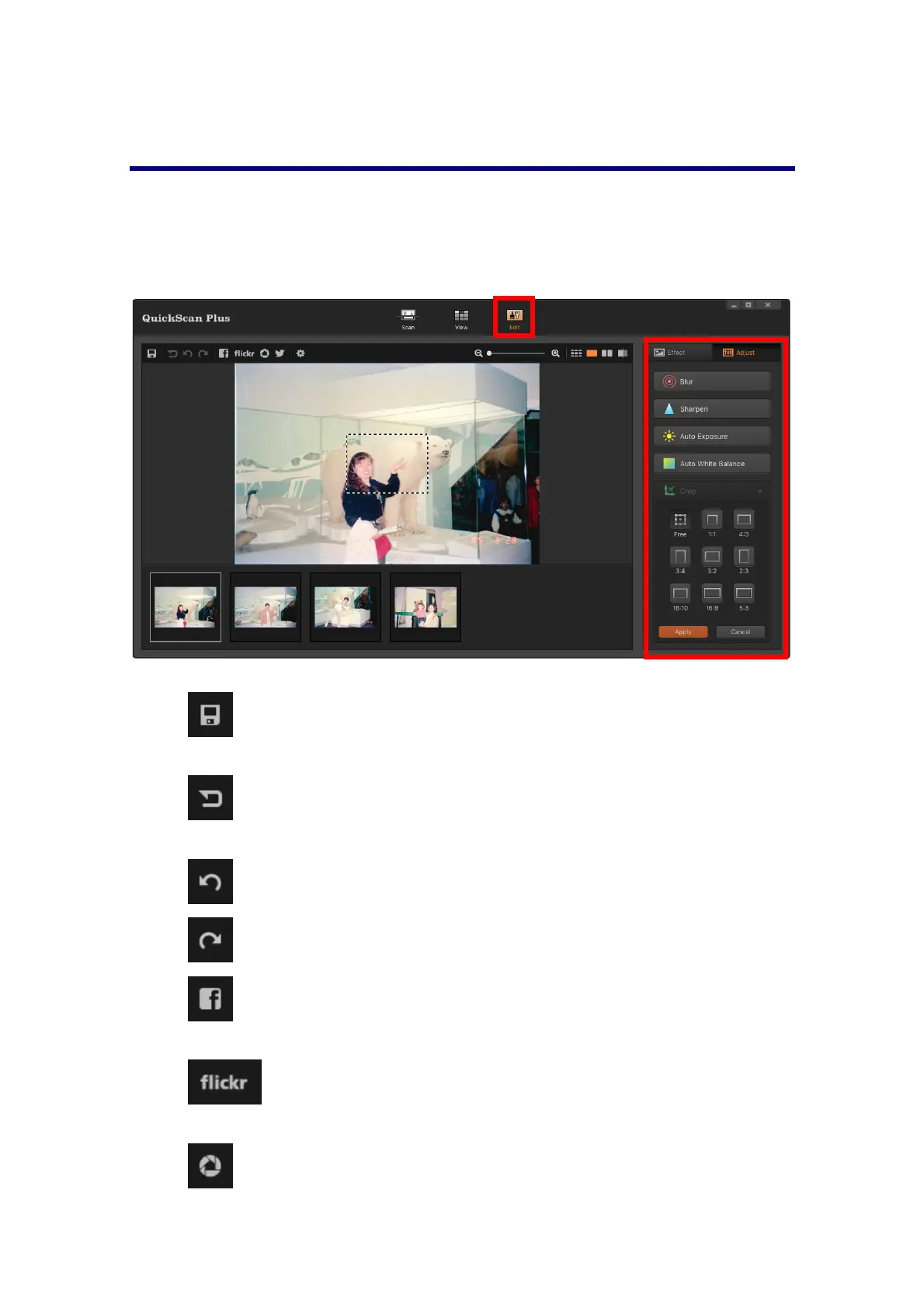
The[Edit]Screen
The Edit screen is whereyou can apply variousfilter effectsandmake more detailed
adjustmentstoyourimages.
Click on the [Edit] button above the frames to switch to the [Edit] screen to apply
variousfiltereffectsandmakemoredetailedadjustmentstoyourimages.
Functionbuttonsonthetoolbarareasfollowing:
Save: Click on this button to save any changes you have made to the
selectedimages.
Reset: Click on this button to reset the selected image to their original
state.
Undo:Clickonthisbuttontoundothelasteffectoradjustment.
Redo:Clickonthisbuttontoredothelasteffectoradjustment.
SharetoFacebook:ClickthisbuttontolaunchtheFacebookwebsiteina
dialogwithinQuickScanPlus.
Share to flickr: Click this button to launch the flickr website in a
dialogwithinQuickScanPlus.
Share to Google Drive: Click this button to launch the Google Drive
websiteinadialogwithinQuickScanPlus.
20














 To Next Page