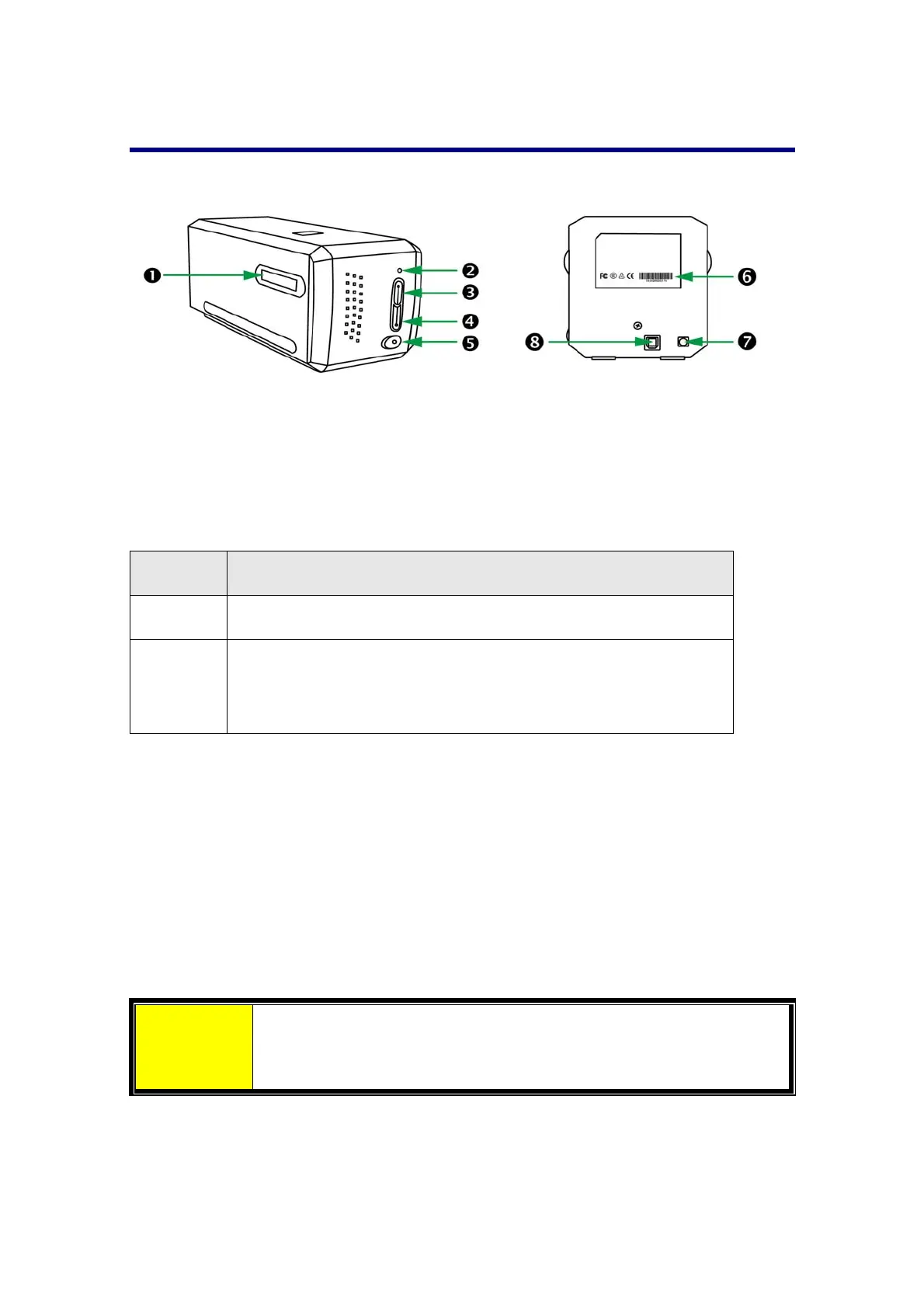
ScannerOverview
FilmHolderSlot:Insertthefilmholderinto thescannerthrough dustcover.The
film holder can be inserted from either side. The film holder will index at each
frameusingthenotchesonitssiderails.
PowerLED:Itindicatesthescannerstatus.
Light Status
On Thescanneristurnedon,readytoscanimages.
Off
The scanner is off, either because the power is not turned
on, or because the power cord is not properly plugged into
anACpoweroutlet.
IntelliScanButton:YoumaypressthebuttontolaunchtheSilverFastapplication.
QuickScan Button: You may press the button to launch the QuickScan Plus
application.
PowerButton:UsethistoturnthescannerONorOFF.
SerialNumberSticker:Locatedattherearofthe
scanner.
PowerReceptor
USBPort
Attention
You will need the 12 digits Serial Number for SilverFast softwar
activation. Youwillalso need it when you contact yourdealeror ou
servicecenterinthefuture.
5














 To Next Page