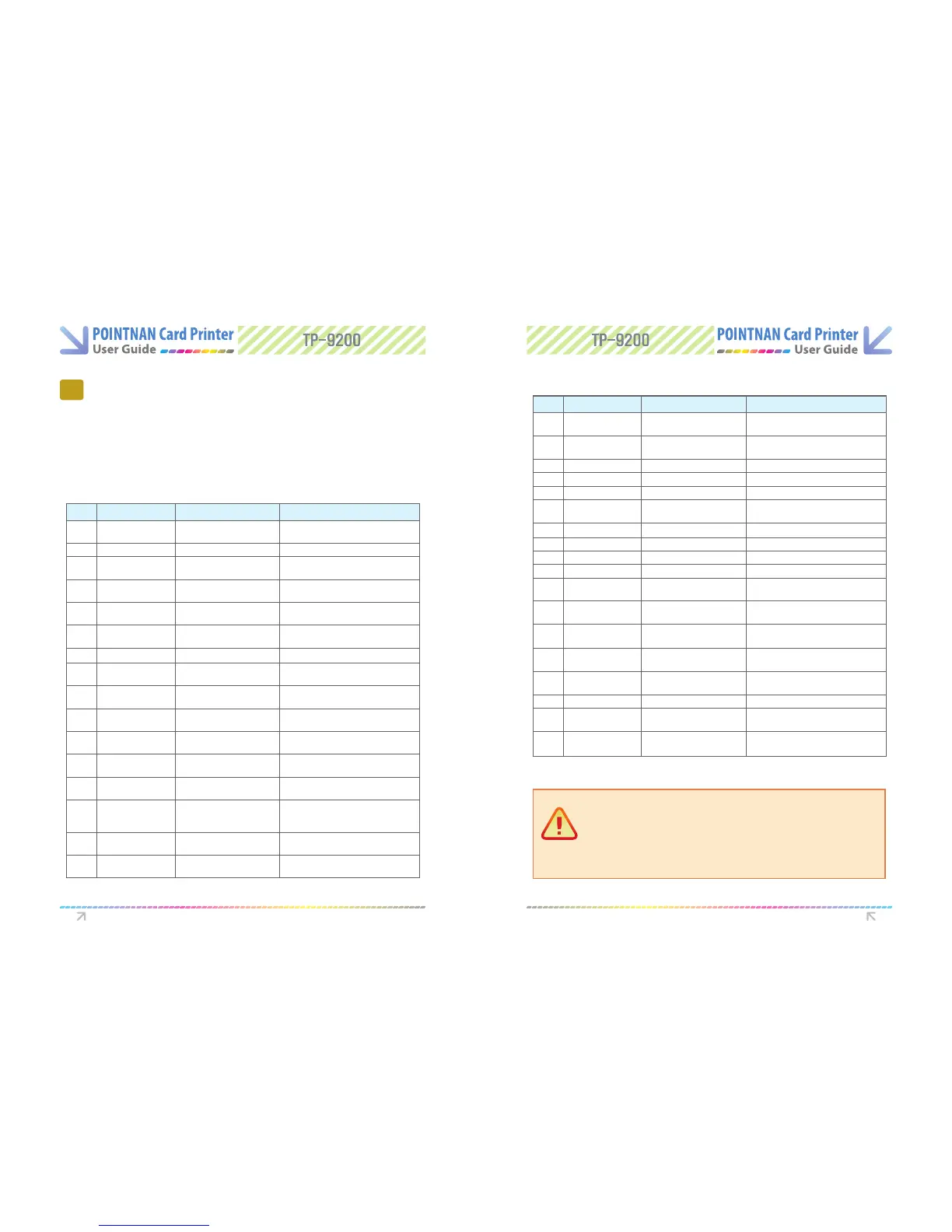
8.1 In case front LED keeps on ashing or always
on all the time.
8
Troubleshooting
a) Fatal Error
b) Warning
Description of Error code
Troubleshooting Troubleshooting
Code Code Name Description Proper measures
10
TPH OPEN
- TPH Module Open in process of
printing
- Check the status of TPH Module Open or
Change TPH Open Checking Sensor.
11
TPH UP/Down Fail
- Fail in TPH Up or Down - Check TPH Up / Down Module
12
Path Jam
- Card Jam on the Path
- Check the status of the Path or Jam on the
path
13
TPH Temp Error
- Disorder in TPH temperature
- Check the temperature of working condition.
Operating temp.: 0`C ~ 70`C
14
Ribbon Encoder Error
- Ribbon Broken or Ribbon End or
Encoder Error
- Check the status of Ribbon and Ribbon
Encoder
15
Media Error
- Error in Media
- Check the status of card (media) and Path
Sensor
16
EEPROM Fail
- Error in EEPROM Read/Write - Reboot or Change EEPROM.
17
IC Contact Module
Error
- Error in the location of IC Contat
Module
50
Card Flipper Timer
Out
- Error in Card Flipper
Communication
- Power o -> Remove Cards (media) ->
Reboot
51
Card Flipper Act
Timeout
- Error in Card Flipper
Communication
- Power o -> Remove Cards (media) ->
Reboot
52
Card Flipper Home
Position Error
-Error occurred in the Card Flipper
Home Position
- Power o -> Remove Cards (media) ->
Reboot
53
Card Flipper Turn Up
Error
- Error in Card Flipper Turn Up
- Power o -> Remove Cards (media) ->
Reboot
54
Card Flipper Card
Input Time out
- Time out during entering the
card into Card Flipper
- Power o -> Remove Cards (media) ->
Reboot
55
Card Flipper Card
Input Jam
- Jam occurred at the time of
entering the card into Card
Flipper
- Power o -> Remove Cards (media) ->
Reboot
56
Card Flipper Card
Jam
- Card Jam in the Card Flipper
- Power o -> Remove Cards (media) ->
Reboot
57
Changer Card Exist
- Abnormal card is detected in the
Changer
- Power o -> Remove Cards (media) ->
Reboot
Code Code Name Description Proper measures
20
Command Error
- Receiving command out of
Format
- Send command corresponding to Format
21
Invalid Parameter
- Receiving parameter out of
Format
- Set Parameter corresponding to Format
22
Time Out
- Command Timeout - Send command corresponding to Format
23
IC Contact Error
- IC Contact is not working - Check IC Contact Module
24
MS Encode Error
- Error in MS Encoding - Check MS Feeding
25
MS Read Error
- Failure in reading 3 tracks all in
MS all track reading
- Check MS Feeding
26
MS Read STX Error
- STX not found in MS reading - Check MS Feeding
27
MS Read Parity Error
- Parity Error in MS reading - Check MS Feeding
28
MS Read ETX Error
- ETX not found in MS reading - Check MS Feeding
29
MS Read LRCM Error
- Discordant LRCM in MS reading - Check MS Feeding
30
IC Module Timeout
- Failure in IC Module
communication
- Check IFM B/D interface and IFM B/D.
31
RF Module Timeout
- Failure in RF Module
communication
- Check RF B/D interface and RF B/D.
32
SAM Module
Timeout
- Failure in SAM Module
communication
- Check SAM B/D interface and SAM B/D.
33
Card Flipper Module
Time out
- Failure in Card Flipper Module
communication
- Check Card Flipper B/D interface and Card
Flipper B/D.
34
Card Input Timeout
- Card Input Time Out
- Check Hopper. Insert Card within pertinent
timing.
35
Near end of ribbon
- Near end of ribbon - Considering exchanging Ribbon
36
Ribbon End
- Perceiving End Mark of YMCKO
Ribbon
- Exchange Ribbon
38
Ribbon Error
- Abnormal Ribbon installed
- Check Ribbon and Install certicated
Ribbon.
Caution:
After the issue is resolved, use one of the methods below to resume normal
printing.
1) Press eject button, then ribbon set button
2) Switch the printer o then on, press the ribbon set button.
3) Place power switch in OFF position, and ON position.
* If you still have issues after clearing the error, please contact your dealer for assistance.



 To Next Page