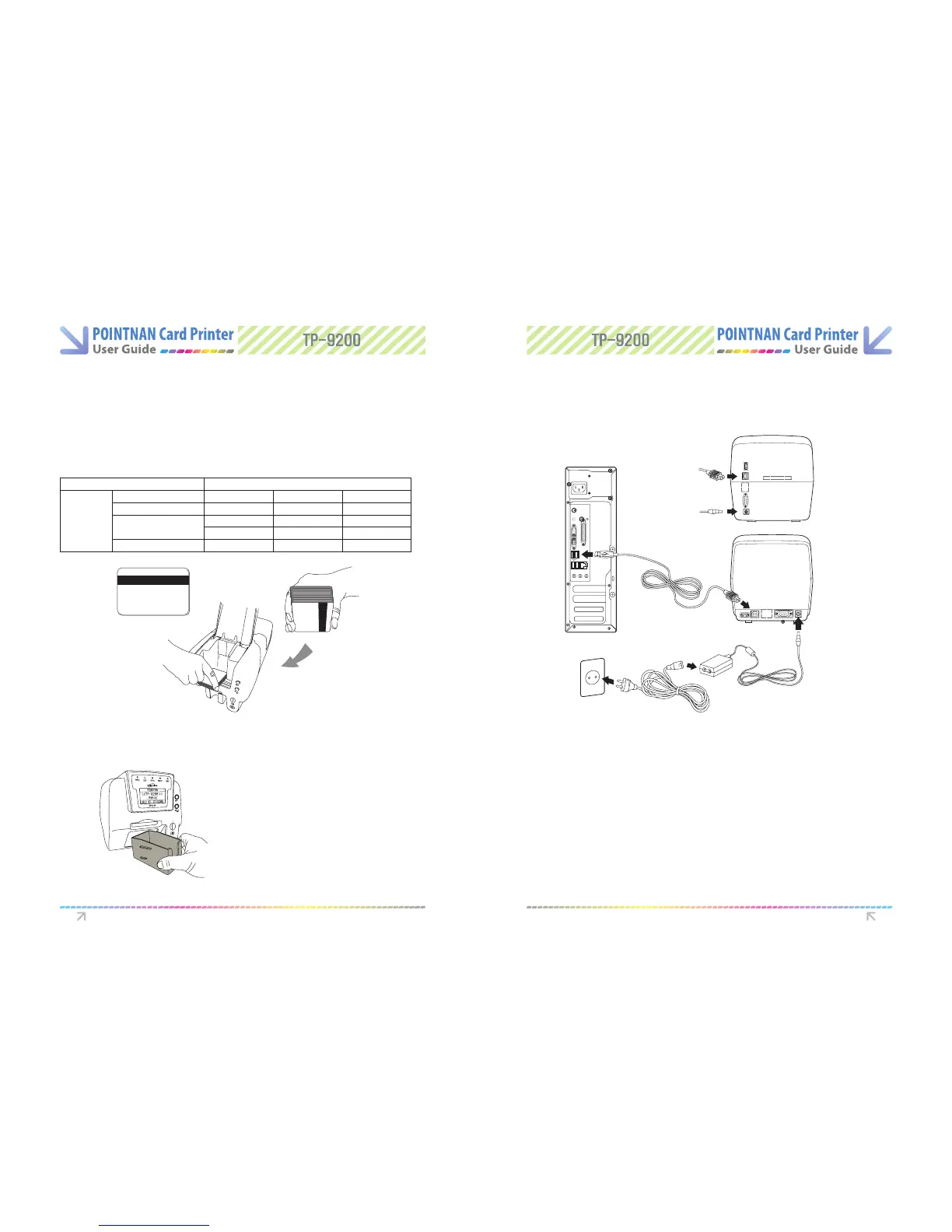
1.8 Using Magnetic Stripe Cards. 1.10 Power Device, Power Cable, Communication
Cable
1.9 Card Output Stacker for the TP-9200
If your printer has the option of magnetic stripe encoding, you can print and encode the
magnetic stripe (ISO 7811 track 1,2,3, Hi-Co/Lo-Co)
When you load magnetic stripe cards into card input hopper, please make sure the magnetic
stripe should be on the bottom and to the right.
ISO 7811
Track
Recording Density
Capacity
Start/End code
Track 1
210 BPI
79 characters
(7 bit code)
%/?
Track 2
75 BPI
40 characters
(5bit code)
;/?
Track 3
210 BPI
107 characters
(5 bit code)
;/?
Magnetic Card Standard : ISO 7811
Lock the card output stacker into
slots of the front side.
1
Use only USB cable provided by Pointman and PC having authentic
USB 2.0.
PC
Power cable
Communication
cable
TP-9000/9200
(Single-side)
TP-9000/9200
(Dual-side)
Power adaptor
Getting Started Getting Started
Magnetic



 To Next Page