Page 12 of 80 Instruction Manual for AURORA CDD BCG.00613_AA
Part 1 Introduction and Safety
The following information can be viewed by
navigating in the menu:
• Operating status of each MICRO Inverter
and statistics
• Operating status of the connection to the
Internet/local network
• Alarm messages and fault indicators
The display offers user friendly and intuitive use
with the option of navigating through the various
menus by means of buttons on the side of the
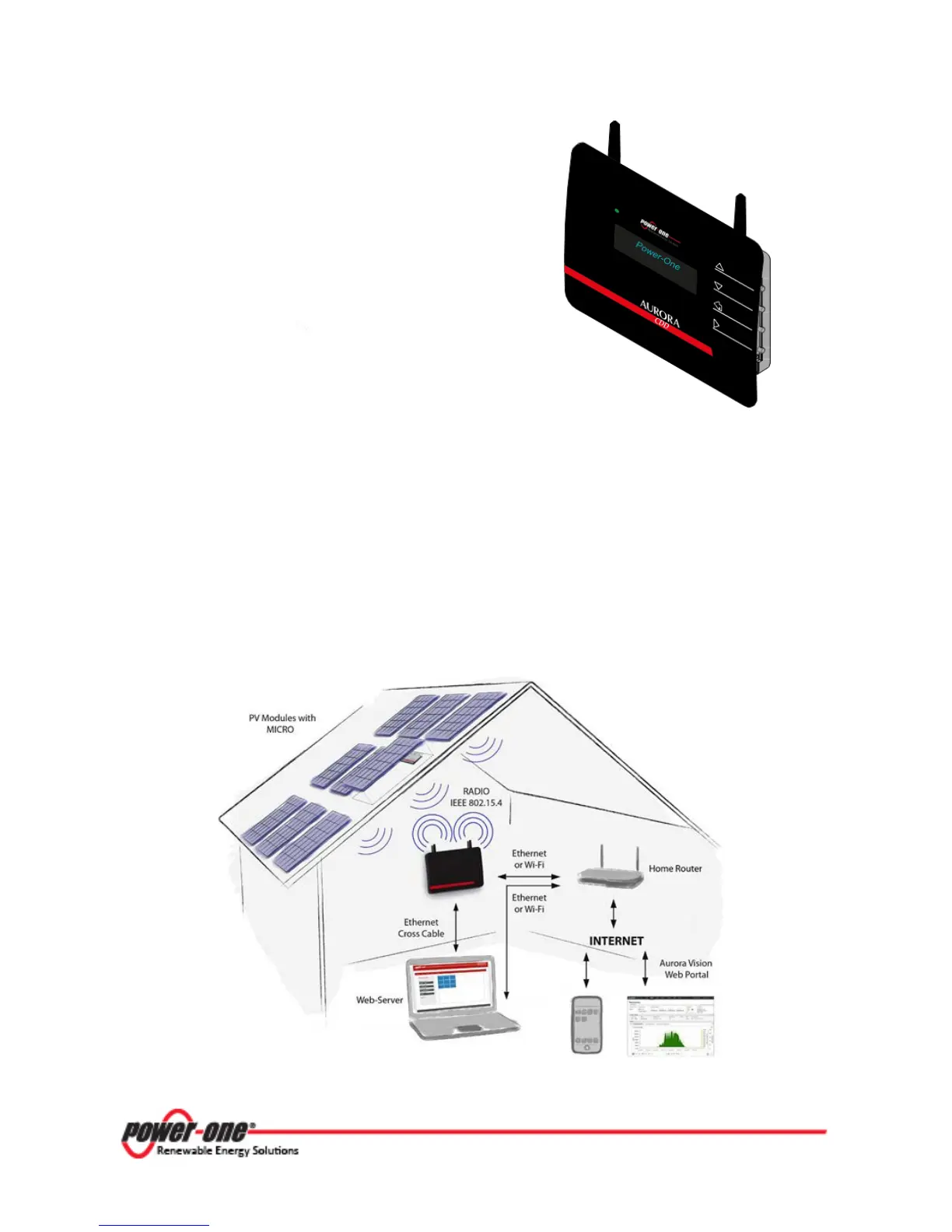
1.4.4 OPERATING DIAGRAM
The diagram for this system shows how several wireless Power-One devices are connected to the
CDD device, which in turn interacts via WiFi or Ethernet with a PC or a router connected to the
Internet.
The system can be managed and monitored from a PC or Smartphone with Internet access if the
device is registered at the Power-One AURORA EASY VIEW web portal, described in Part 4.
Figure 1- 2: Operating Diagram









 To Next Page