Page 21 of 80 Instruction Manual for AURORA CDD BCG.00613_AA
Part 3 Mounting and Configuration
3.3 CABLED CONNECTION (ETHERNET)
Disable WiFi connectivity (enabled by default) before connecting via the Ethernet cable using the
following procedure:
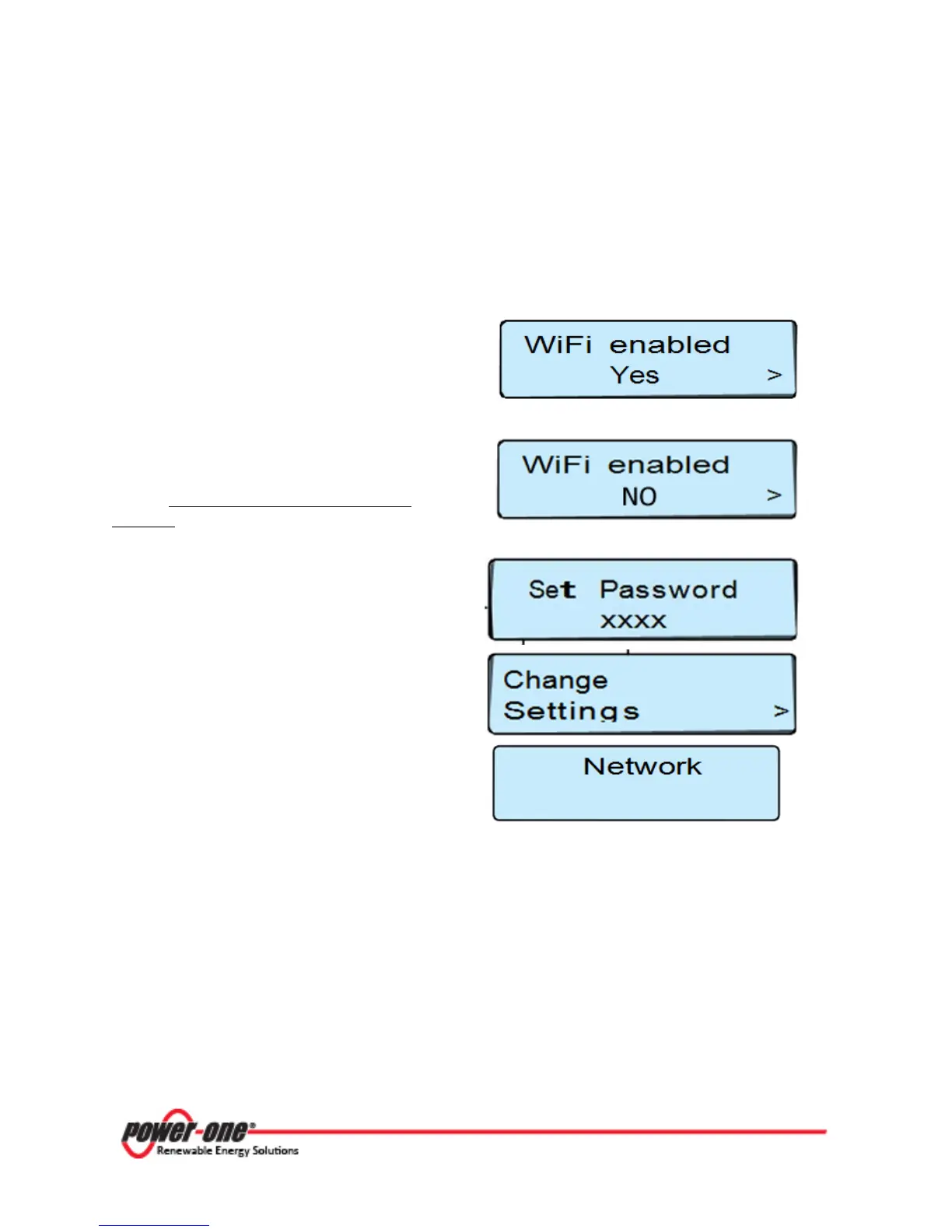
Press any key in the scroll menu, then use the
UP and DOWN keys to scroll to the WiFi enabled
window. Press ENTER to enable modification.
Use the UP and DOWN keys to change to NO and
press ENTER. WiFi is disabled.
Press the UP and DOWN buttons on the CDD
display at the same time and hold for 3
seconds
Set Password
In order to enter the password of 9999, press
the UP or DOWN buttons to scroll the list of
characters and press ENTER to confirm the
character selected. (In order to cancel the last
character input, press ESC.)
Once the password has been entered use the UP
and DOWN keys to navigate to the CHANGE
SETTINGS menu. Press ENTER.
Scroll to select NETWORK and press ENTER.
Scroll UP to select ETHERNET.
The CDD will now reset its connection settings. Connect the Ethernet cable if not already done
before. There are two possibilities for cabled
connection
of the CDD to the computer shown below.









 To Next Page