Page 18 of 80 Instruction Manual for AURORA CDD BCG.00613_AA
Part 3 Mounting and Configuration
3.1 WALL MOUNTING
The device uses radio waves to transmit and receive data, it is therefore important to assess this
factor in choosing the installation position.
Walls in reinforced cement and surfaces covered in metal (doors, shutters, etc.) can markedly re-
duce the reach of the device. It is advisable to undertake
all
the configuration operations, before
fixing the CDD and installing it in the same location and position used during the configuration.
Also choose a place close to an electrical outlet and where the bottom part of the device, (where all
the connections are present, see Table 3-1), remains accessible.
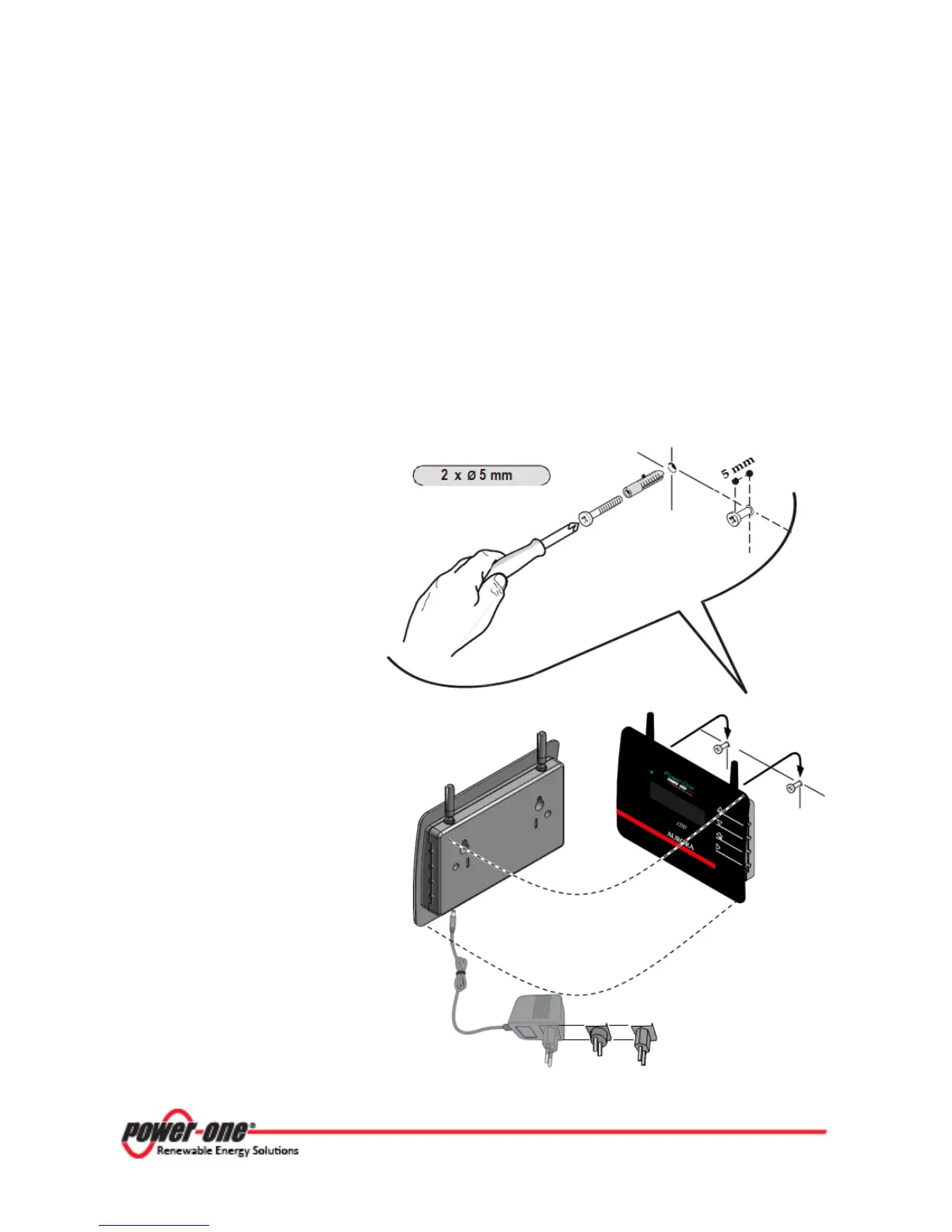
The mounting instructions are as follows and referenced in the figure below:
1. Make the two holes necessary,
using a drill with a 5 mm
diameter bit. The depth of the
holes must be around 30 mm.
2. Insert plugs in the holes and
tighten the countersunk screws
supplied.
3. Fasten the CDD by putting the
head of the screws in the two
holes on the back.
4. In order to operate the system,
the CDD device must be
connected to a computer. The
type of connection can be:
• Cabled - The CDD is
equipped with an Ethernet
port
• Wireless - The CDD is
equipped with a WiFi
network card
During the commissioning of the
MICRO Inverter, verify that the
signal reception from the MICRO
Inverters and from the WiFi
router is sufficient.









 To Next Page