Page 58 of 80 Instruction Manual for AURORA CDD BCG.00613_AA
Part 4 Operations Guide
4.4.5 UPGRADE MENU
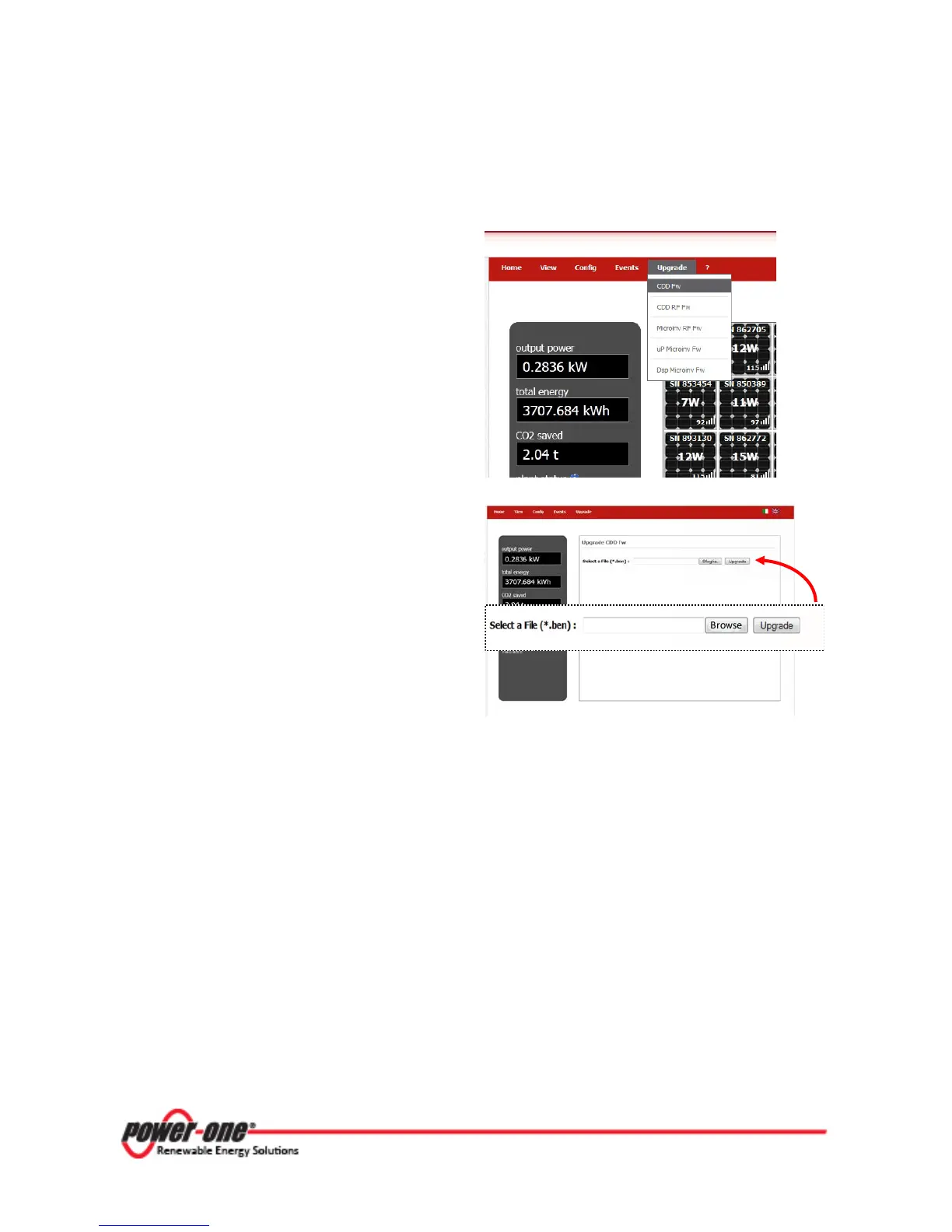
This menu selection is used to update the CDD
and MICROinverter firmware.
Select CDD Fw from the UPGRADE menu.
Click on BROWSE to select the .ben file
(upgrade file) that must already be present on
the PC.
After browsing and choosing the file, click
UPGRADE.
Firmware upgrade is available in four additional areas of the CDD.
• Select CDD RF Fw from the drop-down menu to update the firmware of the CDD internal RF
microprocessor.
• Select MICROinv RF Fw from the drop-down menu to update the firmware of the
MICROinverter internal RF microprocessor.
• Select uP MICROinv Fw from the drop-down menu to update the MICRO inverter
firmware.
• Select Dsp MICROinv Fw from the drop-down menu to update the display firmware.
As in the screen above, click
BROWSE
.ben
UPGRADE
to proceed with each of
the updates.









 To Next Page