41
Powerware 9315 (100 kVA--160 kVA) Installation
164200292 Rev. E 041500
To in s t a l l a n R M P :
1. Securely mount the RMP(s).
2. Install wiring from the RMP using ½-in. conduit through the cable entry panels
in either the top or bottom o f the UPS cabinet.
The top entry connection requires installation of ½-in. flexible conduit within the
UPS. Bottom entry connection requires no additional routing of conduit within
the U PS.
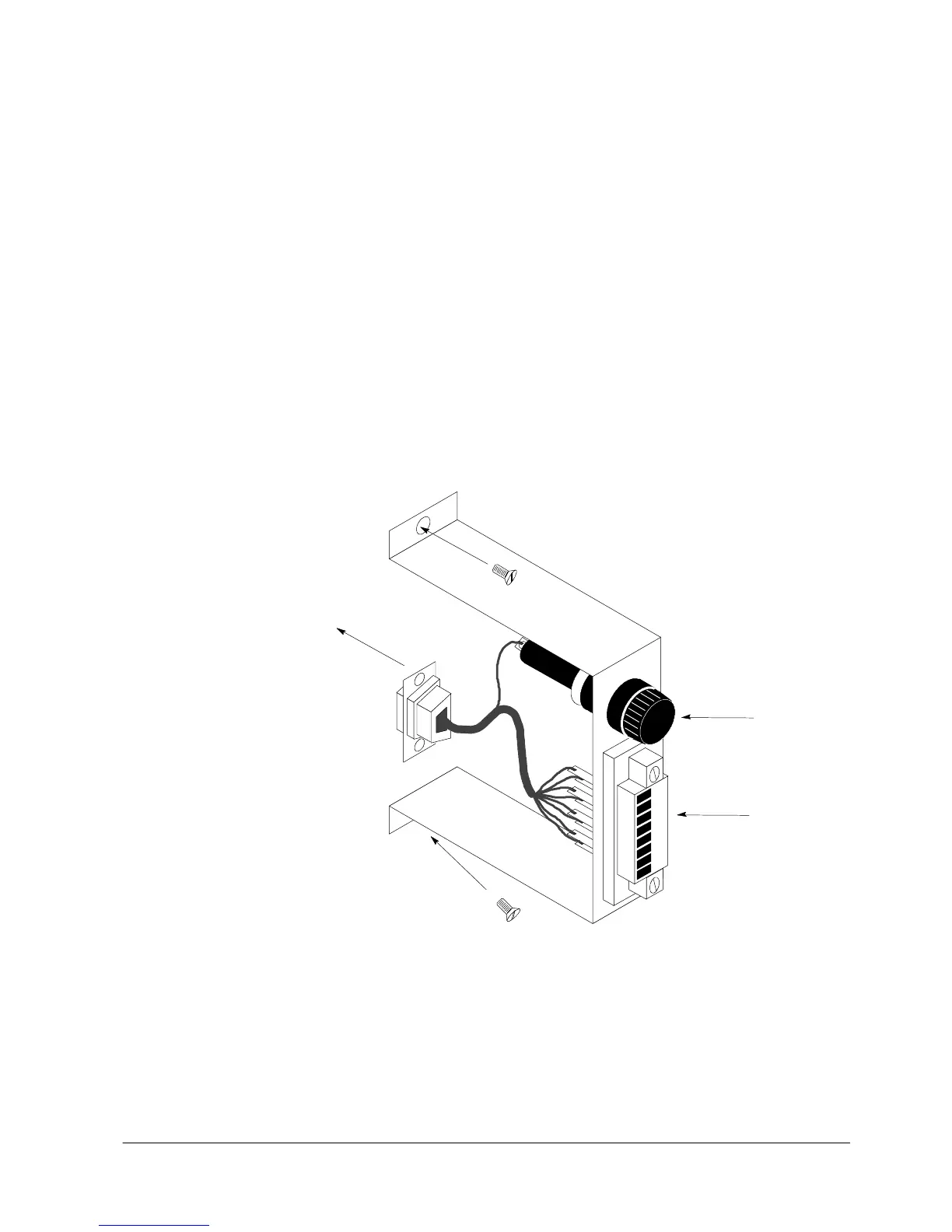
3. In the spare parts kit, locate the RMP adapter cable assembly (see Figure 21).
Mate the DE---9 connector on the back of the terminal block into the DE---9
connector on the Communications Panel of the UPS (see Figure 22). Use two
screws from the spare parts kit to secure the terminal block bracket to the
Communications Panel.
Connect to
Po r t 1 ( D E --- 9 ) o n
Communications Panel
TERMINAL
BL OCK
FUSE
(TB3)
Figure 21. Terminal Block Bracket



 To Next Page