EDIT IMAGE
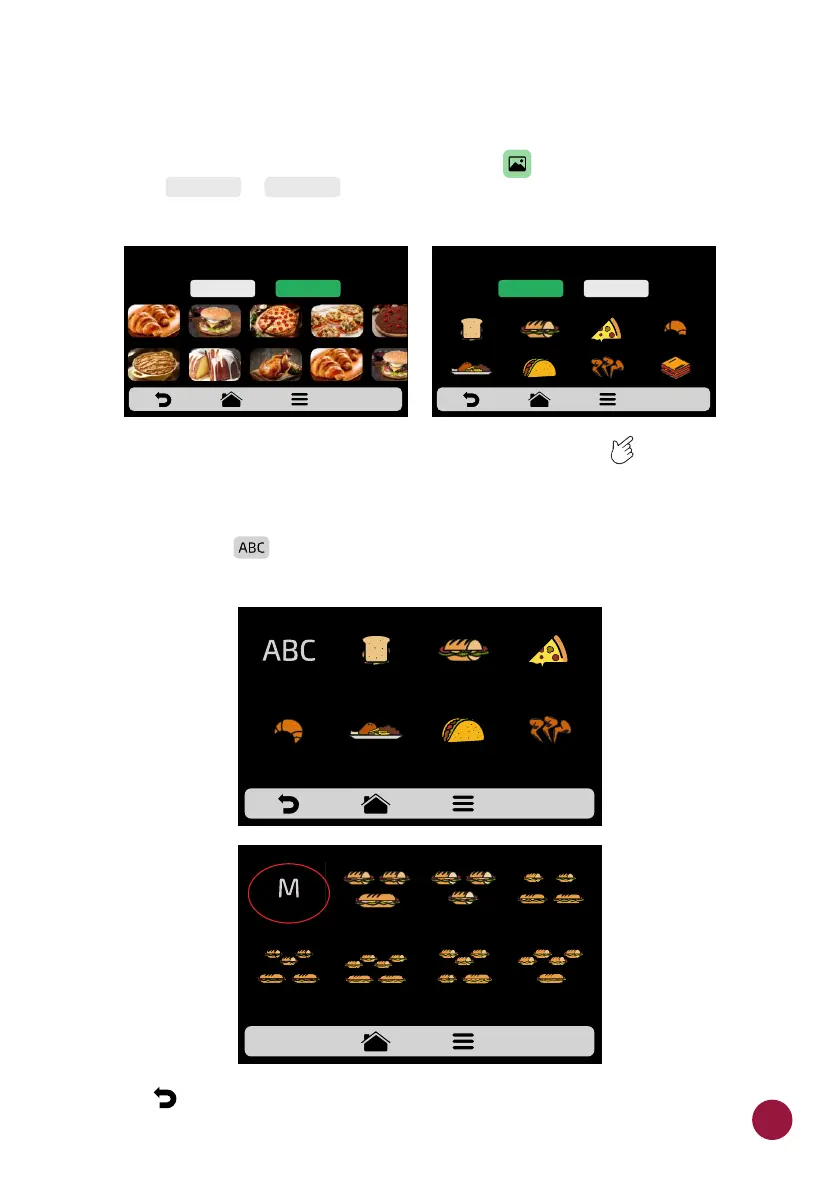
a) The Copa Express has an image gallery that enables the user to change the
icons/picture of the recipes. Click on the icon to edit and then choose TEC
between or for the displayed recipes.TECLAS TECLAS
b) To access the next recipes page, use the gridview, sliding on the touch TEC
screen to see all recipes.
c) Browse through the icons of the image library to select the desired icon or
press the button to transform the first letter of the recipe name into an TEC
icon, as shown in the adjacent example.
c) Use to return to the recipe editing options.TEC
CHOOSE AN IMAGE FOR THE RECIPE
FIRST
CHARACTER OF
RECIPE NAME
2 SUB 15cm
or 2 SUB 30cm
MIXED 2 SUB 15cm
1 SUB 30cm
3 SUB 15cm
3 SUB 15cm
2 SUB 30cm
SUBS - pag. 1
4 SUB 15cm
2 SUB 30cm
3 SUB 15cm
or 1 SUB 15cm
and 1 SUB 30cm
4 SUB 15cm
1 SUB 30cm
ICONS
PICTURES
SELECT IMAGE
ICONS
PICTURES
SELECT IMAGE
ICONS
PICTURES
Choose “Pictures” for real food images Choose “Icons” for stylized food images
43



 To Next Page