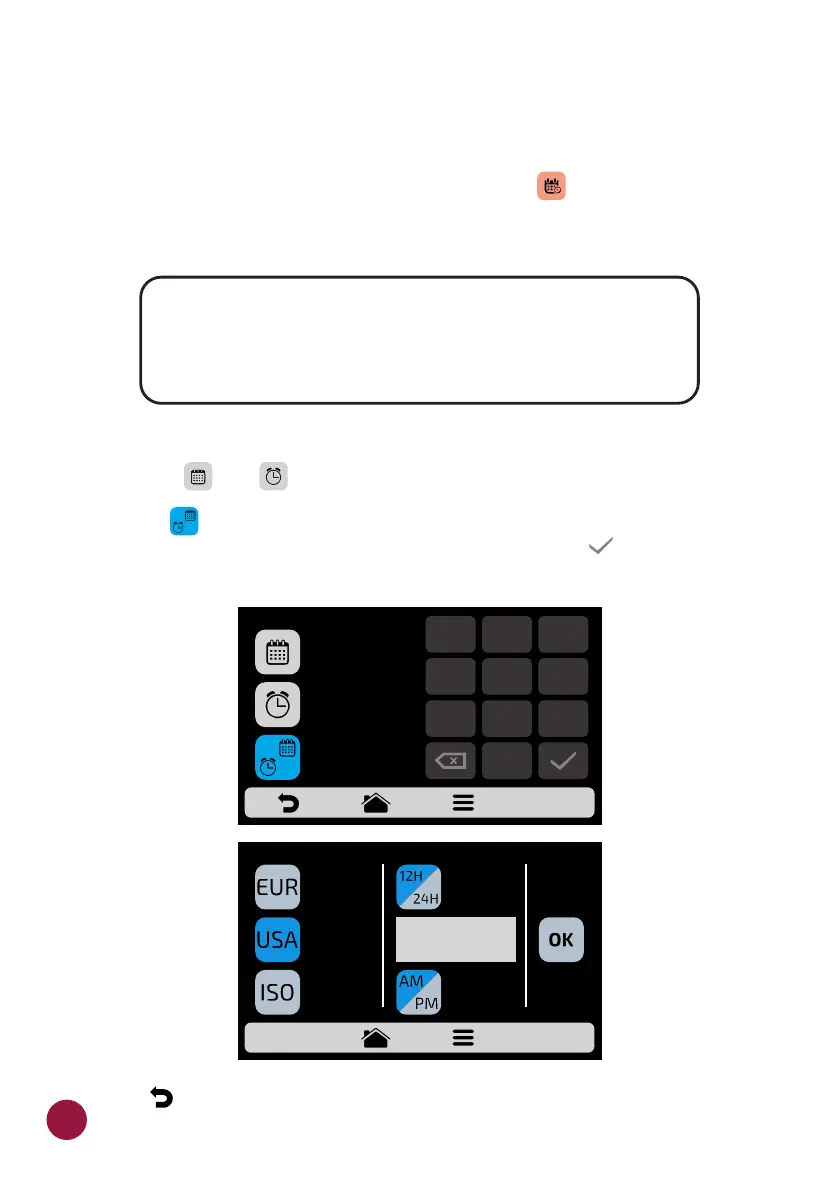
SYSTEM: DATE/TIME ADJUSTMENT
Note: If the oven is connected, it will automatically add all the information.
a) It is possible to adjust the Date, Time and format it must be presented TEC
to the user, respecting the following standards:
b) Click on and to edit, respectively, the date and time.TEC TEC
c) Press to change the date/time format. The following screen will be TEC
displayed. Choose the date and time format and click on to confirm and TEC
return to the options.
d) Use to return to the user editing options.
EUROPEAN: DD/MM/YYYY
AMERICAN: MM/DD/YYYY
ISO: YYYY/MM/DD
TIME: 24H FORMAT
12H FORMAT
DATE/TIME SETTINGS
CHANGE FORMAT
05/07/21
DD/MM/YYYY
24H FORMAT
13:57
1
2
3
4
5
6
7
8 9
0
MM/DD/YYYY
DD/MM/YYYY
YYYY/MM/DD
CHANGE DATE/TIME FORMAT
AM
12H FORMAT
Europe/Andorra
v
v
62



 To Next Page