SX™ Operator Manual
©
Original Printed in English
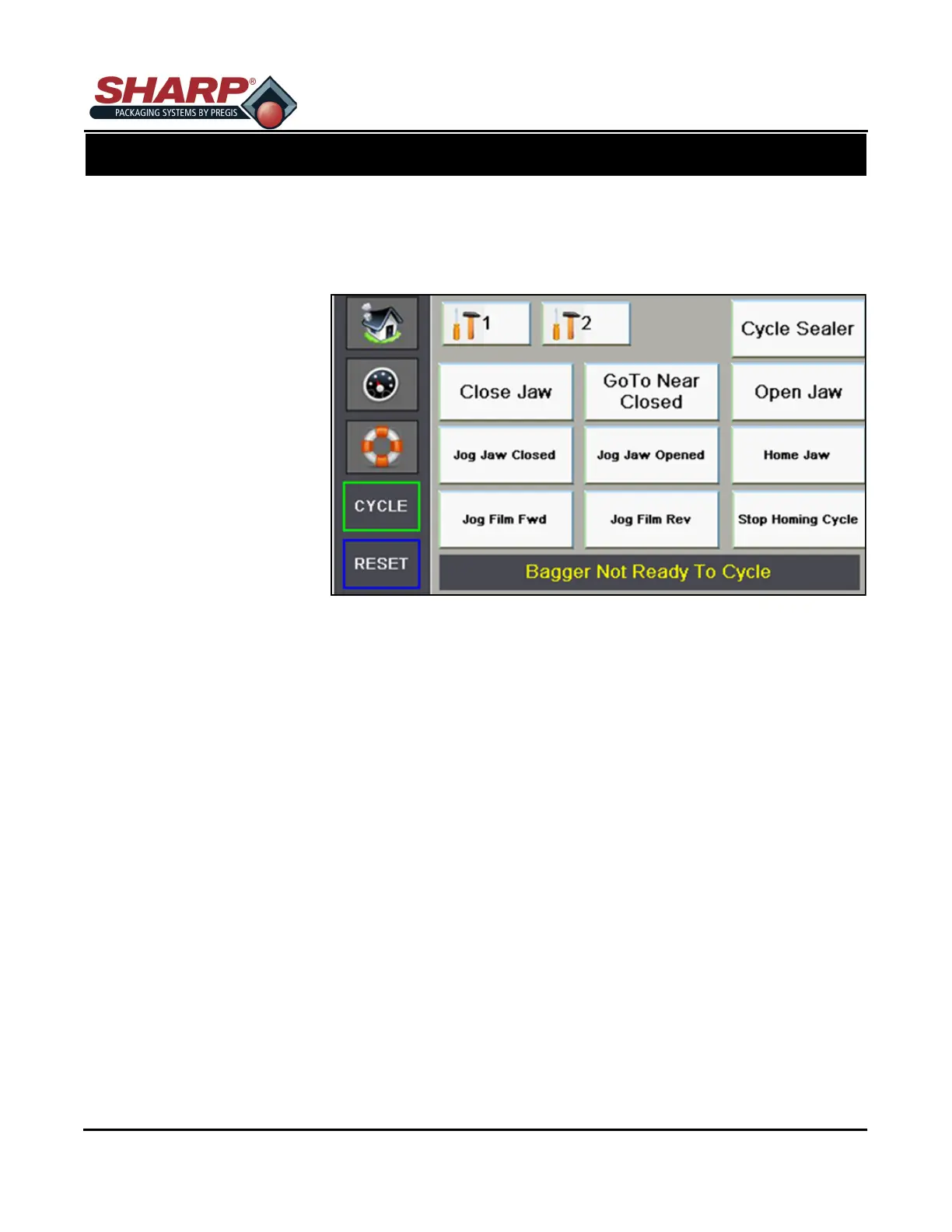
SERVICE SCREENS
There are two Service Screens to be used by qualified service and maintenance personnel to test the various
machine motions. It is assummed that the person using this screen understands the nature of each motion, prior
to invoking that motion. Care must be used to ensure the operation does not damage equipment.
Service Screen 1
Close Jaw – The jaw must
be at the Pass-Thru position
before this motion will occur.
When the momentary button
is pressed, the Jaw will move
to the Sealing Position and
the Jaw Closed Sensor
should make.
GoTo Near Closed – When
the momentary button is
pressed, the Jaw will move to
the Near Closed Position and
the Jaw Near Closed Sensor
should make.
Open Jaw – When the
momentary button is pressed, the Jaw will move to the Pass-Thru Position determined by the Pass-Thru
setting.
Cycle Sealer – When the momentary button is pressed, the Jaw will move to the seal position and the seal
wire be activated based on the Seal Dwell Setting. After the Cooling Time has expired, the jaw will return to
the Pass-Thru position.
Jog Jaw Closed – When the momentary button is pressed, the Jaw will close at Jogging Speed as long as
the button is held. The Jogging will be stopped automatically if the Jaw reaches the Closed Sensor.
Jog Jaw Opened – When the momentary button is pressed, the Jaw will open at Jogging Speed as long as
the button is held. The Jogging will be stopped automatically if the Jaw reaches the maximum pass-thru of
4.5 inches.
Home Jaw – All Faults must be cleared before this cycle can be requested. When the momentary button is
pressed, the Jaw will begin the Homing cycle. The jaw travels until it hits the Jaw Closed sensor, which is
the Home Switch. This esatblishes a Zero Position. All Jaw moves except Jogging and Faults are Absolute
Positional Moves. The homing cycle finishes by moving the jaw to the Pass-Thru Position.
Jog Film Fwd – When the momentary button is pressed, the film will feed out at Jogging Speed as long as
the button is held.
Jog Film Rev – When the momentary button is pressed, the film will reverse at Jogging Speed as long as
the button is held.
Stop Homing Cycle – When the momentary button is pressed, the Jaw will Homing cycle will be stopped
and the jaw will back out 0.5” from the point at which the cycle was stopped. The HMI will display the “Jaw
Failed To Home Fault” The fault must be reset before the Jaw Homing Cycle can be repeted.
SCREEN NAVIGATION
CONTROLS
3-9



 To Next Page