70284701 21
Section 5 Service Procedures
To reduce the risk of electric shock, fire, explosion, serious injury or death:
• Disconnect electric power to the tumbler before servicing.
• Close gas shut-off valve to gas tumbler before servicing.
• Close steam valve to steam tumbler before servicing.
• Never start the tumbler with any guards/panels removed.
• Whenever ground wires are removed during servicing, these ground wires must be
reconnected to ensure that the tumbler is properly grounded.
W002
WARNING
© Copyright, Alliance Laundry Systems LLC – DO NOT COPY or TRANSMIT
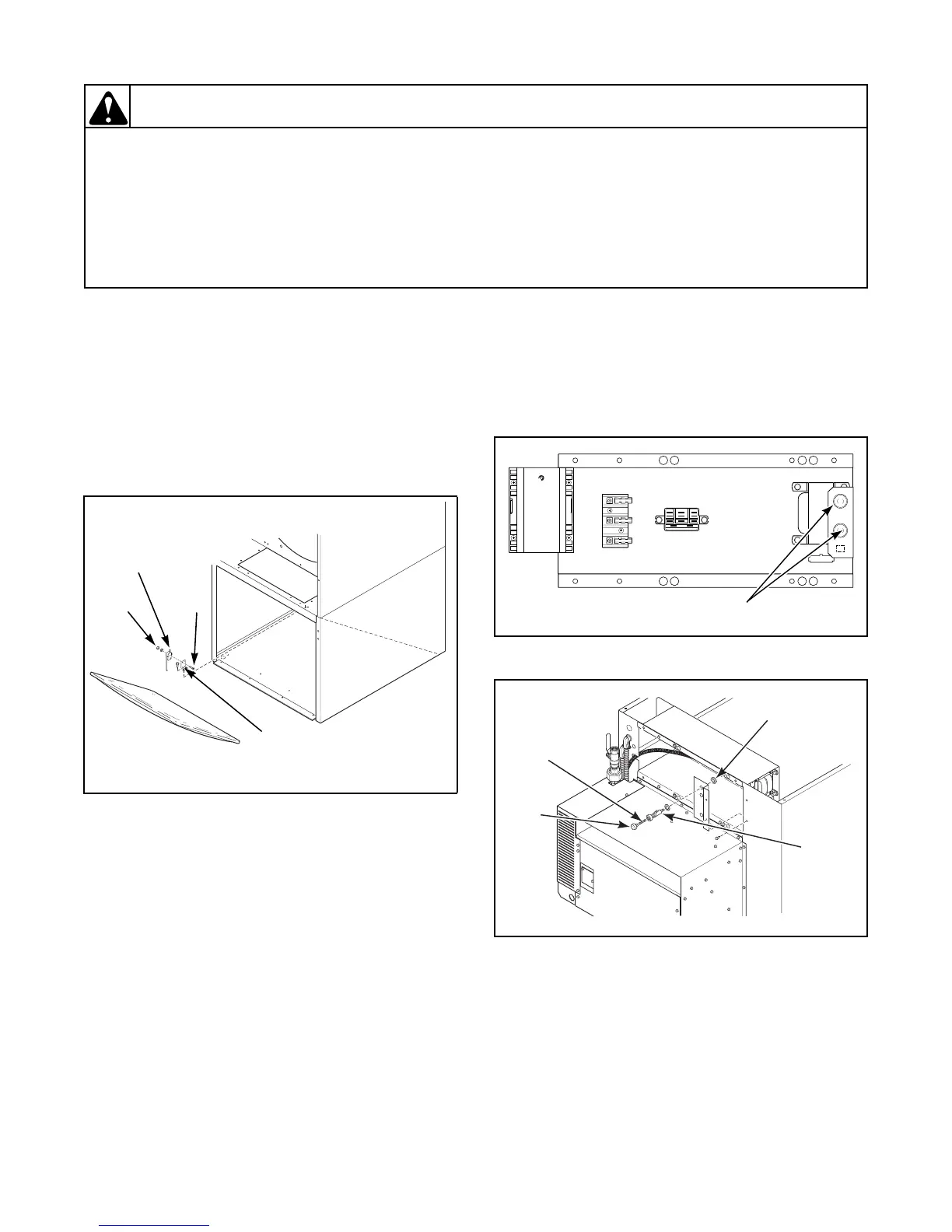
22. LINT PANEL SWITCH
Refer to Figure 8.
a. Remove front panel. Refer to Figure 3.
b. Disconnect wires from lint panel switch.
c. Remove two screws holding switch to switch
mounting bracket.
NOTE: When installing switch, switch lever must
point toward rear of tumbler.
23. JUNCTION BOX/CONTROL BOX
a. Remove four screws holding control tray cover
in place. Refer to Figure 21.
b. Remove control tray cover.
24. FUSE AND FUSE HOLDER ASSEMBLY
Refer to Figures 9 and 10.
NOTE: Fuse holder is located in the junction box at
the rear of the machine. There is a fuse access door
in the junction box cover for changing fuses.
a. Remove junction box cover. Refer to
Paragraph 23.
b. Turn fuse cap counterclockwise to remove fuse.
c. Disconnect wires from fuse holder.
NOTE: Refer to wiring diagram when rewiring
fuse.
d. Remove retaining nut holding fuse holder
assembly to junction box and remove assembly.
Figure 8
TMB1851S
SCREW
NUT
LINT
PANEL
SWITCH
LINT PANEL
SWITCH
BRACKET
Figure 9
Figure 10
T277SE1A
FUSE
HOLDERS
T259SE1A
FUSE
CAP
FUSE
HOLDER
RETAINING
NUT
FUSE



 To Next Page