30 PI-MAX
®
3 System Manual Version 1.A
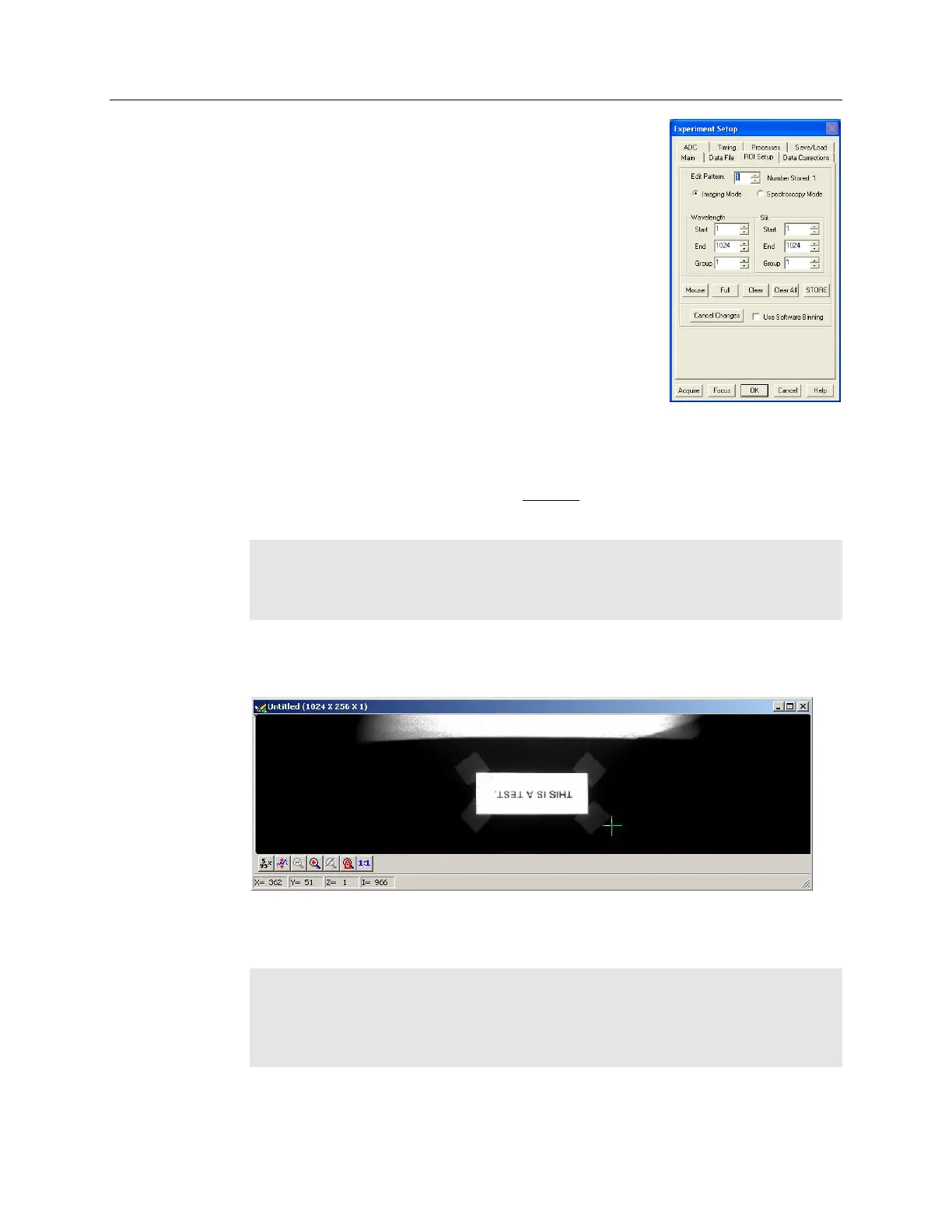
4. If you are running WinSpec, select Imaging
Mode on the ROI Setup tab page.
5. Click on OK to execute the selections and close the dialog box.
Initial Data Acquisition
1. Verify that room or ambient lighting is subdued.
2. Set the PI-MAX3 I.I.T switch to ON.
Note: The PI-MAX3 overload alarm may sound briefly and then stop. This is normal
and is not a cause for concern. However, if the alarm sounds repetitively, even with
no light entering the lens, something is wrong. Turn off the power and contact the
factory for guidance.
3. At the computer, select Acquire mode (WinX Acquisition menu). Data acquisition
will begin and an acquired image will be displayed on the computer monitor. If one is
not displayed, check the software settings.
4. If an image is displayed, you have confirmed that the PI-MAX3 can acquire an
image. If the image is out of focus, you could reposition the target and/or rotate the
lens and click on Acquire to confirm that the degree of focus has changed.
Note: Initially, the test image acquired with a PI-MAX3:1024x256 camera was not
oriented correctly for a right-reading image. To correctly orient the image, it was
necessary to change the image orientation via the Setup|Hardware|Hardware
Setup|Display tab page. After Reverse and Flip were selected and a new image was
acquired, the text was right-reading.


 To Next Page