46 PI-MAX
®
3 System Manual Version 1.A
Partial Frame ROI Binning
When setting up a partial frame ROI (regardless of the array type – full frame or interline),
keep in mind that for the PI-MAX3 the following constraint applies: the number of pixels in
the serial (horizontal) direction must be evenly
divisible by 4, even after binning. The software
may refer to the horizontal as X or Wavelength
depending on the application.
Examples: These examples include partial frame
ROIs with and without binning. The terminology is
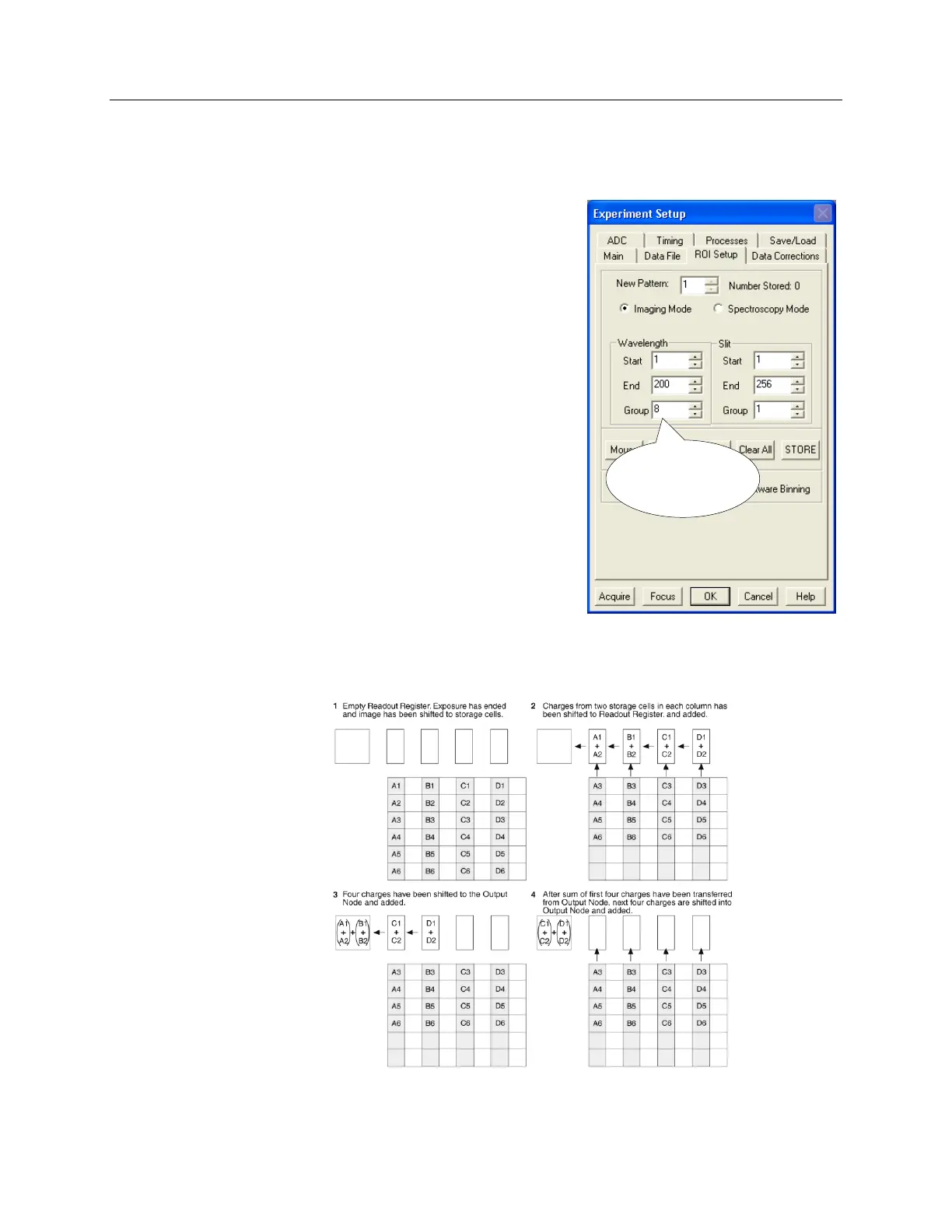
based on the WinView tab page shown to the right.
X Start to End = 200 pixels, no grouping (binning).
Since 200/4=50, this is a valid ROI setup.
X Start to End = 200 pixels and grouping (binning)
is by 8. The resulting number of super pixels is
25. Since 25/4=6.25, this is not a valid ROI
setting for the horizontal direction.
X Start to End = 240 pixels, no grouping (binning).
Since 240/4=60 this is a valid ROI setup.
X Start to End = 240 pixels and grouping
(binning) is by 3. The resulting number of
super pixels is 80. Since 80/4=20, this is a
valid ROI setup.
X Start to End = 240 pixels and grouping
(binning) is by 16. The resulting number of super pixels is 15. Since 15/4=3.75, this is not a
valid ROI setting for the horizontal direction.
Figure 15. Partial Frame 2 × 2 Binning for Interline CCD - Single Port Readout (ROI is not
centered and symmetrical horizontally)
Figure 14. Experiment Setup|ROI Setup tab
8 is Not Valid
For X Start-End
of 200


 To Next Page