64 PI-MAX
®
3 System Manual Version 1.A
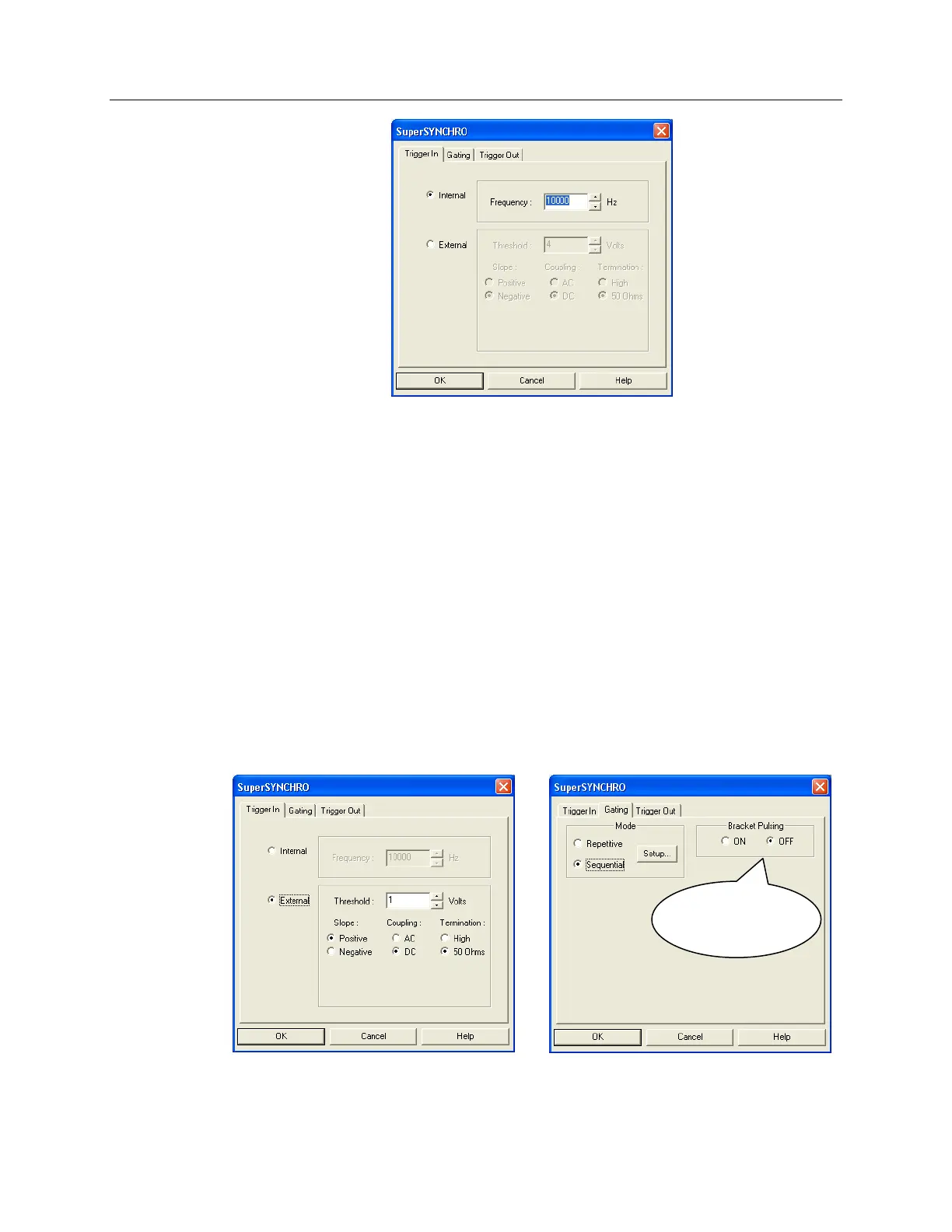
Figure 30. SuperSYNCHRO: Trigger tab page
6. After setting the parameters and making sure the ambient light level is low, click on
Focus.
7. If the readout mode is currently set to “Use Region of Interest” on the Main tab page,
the camera will start acquiring data immediately. If the readout mode is currently set
to “Use Full Chip” you will be asked if you want to change the setting to “Use
Region of Interest” before focus mode is activated. Click on “Yes” and the camera
will begin acquiring data.
8. After you make sure that the camera is seeing, stop data acquisition.
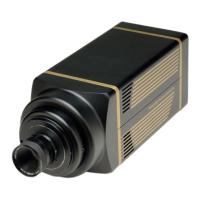
9. Set up the pulser (SuperSYNCHRO). The following figures show typical examples
of the screens you would use to set up the SuperSYNCHRO.
a. After selecting the SuperSYNCHRO as the active pulser, click on "Setup
Pulser…". Define the external trigger on the Trigger In tab page. See Figure 31.
b. On the Gating tab page, select Sequential as the Active Mode and then click on
“Setup…”. If you have a Gen II intensifier, set Bracket Pulsing to OFF for this
experiment. See Figure 31.
Figure 31. SuperSYNCHRO: Trigger In and Gating tab pages
Available for
Gen II Intensifiers


 To Next Page