34
within the Settings section (Sensors > Calibrate > Auto Calibrate).
Positioning the Media Sensors
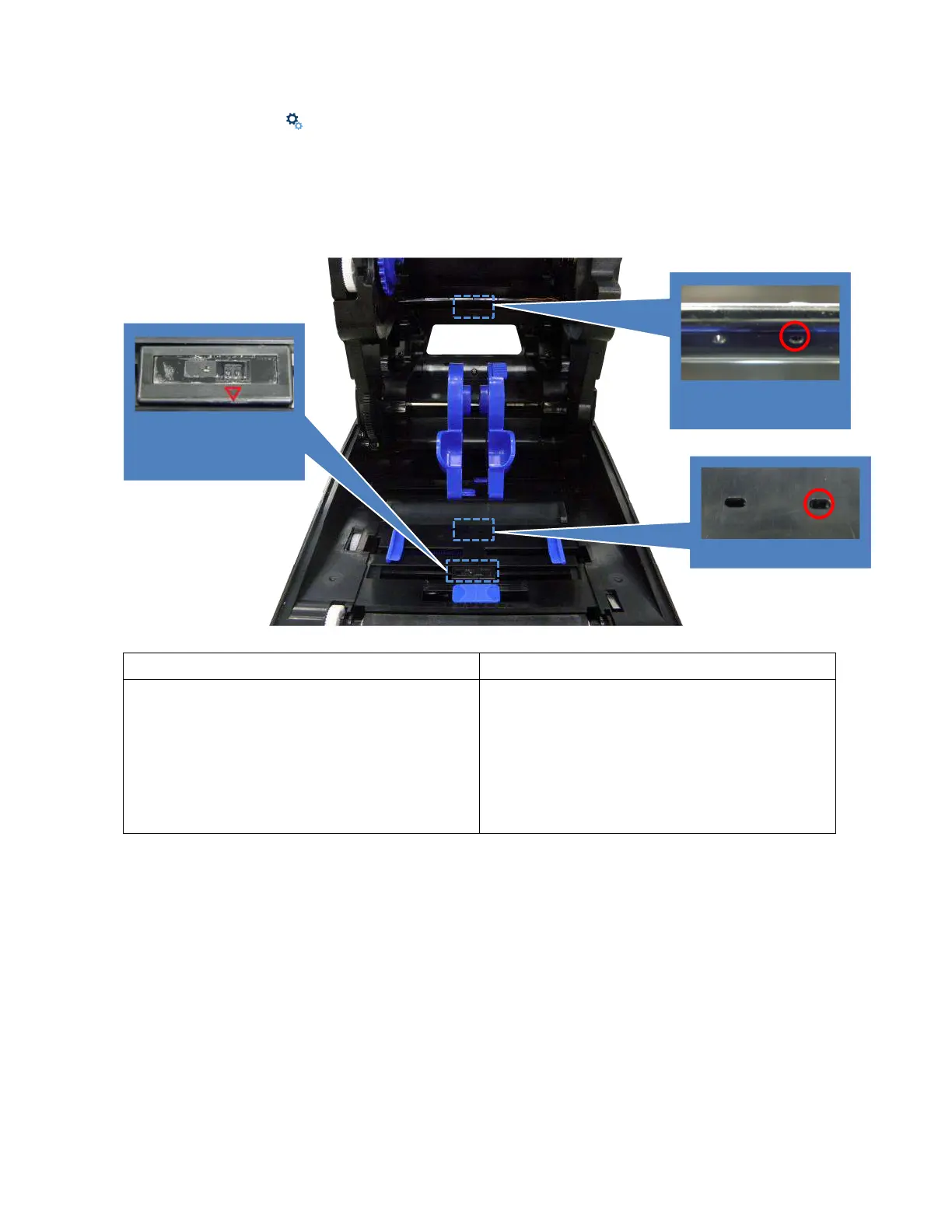
Your printer is equipped with two media sensors that detect the top-of-form position on media with label
length indicators (gaps, notches, holes, or black marks). These sensors also detect when a Paper Out
condition exists. You may select via the Control Panel which sensor will be used, based on the type of
media to be printed.
Black Mark Sensor (Moveable/ Reflective)
Gap Sensor (Fixed/ Transmissive)
The black mark sensor position is moveable.
Move the triangular mark (
▽) directly into the
path of the black mark on the underside of the
media, or extraneous cut-out (notch or hole) to be
used for detection. Please make sure there is no
dark pre-printing or RFID tags that could cause
false black mark detection or paper out faults
within the path of the sensor.
The gap sensor is in a fixed position in the center,
covering an offset 4 mm to right or 7 mm to left
from center. The default is located in center of
offset 4 mm. Please make sure the media has no
vertical gap, rounded die-cut label corners or dark
pre-printing that could cause false gap detection
or paper out faults.
Black Mark sensor
(Transmitter &
Receiver)



 To Next Page